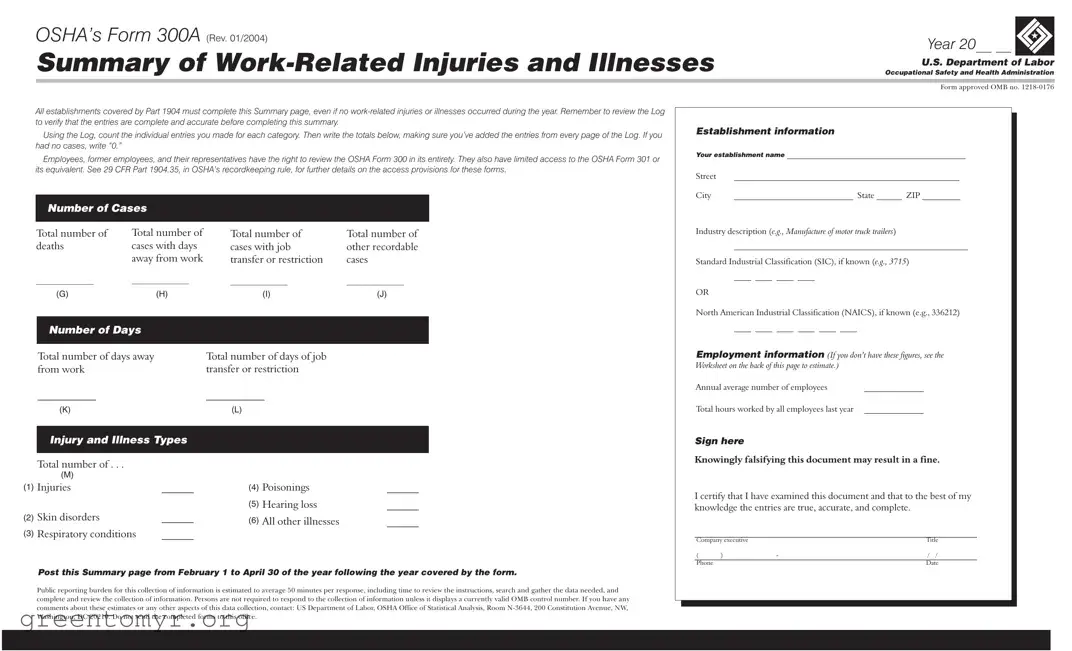
The OSHA Form 300A serves as a critical tool for employers to summarize work-related injuries and illnesses within their establishments. This form, required by the Occupational Safety and Health Administration (OSHA), must be completed by all covered establishments, regardless of whether any incidents occurred during the reporting year. Employers need to review their Log of Work-Related Injuries and Illnesses to ensure that all entries are accurate and complete before filling out the summary. The form includes essential information such as the total number of deaths, cases that resulted in days away from work, and other recordable cases. Additionally, it captures industry-specific details through the Standard Industrial Classification (SIC) or North American Industrial Classification (NAICS) codes. Employers must also report the total hours worked and the average number of employees, providing a comprehensive view of workplace safety. Importantly, this summary must be posted in a visible location from February 1 to April 30 of the following year, allowing employees, former employees, and their representatives to access it. Accurate completion of the Form 300A not only fulfills legal obligations but also promotes a culture of safety and transparency within the workplace.

OSHA’s Form 300A (REV. 01/2004) |
Year 20__ __ |
|
Summary of |
|
|
Occupational Safety and Health Administration |
||
|
U.S. Department of Labor |
|
|
|
|
|
|
|
|
Form approved OMB no. |
|
All establishments covered by Part 1904 must complete this Summary page, even if no
Using the Log, count the individual entries you made for each category. Then write the totals below, making sure you’ve added the entries from every page of the Log. If you had no cases, write “0.”
Employees, former employees, and their representatives have the right to review the OSHA Form 300 in its entirety. They also have limited access to the OSHA Form 301 or its equivalent. See 29 CFR Part 1904.35, in OSHA’s recordkeeping rule, for further details on the access provisions for these forms.
Number of Cases
Establishment information
Your establishment name __________________________________________
Street |
_____________________________________________________ |
City |
____________________________ State ______ ZIP _________ |
Total number of deaths
__________________
(G)
Total number of cases with days away from work
__________________
(H)
Total number of |
Total number of |
cases with job |
other recordable |
transfer or restriction |
cases |
__________________ |
__________________ |
(I) |
(J) |
Industry description (e.g., Manufacture of motor truck trailers)
_______________________________________________________
Standard Industrial Classification (SIC), if known (e.g., 3715)
____ ____ ____ ____
OR
North American Industrial Classification (NAICS), if known (e.g., 336212)
Number of Days
Total number of days away |
Total number of days of job |
from work |
transfer or restriction |
___________ |
___________ |
____ ____ ____ ____ ____ ____
Employment information (If you don’t have these figures, see the Worksheet on the back of this page to estimate.)
Annual average number of employees |
______________ |
(K)
Injury and Illness Types
Total number of . . .
|
(M) |
|
(1) |
Injuries |
______ |
(2) |
Skin disorders |
______ |
(3) |
Respiratory conditions |
______ |
(L)
(4) |
Poisonings |
______ |
(5) |
Hearing loss |
______ |
(6) |
All other illnesses |
______ |
Total hours worked by all employees last year ______________ |
Sign here
Knowingly falsifying this document may result in a fine.
I certify that I have examined this document and that to the best of my knowledge the entries are true, accurate, and complete.
___________________________________________________________
Company executive |
|
Title |
|
( |
) |
- |
/ / |
Phone |
|
|
Date |
Post this Summary page from February 1 to April 30 of the year following the year covered by the form.
Public reporting burden for this collection of information is estimated to average 50 minutes per response, including time to review the instructions, search and gather the data needed, and complete and review the collection of information. Persons are not required to respond to the collection of information unless it displays a currently valid OMB control number. If you have any comments about these estimates or any other aspects of this data collection, contact: US Department of Labor, OSHA Office of Statistical Analysis, Room
| Fact Name | Details |
|---|---|
| Mandatory Completion | All establishments covered by OSHA's Part 1904 must complete Form 300A, even if there were no work-related injuries or illnesses during the year. |
| Access Rights | Employees, former employees, and their representatives have the right to review the entire OSHA Form 300. Limited access to Form 301 or its equivalent is also granted. |
| Filing Period | The summary page must be posted from February 1 to April 30 of the year following the year covered by the form. |
| Falsification Penalties | Knowingly falsifying the information on Form 300A may lead to fines. |
| State-Specific Forms | Some states may have additional requirements or specific forms. Refer to state laws such as Cal/OSHA in California or MIOSHA in Michigan for compliance. |
Completing the OSHA Form 300A is essential for every establishment, even if there were no work-related injuries or illnesses in the past year. It summarizes important information about workplace incidents. Follow these steps to fill out the form accurately.
The OSHA Form 300A is a summary of work-related injuries and illnesses that must be completed by all establishments covered by OSHA's recordkeeping regulations. This form provides a snapshot of the safety record for a specific year and must be posted in the workplace from February 1 to April 30 of the following year.
All establishments that are covered by Part 1904 of OSHA's regulations must complete the Form 300A. This requirement applies even if there were no work-related injuries or illnesses during the reporting year.
To complete the form, you will need the following information:
If there were no work-related injuries or illnesses during the year, you must still complete the form. In each relevant section, write “0” to indicate that there were no cases.
Employees, former employees, and their representatives have the right to review the OSHA Form 300 in its entirety. They also have limited access to the OSHA Form 301 or its equivalent, as outlined in OSHA’s recordkeeping rule.
Knowingly falsifying the OSHA Form 300A can result in significant penalties, including fines. It is crucial to ensure that all entries are true, accurate, and complete before submitting the form.
To calculate the total number of cases, review the entries made in the OSHA Form 300 Log. Count the individual entries for each category and ensure that you include entries from all pages of the Log before writing the totals on the summary form.
The public reporting burden for completing the OSHA Form 300A is estimated to average 50 minutes per response. This includes the time needed to review instructions, gather data, and complete the form.
You should not send the completed OSHA Form 300A to the Department of Labor. Instead, it must be posted in a visible location within the workplace for employees to review.
Filling out the OSHA Form 300A can be straightforward, but many people make common mistakes that can lead to inaccuracies. One frequent error is failing to include all relevant entries from the Log. It’s essential to review each page of the Log and ensure that every case is counted. Missing even one case can distort the overall summary.
Another mistake is not writing “0” when there are no incidents. Some individuals overlook this detail, which can create confusion. Clarity is important, and indicating zero cases helps maintain accurate records.
Many people also forget to include the establishment information completely. Incomplete addresses or missing establishment names can lead to issues when the form is reviewed. Providing full and correct information is crucial for identification purposes.
Inaccurate calculations are another common problem. When tallying the number of cases or total days away from work, double-checking the math is vital. Errors in these figures can affect reporting and compliance.
Some individuals fail to include the correct industry description or the Standard Industrial Classification (SIC) or North American Industrial Classification (NAICS) codes. These codes help categorize the business type, and incorrect entries can lead to misunderstandings regarding industry standards.
Not signing the form is a significant oversight. The form requires a company executive’s signature to validate the information provided. Without this signature, the form is incomplete and may not be accepted.
Another mistake is not posting the summary in the required timeframe. The form must be displayed from February 1 to April 30 of the following year. Failing to adhere to this timeline can result in penalties.
Some people neglect to provide the total hours worked by all employees in the previous year. This figure is necessary for calculating rates of injuries and illnesses. Omitting this information can hinder the effectiveness of safety programs.
Finally, individuals sometimes do not understand the access rights of employees and their representatives regarding the OSHA Form 300. It’s important to know that they have the right to review this form, as well as the related forms. Being aware of these rights can prevent misunderstandings and promote transparency.
When dealing with workplace injuries and illnesses, several forms work alongside OSHA’s Form 300A. Each of these documents plays a crucial role in ensuring safety and compliance. Here’s a brief overview of other important forms you might encounter.
Each of these forms serves a specific purpose and helps maintain workplace safety. Understanding and properly managing these documents can create a safer environment for everyone involved.
The OSHA Form 300A serves as a crucial document for summarizing work-related injuries and illnesses in the workplace. Several other documents share similarities with this form, primarily in their purpose of tracking and reporting workplace incidents. Below are five such documents, each accompanied by a brief explanation of how they relate to the OSHA Form 300A.
When filling out OSHA’s Form 300A, it’s important to follow certain guidelines to ensure accuracy and compliance. Here’s a helpful list of what you should and shouldn’t do:
By adhering to these guidelines, you can ensure that your OSHA Form 300A is filled out correctly, promoting a safer workplace for everyone involved.
Understanding the OSHA Form 300A is crucial for businesses to maintain compliance and ensure workplace safety. However, several misconceptions can lead to confusion. Here are five common misconceptions about the OSHA Form 300A:
By dispelling these misconceptions, businesses can better understand their responsibilities and promote a safer work environment.
Understanding how to fill out and use the OSHA Form 300A is essential for maintaining workplace safety and compliance. Here are some key takeaways to keep in mind:
By keeping these takeaways in mind, you can ensure that your workplace remains compliant with OSHA regulations while promoting a culture of safety and accountability.