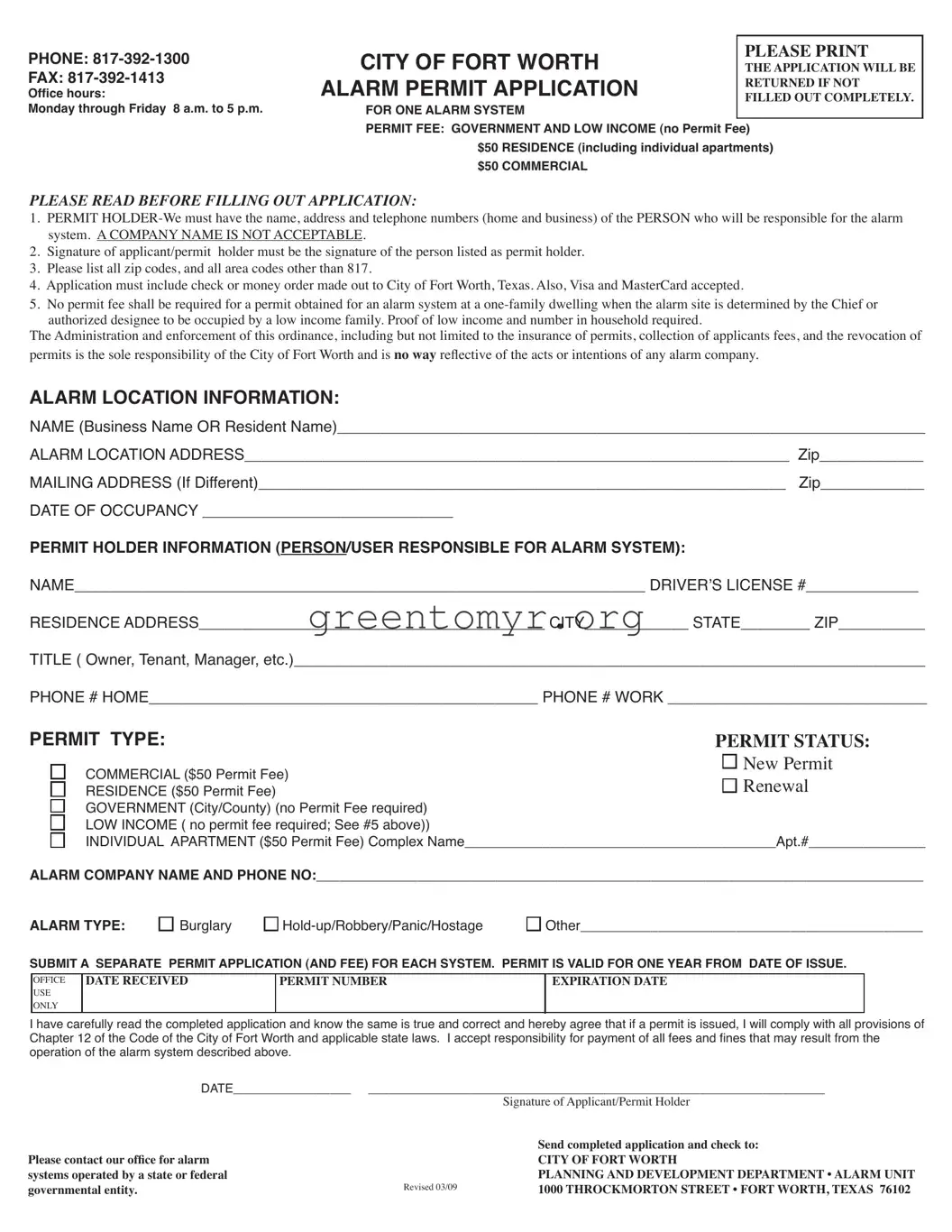
The Alarm Permit Application form is a crucial document for residents and businesses in Fort Worth, Texas, who wish to operate an alarm system. It requires the submission of specific information to ensure compliance with local regulations. Applicants must provide complete details, including the verified name, address, and contact information for the person responsible for the alarm system—individuals only; company names are not accepted. The application includes the payment information, with standard fees set at $50 for residential, commercial, and individual apartment permits, though low-income families may qualify for a waiver. It's vital to note that each alarm system requires a separate application, and the permit is valid for one year. Incomplete forms will be returned, which emphasizes the necessity of accuracy when filling it out. The permit holder assumes responsibility for the alarm system's operation and must adhere to specific city regulations. For any questions, the city provides a contact number, making it straightforward for applicants to seek assistance. This focused approach helps maintain the efficacy of emergency responses while fostering collaboration between residents and local authorities.
PHONE:
FAX:
Ofice hours:
Monday through Friday 8 a.m. to 5 p.m.
CITY OF FORT WORTH |
PLEASE PRINT |
|
THE APPLICATION WILL BE |
||
ALARM PERMIT APPLICATION |
RETURNED IF NOT |
|
FILLED OUT COMPLETELY. |
||
|
||
FOR ONE ALARM SYSTEM |
|
|
PERMIT FEE: GOVERNMENT AND LOW INCOME (no Permit Fee) |
||
$50 RESIDENCE (including individual apartments) |
||
$50 COMMERCIAL |
|
|
PLEASE READ BEFORE FILLING OUT APPLICATION:
1.PERMIT
2.Signature of applicant/permit holder must be the signature of the person listed as permit holder.
3.Please list all zip codes, and all area codes other than 817.
4.Application must include check or money order made out to City of Fort Worth, Texas. Also, Visa and MasterCard accepted.
5.No permit fee shall be required for a permit obtained for an alarm system at a
The Administration and enforcement of this ordinance, including but not limited to the insurance of permits, collection of applicants fees, and the revocation of permits is the sole responsibility of the City of Fort Worth and is no way relective of the acts or intentions of any alarm company.
ALARM LOCATION INFORMATION:
NAME (Business Name OR Resident Name)____________________________________________________________________
ALARM LOCATION ADDRESS_______________________________________________________________ Zip____________
MAILING ADDRESS (If Different)_____________________________________________________________ Zip____________
DATE OF OCCUPANCY _____________________________
PERMIT HOLDER INFORMATION (PERSON/USER RESPONSIBLE FOR ALARM SYSTEM):
NAME__________________________________________________________________ DRIVER’S LICENSE #_____________
RESIDENCE ADDRESS________________________________________ CITY____________ STATE________ ZIP__________
TITLE ( Owner, Tenant, Manager, etc.)_________________________________________________________________________
PHONE # HOME_____________________________________________ PHONE # WORK ______________________________
PERMIT TYPE: |
PERMIT STATUS: |
|
COMMERCIAL ($50 Permit Fee) |
New Permit |
|
Renewal |
||
RESIDENCE ($50 Permit Fee) |
GOVERNMENT (City/County) (no Permit Fee required) LOW INCOME ( no permit fee required; See #5 above))
INDIVIDUAL APARTMENT ($50 Permit Fee) Complex Name________________________________________Apt.#_______________
ALARM COMPANY NAME AND PHONE NO:______________________________________________________________________________
ALARM TYPE: |
Burglary |
Other____________________________________________ |
SUBMIT A SEPARATE PERMIT APPLICATION (AND FEE) FOR EACH SYSTEM. PERMIT IS VALID FOR ONE YEAR FROM DATE OF ISSUE.
OFFICE
USE
ONLY
DATE RECEIVED
PERMIT NUMBER
EXPIRATION DATE
I have carefully read the completed application and know the same is true and correct and hereby agree that if a permit is issued, I will comply with all provisions of
Chapter 12 of the Code of the City of Fort Worth and applicable state laws. I accept responsibility for payment of all fees and ines that may result from the operation of the alarm system described above.
DATE_________________ __________________________________________________________________
Signature of Applicant/Permit Holder
Please contact our ofice for alarm
systems operated by a state or federal governmental entity.
Revised 03/09
Send completed application and check to:
CITY OF FORT WORTH
PLANNING AND DEVELOPMENT DEPARTMENT • ALARM UNIT 1000 THROCKMORTON STREET • FORT WORTH, TEXAS 76102
PERMIT HOLDER’S RESPONSIBILITIES
On November 18, 2003, the Fort Worth City Council amended Chapter 12, concerning the regulation of alarm systems. The ordinance will be in full force and effect from and after January 1, 2004.
1.The ordinance applies to a person who operates, or causes to be operated, an alarm system at an alarm site. No permit shall be required of state and federal governmental entities. City and county political subdivisions that op- erate alarm systems are required to obtain a permit, however, permit fees and service fees shall not be required.
2.The Chief or authorized designee shall refuse police response to any alarm notiication from an alarm site that does not have a valid alarm permit unless the alarm notiication is a duress alarm, a
3.ASEPARATE PERMIT IS REQUIRED FOR EACH ALARM SYSTEM AND EACH SEPARATE ADDRESS and cannot be transferred to
another person or to alarm system except by authorization of the Chief or authorized designee. Additional permit applications for multiple alarm systems at one alarm site may be obtained simply by photocopying the alarm permit application on the reverse side. Each permit application must show for each alarm system located at the alarm site the purpose of the alarm system, i.e., burglary, robbery, hostage, etc.
4.The fee for annual permit, an annual permit renewal or a permit reinstatement for all alarm permits is ifty dol- lars ($50.00). Each permit issued pursuant to this chapter shall be valid for a twelve (12) month period from the date of issuance as indicated on the permit. No refunds of a permit fee, permit renewal fee, or permit reinstatement fee will be made. A permit will not be renewed if the applicant has past due outstanding service fees at the alarm site or at another alarm site for which he is the permit holder, unless the service fees are under review in an appeal.
5.Apermit expires one year from the date of issuance and must be renewed annually by submitting an updated application and a permit renewal fee. It is the responsibility of the permit holder to submit an application and the required permit fee prior to the permit expiration date. A permit shall not be renewed if the applicant has past due outstanding service fees at the alarm site or at another alarm site for which he is the permit holder, unless the service fees are under review in an appeal.
6.No permit fee shall be required for a permit obtained for an alarm system at a
7.Within thirty (30) days of receipt of a completed application form and the required fee, the Chief or authorized designee shall issue an alarm permit to an applicant unless the applicant has failed to pay a service fee or has had an alarm permit revoked, and the violation causing the revocation has not been corrected.
8.To obtain a permit, complete the permit application on the reverse side and return the application with a check or
money order to the:
CITY OF FORT WORTH
PLANNING AND DEVELOPMENT DEPARTMENT, ALARM UNIT
1000 THROCKMORTON STREET
FORT WORTH, TEXAS 76102
If you have any questions, call the Planning and Development Department, Alarm Unit at
Rev. 03/09
| Fact Title | Description |
|---|---|
| Application Purpose | The Alarm Permit Application is required to obtain a permit for operating an alarm system in Fort Worth. |
| Office Contact | For assistance, applicants can contact the City of Fort Worth Planning and Development Department at 817-392-1300. |
| Office Hours | The office operates on weekdays, from 8 a.m. to 5 p.m. |
| Permit Fees | The standard permit fee is $50 for residences and commercial alarms, while government and low-income permits can be obtained without a fee. |
| Signature Requirement | The person listed as the permit holder must sign the application. Company names are not acceptable. |
| Multiple Applications | A separate application must be submitted for each alarm system and address. Multiple applications can be made by photocopying the form. |
| Renewal Period | All permits expire one year from the date of issue and must be renewed annually with a new application and fee. |
| Low-Income Exemption | No permit fee is required for alarm systems at one- or two-family dwellings occupied by a low-income family, subject to proof. |
| Denial of Police Response | The Chief or designee may refuse police response to alarms from locations without a valid permit, except for specific emergency alerts. |
| Governing Law | The ordinance governing alarm permits is found in Chapter 12 of the Code of the City of Fort Worth. |
Filling out the Alarm Permit Application form is a crucial step for ensuring the legal operation of your alarm system. Following these steps will help you complete the form accurately and submit it without delay. Ensure you have the necessary information ready before you start, as incomplete applications may be returned.
After submitting the application, expect the City of Fort Worth to process it within thirty days. Ensure all information is accurate to avoid any delays in receiving your permit. If you have any questions during this process, you can reach out to the Planning and Development Department for assistance.
The Alarm Permit Application is required to legally operate an alarm system within the city limits of Fort Worth. It allows the city to maintain records on alarm systems and ensures that all systems comply with local regulations. By obtaining a permit, you also ensure that emergency services can respond appropriately in case of an alarm activation.
The permit holder is the individual responsible for the alarm system. This means that the name, address, and contact information must belong to a person, not a company or organization. It’s essential that this person is directly accountable for the operation of the alarm system.
The fee for an alarm system permit is as follows:
Please note that this fee is valid for one year from the date of issuance and must be renewed annually.
You can pay the permit fee by check or money order made out to the City of Fort Worth. Alternatively, payments can be made using Visa or MasterCard. Ensure that your application includes the payment to avoid delays in processing.
Yes, if the alarm system is located in a one-family or two-family dwelling occupied by a low-income family, no permit fee will be required. However, you must provide proof of low income and the number of individuals in the household to qualify for this exemption.
If a permit is not renewed prior to its expiration, it will become invalid. The responsibility falls on the permit holder to submit the renewal application and payment. If there are outstanding service fees associated with your alarm system, the renewal may be denied until those fees are cleared.
If you have any questions about the Alarm Permit Application or the associated regulations, you can contact the Planning and Development Department, Alarm Unit. They can be reached at 817-392-1300 during office hours, which are Monday through Friday from 8 a.m. to 5 p.m.
Completing the Alarm Permit Application form can be straightforward, but many applicants make common mistakes. One frequent error is listing a company name instead of an individual’s name as the permit holder. The instructions clearly specify that the application must reflect the name of the person responsible for the alarm system. An incomplete application will be returned.
Another common mistake involves neglecting to include all required contact information. Applicants may forget to provide their home and business phone numbers. Both numbers are vital for communication regarding the alarm system. Ensuring that this information is filled out completely can prevent delays in processing and help facilitate any necessary follow-ups.
People often misinterpret the requirement for additional zip codes and area codes. If the alarm location falls outside of the standard area, it’s essential to list all relevant codes to aid in accurate identification of the site. Leaving this information off can create confusion and lead to processing delays.
Finally, many applicants overlook the payment requirements. The application must include a check or money order made out to the City of Fort Worth, or provide credit card information if paying by Visa or MasterCard. Failing to include the necessary payment will also result in the application being returned. Double-checking that all payment details are correct before submission can save a significant amount of time and hassle.
When applying for an alarm permit, you may need to prepare several additional forms and documents to ensure compliance with local regulations. Understanding these documents can streamline your application process and help avoid delays. Here are six commonly used forms that complement the Alarm Permit Application.
Completing these documents alongside your Alarm Permit Application helps set clear expectations and meet licensing requirements. Being thorough at this stage can save you time and trouble down the line. Be sure to review all forms for accuracy before submission, and keep copies for your records.
When completing the Alarm Permit Application form, it is essential to follow specific guidelines to ensure a smooth submission. Here is a list of ten actions to consider as you fill out the form:
Adhering to these guidelines can facilitate a more efficient application process for your alarm permit.
The Alarm Permit Application has several misconceptions that can lead to confusion. Here are eight common misunderstandings:
Understanding these points will help ensure a smoother application process. Reach out if you have further questions about the requirements.
Filling out an Alarm Permit Application form may seem straightforward, but it involves different nuances that are important to understand. Here are ten key takeaways to help you navigate this process:
By understanding these key aspects of the Alarm Permit Application, you can ensure a smoother and more efficient process. Whether you're a homeowner or a business owner, staying informed is the first step in maintaining safety and compliance.