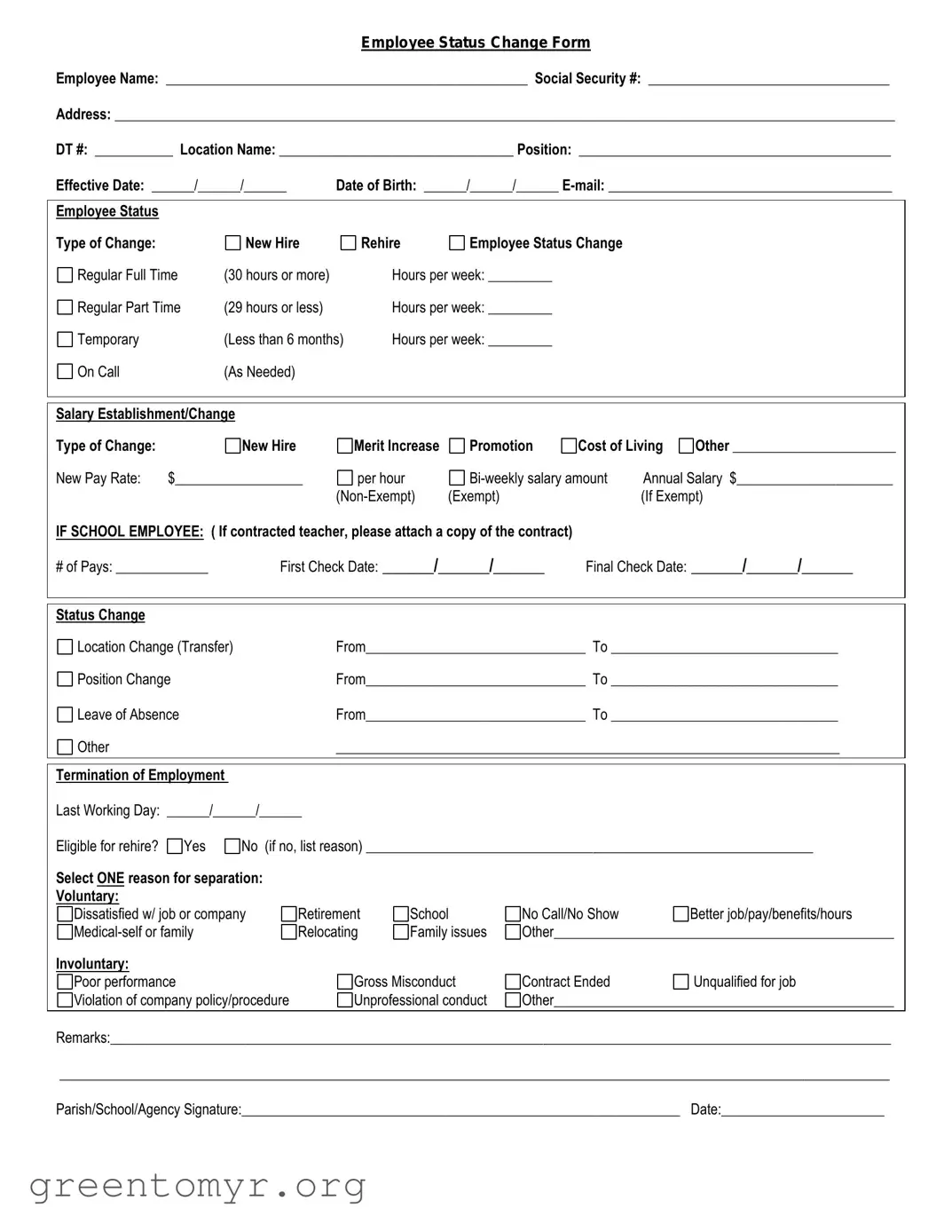
The Employee Status Change form is a vital document that facilitates various transitions within a workplace. It is designed to capture essential information when an employee experiences changes in their job status, such as promotions, demotions, transfers, or even terminations. This form serves multiple purposes, including updating payroll information, adjusting benefits, and ensuring compliance with company policies. By clearly outlining the necessary details, such as the employee's name, current position, and new status, the form helps maintain accurate records and promotes effective communication between management and HR departments. Timely submission of this form is crucial, as it can impact an employee's compensation and benefits, making it an essential tool for both employees and employers alike.

Employee Status Change Form
Employee Name: ___________________________________________________ Social Security #: __________________________________
Address: ______________________________________________________________________________________________________________
DT #: ___________ Location Name: _________________________________ Position: ____________________________________________
Effective Date: ______/______/______ |
Date of Birth: ______/______/______ |
|||
|
|
|
|
|
Employee Status |
|
|
|
|
Type of Change: |
New Hire |
|
Rehire |
Employee Status Change |
Regular Full Time |
(30 hours or more) |
|
Hours per week: _________ |
|
Regular Part Time |
(29 hours or less) |
|
Hours per week: _________ |
|
Temporary |
(Less than 6 months) |
Hours per week: _________ |
||
On Call |
(As Needed) |
|
|
|
|
|
|
|
|
Salary Establishment/Change |
|
|
|
|
|
|
|
|
|
|
Type of Change: |
|
New Hire |
|
Merit Increase |
Promotion |
Cost of Living |
Other _______________________ |
|||
New Pay Rate: |
$__________________ |
per hour |
|
Annual Salary $______________________ |
||||||
|
|
|
|
(Exempt) |
|
|
(If Exempt) |
|||
IF SCHOOL EMPLOYEE: ( If contracted teacher, please attach a copy of the contract) |
|
|
|
|||||||
# of Pays: _____________ |
First Check Date: ______/______/______ |
Final Check Date: ______/______/______ |
||||||||
|
|
|
|
|
|
|
|
|
|
|
|
|
|
|
|
|
|
|
|
|
|
Status Change |
|
|
|
|
|
|
|
|
|
|
Location Change (Transfer) |
|
|
From_______________________________ To ________________________________ |
|||||||
Position Change |
|
|
From_______________________________ To ________________________________ |
|||||||
Leave of Absence |
|
|
From_______________________________ To ________________________________ |
|||||||
Other |
|
|
|
_______________________________________________________________________ |
||||||
|
|
|
|
|
|
|
|
|
|
|
Termination of Employment |
|
|
|
|
|
|
|
|
|
|
Last Working Day: ______/______/______ |
|
|
|
|
|
|
|
|||
Eligible for rehire? |
Yes |
No (if no, list reason) _______________________________________________________________ |
||||||||
Select ONE reason for separation: |
|
|
|
|
|
|
|
|
||
Voluntary: |
|
|
|
|
|
|
|
|
|
|
Dissatisfied w/ job or company |
Retirement |
School |
No Call/No Show |
|
Better job/pay/benefits/hours |
|||||
|
Relocating |
Family issues |
Other________________________________________________ |
|||||||
Involuntary: |
|
|
|
|
|
|
|
|
|
|
Poor performance |
|
|
Gross Misconduct |
Contract Ended |
|
Unqualified for job |
||||
Violation of company policy/procedure |
|
Unprofessional conduct |
Other________________________________________________ |
|||||||
|
|
|
|
|
|
|
|
|
|
|
Remarks:______________________________________________________________________________________________________________
_____________________________________________________________________________________________________________________
Parish/School/Agency Signature:______________________________________________________________ Date:_______________________
| Fact Name | Description |
|---|---|
| Purpose | The Employee Status Change form is used to document changes in an employee's status, such as promotions, demotions, or terminations. |
| Who Uses It | This form is typically used by HR departments to ensure accurate record-keeping and compliance with company policies. |
| State-Specific Forms | Some states may have specific requirements for employee status changes. Check local regulations to ensure compliance. |
| Governing Laws | In California, for example, the Fair Employment and Housing Act governs employment practices related to status changes. |
| Submission Process | Completed forms should be submitted to HR for processing, and copies should be kept in the employee's file. |
| Employee Notification | Employees should be notified of any changes to their status as soon as possible to maintain transparency. |
| Record Keeping | It's essential to keep a record of all status changes for future reference and compliance audits. |
After completing the Employee Status Change form, it will be submitted to the appropriate department for processing. The changes requested will be reviewed, and updates will be made to the employee's records as necessary. Ensure all information is accurate to avoid delays in processing.
The Employee Status Change form is a document used by organizations to officially record changes in an employee's status. This could include promotions, demotions, transfers, changes in job title, or shifts in work hours. By documenting these changes, employers ensure that all personnel records are up to date and that employees are aware of their current status within the organization.
You should submit the Employee Status Change form whenever there is a change in your employment status. This could be triggered by various events, such as:
Timely submission helps maintain accurate records and ensures that your benefits and compensation are adjusted accordingly.
Providing thorough information helps HR process the changes quickly and accurately.
When completing the Employee Status Change form, many individuals overlook critical details that can lead to complications later on. One common mistake is failing to provide accurate personal information. This includes not updating addresses, phone numbers, or emergency contacts. When this information is incorrect, it can hinder communication and delay important notifications.
Another frequent error involves not clearly indicating the reason for the status change. Whether it’s a promotion, transfer, or leave of absence, it’s essential to specify the reason clearly. Without this clarity, the processing of the change may be delayed or misunderstood, leading to unnecessary confusion.
People often forget to check for any required signatures. Many forms require the approval of a supervisor or HR representative. Skipping this step can render the form invalid, causing delays in processing the change. Always ensure that all necessary signatures are obtained before submitting the form.
Additionally, some individuals neglect to review the form for completeness. Leaving out sections or providing incomplete information can lead to processing errors. It’s crucial to double-check that all fields are filled out as required. Taking a moment to review the entire form can save time and prevent issues down the line.
Lastly, many fail to submit the form to the correct department or individual. Each organization has specific protocols for submitting employee status changes. Not following these procedures can result in the form being lost or overlooked. Always verify the submission process to ensure that your changes are recorded promptly.
When an employee's status changes within a company—whether due to a promotion, transfer, or termination—several important documents often accompany the Employee Status Change form. Each of these documents serves a specific purpose in ensuring a smooth transition and maintaining accurate records. Below is a list of common forms and documents used in conjunction with the Employee Status Change form.
Each of these documents plays a vital role in managing employee transitions and ensuring compliance with company policies and legal requirements. By understanding the purpose of each form, both employees and employers can navigate changes in employment status more effectively.
When filling out the Employee Status Change form, it’s important to approach the task with care. Here are some guidelines to help you navigate the process effectively.
Following these tips can make the process smoother for everyone involved. Remember, clarity and accuracy are your best allies when handling such important documents.
Misconceptions about the Employee Status Change form can lead to confusion among employees and employers alike. Here are nine common misunderstandings:
This is not true. While HR typically processes the form, employees can initiate the request by filling it out and submitting it to their supervisor.
In reality, the Employee Status Change form is used for various changes, including promotions, transfers, and changes in job titles or salary.
Submitting the form does not automatically ensure the requested change will be approved. Approval is subject to management review and company policy.
Many organizations allow employees to complete the form electronically. Check with your HR department for specific submission methods.
Most companies have specific deadlines for submitting status change requests. Failing to meet these deadlines may result in delays or denial of the request.
Changes may not take effect until a specified date, which should be noted on the form. It is important to confirm the effective date with HR.
Part-time and temporary employees may also be eligible to submit the form for status changes, depending on company policy.
While the information on the form is typically treated with discretion, it may still be shared with relevant parties within the organization for processing.
It is advisable to follow up with HR or your supervisor to ensure the form has been received and is being processed.
Understanding these misconceptions can help employees navigate the Employee Status Change process more effectively.
Filling out and using the Employee Status Change form is a critical process for maintaining accurate employee records and ensuring compliance with company policies. Here are key takeaways to consider: