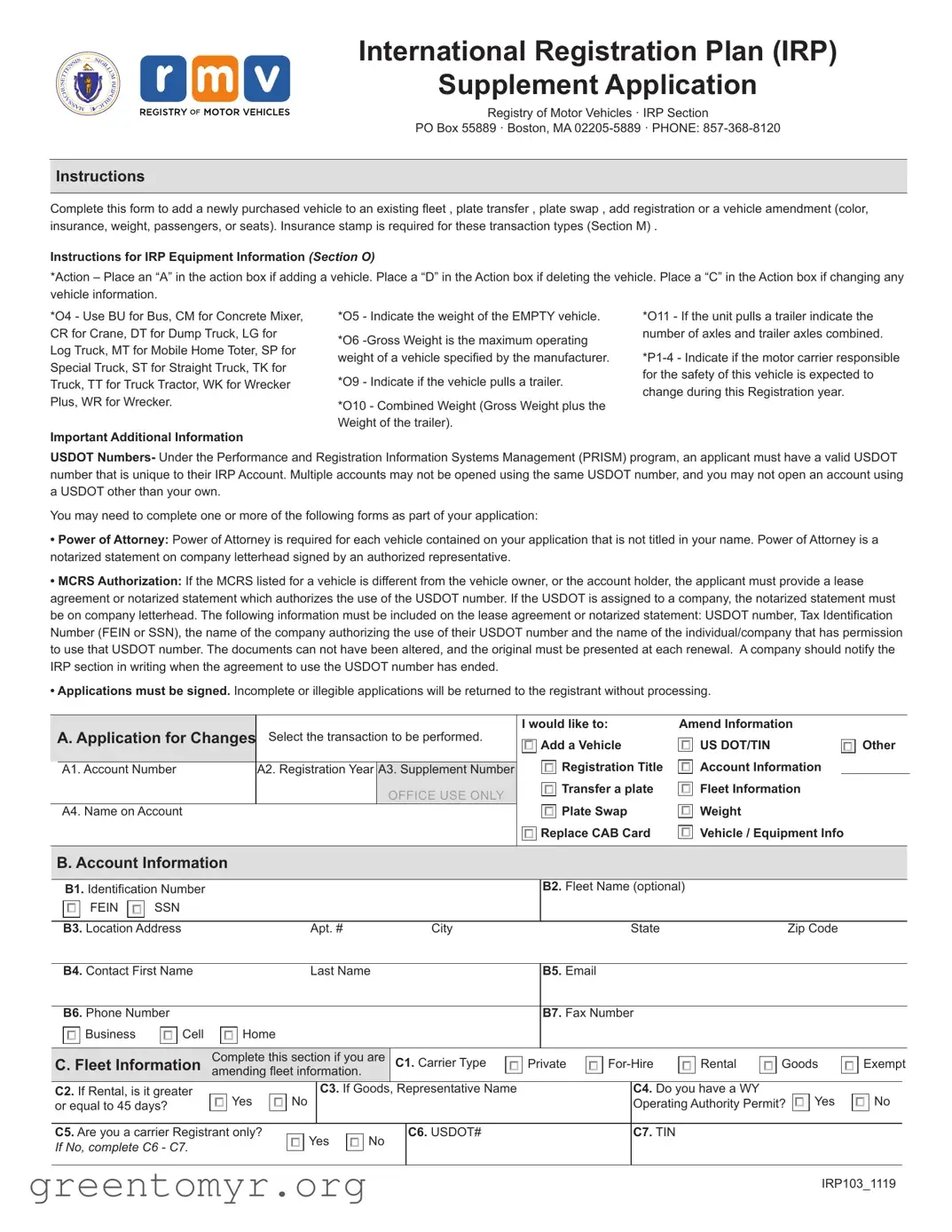
The MA IRP Application form serves as a critical tool for vehicle owners looking to manage their fleet registration under the International Registration Plan (IRP). This form allows applicants to add newly purchased vehicles to an existing fleet, transfer plates, swap plates, or amend vehicle information such as color, insurance, weight, or passenger capacity. To ensure compliance with regulations, an insurance stamp is required for specific transaction types. The application includes various sections that guide users through the necessary steps, from selecting the action to be taken—such as adding or deleting a vehicle—to providing detailed vehicle information, including the weight classifications and identification numbers. Applicants must also include their USDOT number, which must be unique to their IRP account, and may need to submit additional documents like a Power of Attorney or MCRS Authorization if applicable. It is essential for the application to be completed accurately, as any incomplete or illegible submissions will be returned without processing. By following the outlined instructions and providing the necessary documentation, applicants can navigate the complexities of fleet registration with greater ease.
International Registration Plan (IRP)
Supplement Application
Registry of Motor Vehicles · IRP Section
PO Box 55889 · Boston, MA
Instructions
Complete this form to add a newly purchased vehicle to an existing fleet , plate transfer , plate swap , add registration or a vehicle amendment (color, insurance, weight, passengers, or seats). Insurance stamp is required for these transaction types (Section M) .
Instructions for IRP Equipment Information (Section O)
*Action – Place an “A” in the action box if adding a vehicle. Place a “D” in the Action box if deleting the vehicle. Place a “C” in the Action box if changing any vehicle information.
*O4 - Use BU for Bus, CM for Concrete Mixer, CR for Crane, DT for Dump Truck, LG for Log Truck, MT for Mobile Home Toter, SP for Special Truck, ST for Straight Truck, TK for Truck, TT for Truck Tractor, WK for Wrecker Plus, WR for Wrecker.
Important Additional Information
*O5 - Indicate the weight of the EMPTY vehicle.
*O6
*O9 - Indicate if the vehicle pulls a trailer.
*O10 - Combined Weight (Gross Weight plus the Weight of the trailer).
*O11 - If the unit pulls a trailer indicate the number of axles and trailer axles combined.
USDOT Numbers- Under the Performance and Registration Information Systems Management (PRISM) program, an applicant must have a valid USDOT number that is unique to their IRP Account. Multiple accounts may not be opened using the same USDOT number, and you may not open an account using a USDOT other than your own.
You may need to complete one or more of the following forms as part of your application:
•Power of Attorney: Power of Attorney is required for each vehicle contained on your application that is not titled in your name. Power of Attorney is a notarized statement on company letterhead signed by an authorized representative.
•MCRS Authorization: If the MCRS listed for a vehicle is different from the vehicle owner, or the account holder, the applicant must provide a lease agreement or notarized statement which authorizes the use of the USDOT number. If the USDOT is assigned to a company, the notarized statement must be on company letterhead. The following information must be included on the lease agreement or notarized statement: USDOT number, Tax Identification Number (FEIN or SSN), the name of the company authorizing the use of their USDOT number and the name of the individual/company that has permission to use that USDOT number. The documents can not have been altered, and the original must be presented at each renewal. A company should notify the IRP section in writing when the agreement to use the USDOT number has ended.
•Applications must be signed. Incomplete or illegible applications will be returned to the registrant without processing.
A. Application for Changes |
Select the transaction to be performed. |
||
|
|
|
|
|
A1. Account Number |
A2. Registration Year |
A3. Supplement Number |
|
|
|
OFFICE USE ONLY |
|
A4. Name on Account |
|
|
|
|
|
|
I would like to:
Add a Vehicle
Registration Title
Transfer a plate
Plate Swap Replace CAB Card
Amend Information |
|
|
US DOT/TIN |
Other |
|
Account Information |
|
|
Fleet Information |
|
|
Weight |
|
|
Vehicle / Equipment Info |
|
|
B. Account Information
|
|
|
|
|
|
|
|
|
|
|
|
|
|
|
|
|||
B1. Identification Number |
|
|
|
|
|
|
|
B2. |
Fleet Name (optional) |
|
|
|
|
|
||||
|
FEIN |
SSN |
|
|
|
|
|
|
|
|
|
|
|
|
|
|
|
|
|
|
|
|
|
|
|
|
|
|
|
|
|
|
|
|
|
|
|
B3. |
Location Address |
|
Apt. # |
|
|
City |
|
|
|
|
State |
|
|
Zip Code |
|
|
||
|
|
|
|
|
|
|
|
|
|
|
|
|
|
|
|
|
||
B4. |
Contact First Name |
|
Last Name |
|
|
|
B5. |
|
|
|
|
|
|
|
||||
|
|
|
|
|
|
|
|
|
|
|
|
|
|
|
|
|
||
B6. |
Phone Number |
|
|
|
|
|
|
|
B7. |
Fax Number |
|
|
|
|
|
|||
|
Business |
Cell |
Home |
|
|
|
|
|
|
|
|
|
|
|
|
|
|
|
|
|
|
|
|
|
|
|
|
|
|
|
|
|
|
|
|
||
C. Fleet Information |
Complete this section if you are |
C1. Carrier Type |
Private |
Rental |
Goods |
Exempt |
||||||||||||
amending fleet information. |
|
|||||||||||||||||
C2. If Rental, is it greater |
Yes |
No |
C3. If Goods, |
Representative Name |
|
|
|
|
C4. Do you have a WY |
|
Yes |
No |
|
|||||
or equal to 45 days? |
|
|
|
|
|
|
|
|
Operating Authority Permit? |
|||||||||
|
|
|
|
|
|
|
|
|
|
|
|
|
|
|
|
|||
C5. Are you a carrier Registrant only? |
Yes |
No |
|
C6. USDOT# |
|
|
|
|
C7. TIN |
|
|
|
|
|
||||
If No, complete C6 - C7. |
|
|
|
|
|
|
|
|
|
|
|
|
|
|||||
|
|
|
|
|
|
|
|
|
|
|
|
|
|
|
|
|||
|
|
|
|
|
|
|
|
|
|
|
|
|
|
|
|
|
|
|
|
|
|
|
|
|
|
|
|
|
|
|
|
|
|
|
IRP103_1119 |
||
Reprint this page as needed for multiple vehicles. |
Account # |
|
Unit/Owner Equipment Number |
D. Vehicle Information
D1. Vehicle Identification Number (VIN)
D2. Body Style
|
|
|
|
|
|
|
|
|
|
|
|
|
|
|
|
D3. Registration Type: |
Passenger |
Commercial |
Bus |
|
Livery |
Camper |
D4. Color(s): |
Black |
White |
Brown |
Blue |
Yellow |
|||
Trailer |
Taxi |
Motorcycle |
Other: |
|
|
Gray |
Red |
Purple |
Green |
Orange |
Gold |
Silver |
|||
|
|
|
|
|
|
|
|
|
|
|
|
|
|
|
|
D5. Year |
|
Make |
|
|
Model |
|
|
|
|
Model# |
|
|
Trim |
|
|
D6. Transmission Type: |
Automatic |
D7. Number of: Cylinders/Passengers/Doors |
D8. Fuel Type: |
Gas |
Electric Propane |
|||
Other: |
|
|
Manual |
|
Diesel |
Hybrid |
Other: |
|
|
|
|||||||
|
|
|
|
|
|
|
|
|
D9. Odometer (Miles)
D10. Bus: |
Regular |
DPU |
|
School Pupil/Taxi |
|
School Bus |
School Pupil |
D11. If carrying passengers for hire, |
|
School Pupil/Livery |
enter max seating capacity |
||
|
|
||
|
|
|
|
D12. Total Gross Weight (Laden) Cannot exceed GVWR
E. Title Information
E3. Previous Title Number
E1. Vehicle Condition |
New |
Used |
Previous Title State
E2. Previous Title Issue Date (MM/DD/YYYY)
Previous Title Country
|
E4. Title Type: |
Clear |
Salvage |
Reconstructed |
E5. Primary Salvage Title Brand: |
E6. Secondary Salvage Brand(s): |
Vandalism |
Flood |
|||||||||||||||
|
|
Theft |
Prior Owner Retained |
Owner Retained |
Repairable |
Parts Only |
|
Theft |
|
|
Fire |
Salt |
Collision |
Other |
|||||||||
|
|
|
|
|
|
|
|
|
|
|
|
|
|
|
|||||||||
|
F. Owner 1 Information |
F1. Select Owner(s) Identification Requirement being provided for registration purposes |
MA License/ID |
||||||||||||||||||||
|
|
|
|
|
Social Security Number |
Lawful Presence |
|||||||||||||||||
|
F2. |
1st Owner’s Name (Last, First, Middle) |
|
F3. Date of Birth (MM/DD/YYYY) |
|
F4. |
License#/ ID#/ SSN |
|
|
|
|
|
|||||||||||
|
|
|
|
|
|
|
|
|
|
|
|
|
|
|
|
|
|
|
|
|
|
|
|
|
F5. |
Residential Address |
|
Apt.# |
City |
|
State |
Zip Code |
F6. |
State/Country of License/ID |
|
|
|||||||||||
|
|
|
|
|
|
|
|
|
|
|
|
|
|
|
|
|
|
|
|
|
|||
|
F7. |
Mailing Address |
Same as Residential Apt.# |
City |
|
State |
Zip Code |
F8. |
Exp. Date of License/ ID/ Lawful Presence |
||||||||||||||
|
|
|
|
|
|
|
|
|
|
|
|
|
|
|
|
|
|
|
|
|
|
|
|
|
F9. |
|
|
|
|
|
|
Cell |
Home |
Work |
|
Phone# |
|
|
|
|
|
|
|
||||
|
|
|
|
|
|
|
|
|
|
|
|
|
|
|
|
|
|
|
|
||||
Owner 2 Information
F10. Select Owner(s) Identification Requirement being provided for registration purposes |
MA License/ID |
|
||
Social Security Number |
Lawful Presence |
|||
|
|
|
|
|
F11. 2nd Owner’s Name (Last, First, Middle) |
|
F12. Date of Birth (MM/DD/YYYY) |
|
|
F13. |
License#/ ID#/ SSN |
||||||||||||
|
|
|
|
|
|
|
|
|
|
|
|
|
|
|
|
|
|
|
F14. |
Residential Address |
|
Apt.# |
City |
State |
Zip Code |
|
F15. |
State/Country of License/ID |
|||||||||
|
|
|
|
|
|
|
|
|
|
|
|
|
|
|
|
|
|
|
F16. |
Mailing Address |
Same as Residential |
Apt.# |
City |
State |
Zip Code |
|
F17. |
Exp. Date of License/ ID/ Lawful Presence |
|||||||||
|
|
|
|
|
|
|
|
|
|
|
|
|
|
|
|
|
|
|
F18. |
|
|
|
Cell |
Home |
Work |
|
Phone# |
||||||||||
|
|
|
|
|
|
|
|
|
|
|
|
|
|
|
||||
G. Lessee Information / In Custody of
G1. 1st License #/ ID #/ SSN/ FID
G2. 1st Lessee or Corp/Co/Organizations Name
G3. 1st Lessee Address
G4. 2nd License #/ ID #/ SSN/ FID
G5. 2nd Lessee or Corp/Co/Organizations Name
G6. 2nd Lessee Address
H. Business Owner Information |
H1. Email |
|
|
Cell |
Home |
Work |
Phone# |
|
||||
|
|
|
|
|
|
|
|
|
|
|
||
H2. |
EIN/FID |
|
H3. Corp/Co/Organization/Lessor Name |
|
|
|
|
H4. USDOT# |
H5. TIN |
|||
|
|
|
|
|
|
|
|
|
|
|||
H6. |
DBA Dealer - Farmer - OC - Repair - and Transporter use only |
|
|
|
|
H7. SSN if Sole Proprietor |
||||||
|
|
|
|
|
|
|
|
|
|
|
|
|
H8. |
Physical Address |
|
|
|
Apt.# |
City |
|
State |
Zip Code |
|||
|
|
|
|
|
|
|
|
|
|
|
|
|
H9. |
Mailing Address |
Same as Physical Address |
Apt.# |
City |
|
State |
Zip Code |
|||||
IRP103_1119

Reprint this page as needed for multiple vehicles. |
Account # |
|
Unit/Owner Equipment Number |
|
|
||
|
|
|
|
|
|
|
|
I. Garaging Address Address where vehicle is principally garaged. |
|
|
|
|
|||
I1. Address |
|
Apt.# |
City |
State |
Zip Code |
|
|
|
|
|
|
|
|||
J. Lienholder Information |
The bank, financial institution, or private party that financed your vehicle loan. |
|
|
||||
1st Lien Code
Name |
Address |
2nd Lien Code
Name |
Address |
3rd Lien Code
Name |
Address |
|
|
|
K. Sales or Use Tax Schedule |
Numbers K1 or K2 must be completed by a licensed dealer. Number K3 must be completed for all |
|
casual/private sales. Number K4 is completed for sales tax exemptions by the RMV. |
||
|
K1. Sale by Licensed Motor Dealer EIN/FID#: |
K2. Sale By Auction |
|||
Authorized Dealer’s Signature: |
|
|
Sale Price including Buyer’s Premium: |
|
|
|
|||
MSRP: |
|
|
|
Total Sales Price: |
|||||||||
|
|
|
|
||||||||||
Less Manufacturers Excise: |
|||||||||||||
|
|
|
|
Less |
|
||||||||
Year: |
Make: |
|
|
|
Model: |
||||||||
|
|
|
|
|
|
|
|
|
|
|
|
||
|
|
|
|
Less |
|
||||||||
Year: |
Make: |
|
|
|
Model: |
||||||||
|
|
|
|
|
|
|
|
|
|
|
|
||
Taxable Sales Price: |
|
|
|
MA Sales Tax Paid: |
|
||||||||
K3. Sale By Other Than Motor Vehicle Dealer or Auction House (Casual Sale)
Gross Sale Price (Proof Required):
MA Sales/Use Tax:
Out of State Sales Tax Previously Paid:
State that Sales Tax was Paid to:
K4. Claim Exemption Code
Form Attached (If Required)
L. Purchase Information |
|
L1. Purchase Date: |
|
|
L2. Is this vehicle being converted from another state with the same owner? |
|||||||||||||||
|
|
|
|
|
|
|
|
|
|
|
|
If Yes, answer questions |
Yes |
No |
||||||
L3. MA Resident at |
Yes |
|
No |
|
|
|
L4. Was Mass Sales |
Yes |
|
No |
|
L5. Proof of Tax or Letter |
Yes |
No |
||||||
Time of Purchase? |
|
|
|
|
Tax Previously Paid? |
|
|
of Delivery provided? |
||||||||||||
|
|
|
|
|
|
|
|
|
|
|
|
|
||||||||
M. Insurance Information |
|
|
|
|
|
|
|
|
|
|
|
The company signatory hereto hereby certifies that it has or will insure or guarantee |
||||||||
|
|
|
|
|
|
|
|
|
|
|
performance by the applicant herein before named with respect to the motor |
|
|
|||||||
|
|
|
|
|
|
|
|
|
|
|
|
|
|
vehicle herein before described for a period at least coterminous with that of such |
||||||
M1. Insurance Company |
|
|
|
|
|
|
|
|
|
|
|
|||||||||
|
|
|
|
|
|
|
|
|
|
|
registration under a motor vehicle liability policy, binder or bond which conforms to |
|||||||||
|
|
|
|
|
|
|
|
|
|
|
|
|
|
the provisions of general laws, Chapter 175, Section 113A, and that the premium |
||||||
|
|
|
|
|
|
|
|
|
|
|
|
|
|
charge and classification on the effective date of registration are as established by the |
||||||
|
|
|
|
|
|
|
|
|
|
|
|
|
|
commissioner of insurance under Chapter 175, Section 113B, 113H and Chapter 175E. |
||||||
M2. Insurance Code |
|
|
M3. Effective Date of Insurance |
|
||||||||||||||||
|
|
|
|
|
|
|
|
|
|
|||||||||||
|
|
|
|
|
|
|
|
|
|
|
|
|
|
|
|
|
|
|
|
|
M4. Self Insured? |
Yes |
No |
M5. Policy |
|
|
|
|
|
|
|
|
|
|
|
||||||
Change Date |
|
|
|
|
|
|
|
|
|
|
|
|||||||||
|
|
|
|
|
|
|
|
|
|
|
|
|
|
|
|
|||||
|
|
|
|
|
|
|
|
|
|
|
|
|
|
|
|
|
|
|||
N. Seller Information |
|
|
|
|
|
|
|
|
|
|
|
|
|
|
|
|
|
|
||
|
|
|
|
|
|
|
|
|
|
|
Insurance Company’s Authorized Representative’s Signature |
|
||||||||
N1. Seller Name (Please Print) |
|
|
|
|
|
|
|
|
|
|
|
|
|
|
|
|
|
|
||
|
|
|
|
|
|
|
|
|
|
|
|
|
|
|
|
|
|
|
|
|
N2. Address |
|
|
|
|
|
|
|
|
Apt.# |
|
City |
|
|
State |
Zip Code |
|
|
|||
|
|
|
|
|
|
|
|
|
|
|
|
|
|
|
|
|
|
|
||
O. IRP Equipment Information |
|
|
|
|
|
|
|
|
|
|
|
|
|
|
|
|
||||
|
|
|
|
|
|
|
|
|
|
|
|
|
|
|
||||||
O1. Action |
|
O2. Plate Number |
|
|
|
|
O3. Unit/Owner Equipment Number |
|
|
O4. IRP Classification |
|
|
|
|||||||
|
|
|
|
|
|
|
|
|
|
|
|
|
|
|
|
|
|
|||
O5. Unladen Weight |
|
|
|
|
O6. Gross Vehicle Weight |
|
|
|
|
|
O7. Seats |
O8. Axles |
|
|
||||||
|
|
|
|
|
|
|
|
|
|
|
|
|
|
|
||||||
O9. Does this vehicle pull a trailer? |
|
|
Yes |
|
No |
O10. Combined Gross Vehicle Weight |
|
|
O11. Combined Axles |
|
|
|
||||||||
If Yes, answer questions |
|
|
|
|
|
|
|
|
|
|
|
|
|
|
||||||
|
|
|
|
|
|
|
|
|
|
|
|
|
|
|
|
|
|
|||
|
|
|
|
|
|
|
|
|
|
|
|
|||||||||
O12. Does this vehicle |
|
|
Yes |
|
No |
O13. Does this vehicle |
|
Yes |
No |
O14. Purchase Price |
O15. Purchase Date |
|||||||||
transport hazardous material? |
|
|
|
|
|
|
|
travel less than 10,000? |
|
|
|
|
|
|
|
|
||||
|
|
|
|
|
|
|
|
|
|
|
|
|
|
|
|
|
|
|
|
|
IRP103_1119
| Fact Name | Description |
|---|---|
| Purpose | The MA IRP Application form is used to add, transfer, or amend vehicle registrations within an existing fleet. |
| Insurance Requirement | An insurance stamp is mandatory for certain transactions, specifically those listed in Section M of the form. |
| Action Codes | Applicants must indicate the action type: "A" for adding a vehicle, "D" for deleting, or "C" for changing vehicle information. |
| Weight Information | Empty vehicle weight and gross weight must be specified. Gross weight is the maximum operating weight set by the manufacturer. |
| USDOT Number | Under PRISM, a valid and unique USDOT number is required for each IRP account. Duplicate accounts with the same USDOT are prohibited. |
| Power of Attorney | A notarized Power of Attorney is needed for vehicles not titled in the applicant's name. It must be on company letterhead. |
| Application Completeness | Applications must be complete and legible. Incomplete submissions will be returned without processing. |
| Signature Requirement | All applications require signatures from the applicant or an authorized representative to be valid. |
| Jurisdiction Weight | Applicants must list the weight for each jurisdiction they intend to travel in, which will appear on the CAB Card. |
| Governing Law | This application is governed by Massachusetts General Laws, specifically M.G.L. c.90, §24 and related statutes. |
Filling out the MA IRP Application form is an essential step for managing vehicle registrations within the International Registration Plan. This process involves providing accurate details about your vehicle and your business to ensure compliance with state regulations. Below are the steps you need to follow to complete the form correctly.
The MA IRP Application form is used to manage vehicle registrations under the International Registration Plan (IRP). This includes adding new vehicles to an existing fleet, transferring plates, swapping plates, and making amendments to vehicle information such as color, insurance, weight, and passenger capacity.
Applicants must provide detailed information including:
Incomplete or illegible applications will be returned without processing.
In Section O of the form, you will find an action box. You should place an "A" to add a vehicle, "D" to delete a vehicle, or "C" to change any vehicle information. This helps the Registry process your request accurately.
The USDOT number is essential for IRP applications. It must be unique to your IRP account, and you cannot use the same USDOT number for multiple accounts. Ensure that your USDOT number is valid and corresponds to your business or personal registration.
If the vehicle is not titled in your name, you must provide a notarized Power of Attorney. This document should be on company letterhead and signed by an authorized representative. Additionally, if the MCRS differs from the vehicle owner, a lease agreement or notarized statement is required.
In Section P, you must indicate if the motor carrier responsible for the vehicle is expected to change during the registration year. This information is crucial for maintaining accurate records and ensuring compliance with safety regulations.
Yes, insurance information is mandatory. You must provide the insurance company name, policy number, and effective date. An insurance stamp is also required for certain transaction types. Ensure that the insurance coverage meets the legal requirements outlined in Massachusetts General Laws.
Once you have completed the application, you can mail it to the IRP Section at the address provided on the form: PO Box 55889, Boston, MA 02205-5889. Alternatively, you may contact the IRP Section at 857-368-8120 for further assistance or to inquire about submission options.
Filling out the MA IRP Application form can be a complex process. Many applicants make mistakes that can delay their registration or lead to rejection. Here are seven common errors to avoid.
One frequent mistake is not providing complete information. Every section of the application must be filled out accurately. If any fields are left blank, the application may be returned for completion. Ensure that all required details are included, especially contact information and vehicle specifics.
Another common error is using an incorrect or outdated USDOT number. Each applicant must have a unique and valid USDOT number. Using someone else's number or a number that is no longer valid can lead to complications. Always double-check that the number entered is correct and corresponds to your account.
Many applicants also fail to sign the application. The application is not complete without the necessary signatures. If the application lacks a signature, it will be returned. Make sure to review the signature section before submitting.
Some individuals overlook the importance of insurance information. An insurance stamp is required for specific transaction types. Without this, the application cannot be processed. Ensure that the insurance details are accurate and that you have the necessary documentation ready.
Additionally, applicants sometimes misinterpret the action box instructions. The action box must clearly indicate whether you are adding, deleting, or changing vehicle information. Misplacing or misidentifying this can lead to processing delays.
Another mistake involves not including necessary supporting documents. For example, if a vehicle is not titled in your name, a Power of Attorney is required. Failing to provide this documentation will result in the application being incomplete.
Lastly, applicants often forget to keep copies of their submissions. It is wise to maintain a record of what was submitted. This can be helpful for reference in case of any follow-up questions or issues. Keeping organized records can simplify the process and reduce stress.
The International Registration Plan (IRP) Supplement Application is a crucial document for those looking to manage their vehicle registrations across multiple states. However, several other forms and documents may be required to complete the application process effectively. Here is a list of these essential documents along with brief descriptions of each.
Understanding these documents can streamline the application process and ensure compliance with the requirements of the IRP. By gathering the necessary paperwork ahead of time, applicants can avoid delays and make the registration process smoother.
When filling out the MA IRP Application form, it's essential to follow certain guidelines to ensure a smooth process. Here’s a list of things you should and shouldn’t do:
Following these guidelines will help ensure your application is processed without unnecessary complications. If you have questions, consider reaching out to the IRP Section at the provided contact number.
Misconceptions about the MA IRP Application form can lead to confusion and delays in processing. Below is a list of ten common misunderstandings, along with clarifications to help applicants navigate the process more smoothly.
Understanding these misconceptions can greatly enhance the efficiency of the application process and ensure compliance with all necessary regulations.
Filling out the MA IRP Application form can be straightforward if you keep a few key points in mind. Here are some essential takeaways to guide you through the process:
By keeping these points in mind, you can navigate the MA IRP Application form more effectively and ensure a smoother registration process.