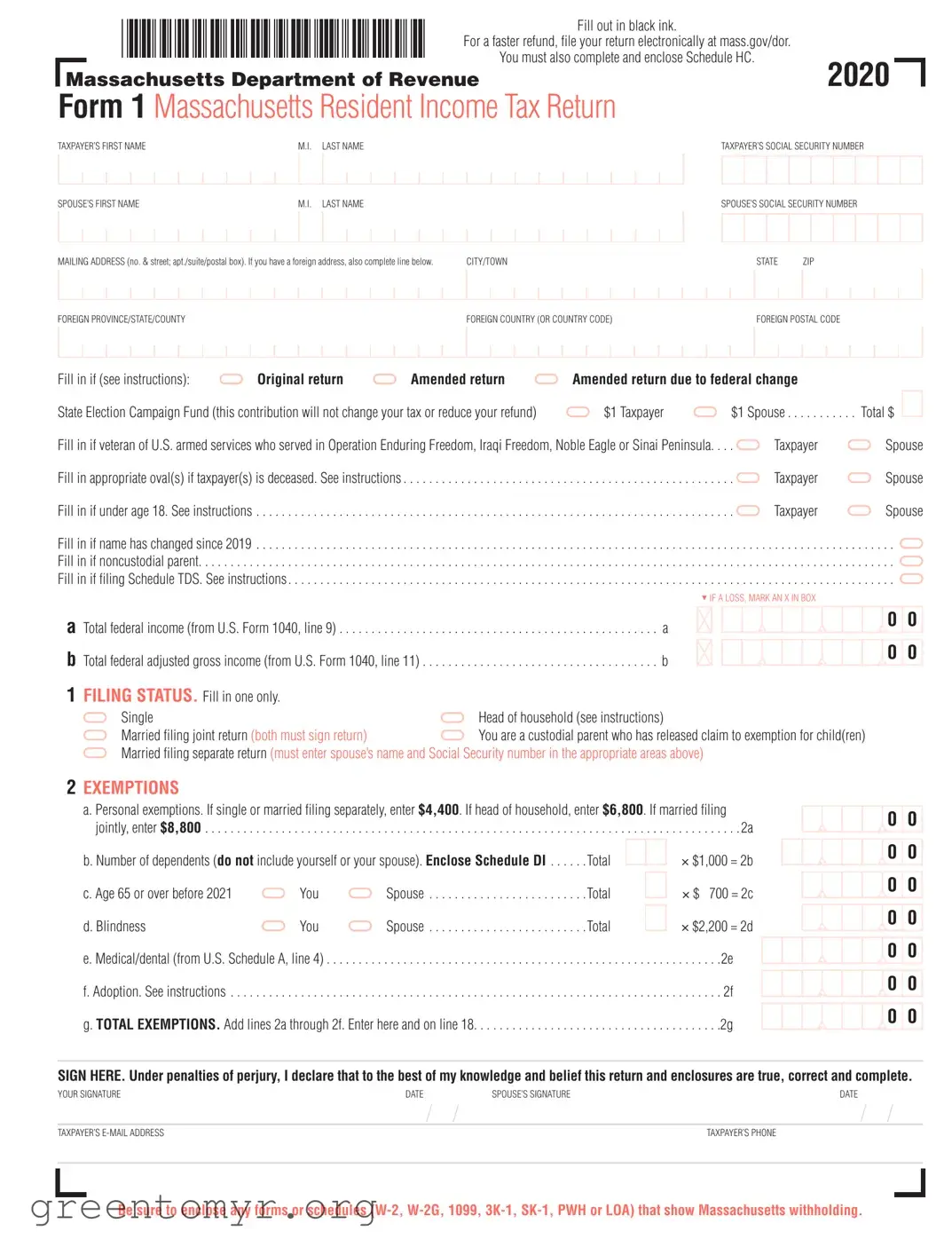
The Massachusetts Resident Form is a crucial document for individuals residing in Massachusetts who need to file their state income tax returns. This form requires taxpayers to provide essential personal information, including names, Social Security numbers, and addresses. To streamline the process and potentially expedite refunds, it is recommended to fill out the form using black ink and file electronically through the Massachusetts Department of Revenue website. Additionally, taxpayers must complete and include Schedule HC, which addresses health care coverage. The form outlines various sections where individuals report their income, deductions, and exemptions, along with their filing status. It also includes options for contributing to state funds and claiming credits. Understanding the intricacies of this form is vital, as it directly impacts tax liabilities and potential refunds. Timely and accurate completion of the Massachusetts Resident Form can significantly influence your financial standing, making it imperative to approach this task with diligence and care.

|
|
|
|
|
|
|
|
|
|
|
|
|
|
|
|
|
|
|
|
|
|
|
|
|
|
|
|
|
|
|
|
|
|
|
|
|
|
|
|
|
|
|
|
|
|
|
|
|
|
|
|
|
|
|
|
Fill out in black ink. |
|
|
|
|
|
|
|
|
|
|
|
|
|
|
|
|
|
|
|
|||||||||
|
|
|
|
|
|
|
|
|
|
|
|
|
|
|
|
|
|
|
|
|
|
|
|
|
|
|
|
|
|
|
|
|
|
|
|
|
|
|
|
|
|
|
|
|
|
|
|
|
|
|
|
|
|
|
|
|
|
|
|
|
|
|
|
|
|
|
|
|
|
|
|
|
|
|
||||||||||
|
|
|
|
|
|
|
|
|
|
|
|
|
|
|
|
|
|
|
|
|
|
|
|
|
|
|
|
|
|
|
|
|
|
|
|
|
|
|
|
|
|
|
|
|
|
|
|
|
For a faster refund, file your return electronically at mass.gov/dor. |
|
|
|
|
|
|
|
|
|
|
|
||||||||||||||||||||||||
|
|
|
|
|
|
|
|
|
|
|
|
|
|
|
|
|
|
|
|
|
|
|
|
|
|
|
|
|
|
|
|
|
|
|
|
|
|
|
|
|
|
|
|
|
|
|
|
|
|
|
You must also complete and enclose Schedule HC. |
|
|
|
|
2020 |
|
|
||||||||||||||||||||||||||
|
|
|
|
|
|
|
|
|
|
|
|
|
|
|
|
|
|
|
|
|
|
|
|
|
|
|
|
|
|
|
|
|
|
|
|
|
|
|
|
|
|
|
|
|
|
|
|
|
|
|
|
|
|
|
|
|
||||||||||||||||||||||||||||
|
|
|
|
|
|
|
|
|
|
|
|
|
|
|
|
|
|
|
|
|
|
|
|
|
|
|
|
|
|
|
|
|
|
|
|
|
|
|
|
|
|
|
|
|
|
|
|
|
|
|
|
|
|
|||||||||||||||||||||||||||||||
|
Massachusetts Department of Revenue |
|
|
|
|
|
|
|
|
|
|
|
|
|
|
|
|
|
|
|
|
|
||||||||||||||||||||||||||||||||||||||||||||||||||||||||||||||
|
Form 1 Massachusetts Resident Income Tax Return |
|
|
|
|
|
|
|
|
|
|
|
|
|
|
|
|
|
|
|
|
|
|
|
||||||||||||||||||||||||||||||||||||||||||||||||||||||||||||
|
TAXPAYER’S FIRST NAME |
|
|
|
|
|
|
|
|
|
|
|
|
|
|
|
M.I. |
LAST NAME |
|
|
|
|
|
|
|
|
|
|
|
|
|
|
|
|
|
|
|
|
|
|
|
|
|
TAXPAYER’S SOCIAL SECURITY NUMBER |
|
|
|
|||||||||||||||||||||||||||||||||||||
|
|
|
|
|
|
|
|
|
|
|
|
|
|
|
|
|
|
|
|
|
|
|
|
|
|
|
|
|
|
|
|
|
|
|
|
|
|
|
|
|
|
|
|
|
|
|
|
|
|
|
|
|
|
|
|
|
|
|
|
|
|
|
|
|
|
|
|
|
|
|
|
|
|
|
|
|
|
|
|
|
|
|
|
|
|
|
|
|
|
|
|
|
|
|
|
|
|
|
|
|
|
|
|
|
|
|
|
|
|
|
|
|
|
|
|
|
|
|
|
|
|
|
|
|
|
|
|
|
|
|
|
|
|
|
|
|
|
|
|
|
|
|
|
|
|
|
|
|
|
|
|
|
|
|
|
|
|
|
|
|
|
|
|
|
|
|
|
|
|
|
|
|
|
|
|
|
|
|
|
|
|
|
|
|
|
|
|
|
|
|
|
|
|
|
|
|
|
|
|
|
|
|
|
|
|
|
|
|
|
|
|
|
|
|
|
|
|
|
|
|
|
|
|
|
|
|
|
|
|
|
|
|
|
|
|
|
|
|
|
|
|
|
|
|
|
|
|
|
|
|
|
|
|
|
|
SPOUSE’S FIRST NAME |
|
|
|
|
|
|
|
|
|
|
|
|
|
|
|
M.I. |
LAST NAME |
|
|
|
|
|
|
|
|
|
|
|
|
|
|
|
|
|
|
|
|
|
|
|
|
|
SPOUSE’S SOCIAL SECURITY NUMBER |
|
|
|
|
|
|
||||||||||||||||||||||||||||||||||
|
|
|
|
|
|
|
|
|
|
|
|
|
|
|
|
|
|
|
|
|
|
|
|
|
|
|
|
|
|
|
|
|
|
|
|
|
|
|
|
|
|
|
|
|
|
|
|
|
|
|
|
|
|
|
|
|
|
|
|
|
|
|
|
|
|
|
|
|
|
|
|
|
|
|
|
|
|
|
|
|
||||
|
|
|
|
|
|
|
|
|
|
|
|
|
|
|
|
|
|
|
|
|
|
|
|
|
|
|
|
|
|
|
|
|
|
|
|
|
|
|
|
|
|
|
|
|
|
|
|
|
|
|
|
|
|
|
|
|
|
|
|
|
|
|
|
|
|
|
|
|
|
|
|
|
|
|
|
|
|
|
|
|
|
|
|
|
|
|
|
|
|
|
|
|
|
|
|
|
|
|
|
|
|
|
|
|
|
|
|
|
|
|
|
|
|
|
|
|
|
|
|
|
|
|
|
|
|
|
|
|
|
|
|
|
|
|
|
|
|
|
|
|
|
|
|
|
|
|
|
|
|
|
|
|
|
|
|
|
|
|
|
|
|
|
|
|
|
|
|
|
|
|
MAILING ADDRESS (no. & street; apt./suite/postal box). If you have a foreign address, also complete line below. |
|
|
CITY/TOWN |
|
|
|
|
|
|
|
|
|
|
|
|
|
|
|
STATE |
ZIP |
|
|
|
|
|
|
|||||||||||||||||||||||||||||||||||||||||||||||||||||||||
|
|
|
|
|
|
|
|
|
|
|
|
|
|
|
|
|
|
|
|
|
|
|
|
|
|
|
|
|
|
|
|
|
|
|
|
|
|
|
|
|
|
|
|
|
|
|
|
|
|
|
|
|
|
|
|
|
|
|
|
|
|
|
|
|
|
|
|
|
|
|
|
|
|
|
|
|
|
|
||||||
|
|
|
|
|
|
|
|
|
|
|
|
|
|
|
|
|
|
|
|
|
|
|
|
|
|
|
|
|
|
|
|
|
|
|
|
|
|
|
|
|
|
|
|
|
|
|
|
|
|
|
|
|
|
|
|
|
|
|
|
|
|
|
|
|
|
|
|
|
|
|
|
|
|
|
|
|
|
|
||||||
|
|
|
|
|
|
|
|
|
|
|
|
|
|
|
|
|
|
|
|
|
|
|
|
|
|
|
|
|
|
|
|
|
|
|
|
|
|
|
|
|
|
|
|
|
|
|
|
|
|
|
|
|
|
|
|
|
|
|
|
|
|
|
|
|
|
|
|
|
|
|
|
|
|
|
|
|
|
|
|
|
|
|
|
|
|
FOREIGN PROVINCE/STATE/COUNTY |
|
|
|
|
|
|
|
|
|
|
|
|
|
|
|
|
|
|
|
|
|
|
|
|
|
|
|
|
|
|
|
|
|
|
|
|
|
|
FOREIGN COUNTRY (OR COUNTRY CODE) |
|
|
|
|
|
|
|
|
FOREIGN POSTAL CODE |
|
|
|
|
|
|
|||||||||||||||||||||||||||||
|
|
|
|
|
|
|
|
|
|
|
|
|
|
|
|
|
|
|
|
|
|
|
|
|
|
|
|
|
|
|
|
|
|
|
|
|
|
|
|
|
|
|
|
|
|
|
|
|
|
|
|
|
|
|
|
|
|
|||||||||||||||||||||||||||
|
|
|
|
|
|
|
|
|
|
|
|
|
|
|
|
|
|
|
|
|
|
|
|
|
|
|
|
|
|
|
|
|
|
|
|
|
|
|
|
|
|
|
|
|
|
|
|
|
|
|
|
|
|
|
|
|
|
|
|
|||||||||||||||||||||||||
|
|
|
|
|
|
|
|
|
|
|
|
|
|
|
|
|
|
|
|
|
|
|
|
|
|
|
|
|
|
|
|
|
|
|
|
|
|
|
|
|
|
|
|
|
|
|
|
|
|
|
|
|
|
|
|
|
|
|
|
|
|
|
|
|
|
|
|
|
|
|
|
|
|
|
|
|
|
|
|
|
|
|
|
|
|
Fill in if (see instructions): |
|
|
|
|
|
|
|
|
Original return |
|
|
|
|
|
|
|
|
|
|
Amended return |
Amended return due to federal change |
|
|
|
|
|
|
|
|
|
|
|
|||||||||||||||||||||||||||||||||||||||||||||||||||
|
State Election Campaign Fund (this contribution will not change your tax or reduce your refund) |
|
|
|
$1 Taxpayer |
|
$1 Spouse |
. . . . |
|
Total $ |
|
|||||||||||||||||||||||||||||||||||||||||||||||||||||||||||||||||||||||||
|
|
|
|
|
||||||||||||||||||||||||||||||||||||||||||||||||||||||||||||||||||||||||||||||||
|
Fill in if veteran of U.S. armed services who served in Operation Enduring Freedom, Iraqi Freedom, Noble Eagle or Sinai Peninsula. |
. |
. |
. |
|
|
Taxpayer |
|
Spouse |
|||||||||||||||||||||||||||||||||||||||||||||||||||||||||||||||||||||||||||
|
Fill in appropriate oval(s) if taxpayer(s) is deceased. See instructions. |
.. . . . . . . . . . |
. . . . . . . . . . . . . |
. |
|
. |
|
|
Taxpayer |
|
Spouse |
|||||||||||||||||||||||||||||||||||||||||||||||||||||||||||||||||||||||||
|
Fill in if under age 18. See instructions. |
. . .. . . . . . . . . . . . . . . . . . . |
|
|
. . . . . . . . . . . . . . |
. |
|
|
|
Taxpayer |
|
Spouse |
||||||||||||||||||||||||||||||||||||||||||||||||||||||||||||||||||||||||
|
Fill in if name has changed since 2019 . |
. . .. . . . . . . . . . . . . . . . . . . . . . . . . . . . . . . . . . . . . . . . . . . . . . . |
|
|||||||||||||||||||||||||||||||||||||||||||||||||||||||||||||||||||||||||||||||||
|
Fill in if noncustodial parent. |
. |
|
. |
. |
. |
. |
. |
. |
|
. |
. |
. |
. |
. |
. |
. |
. |
. |
. |
. |
. |
. |
. |
. |
. |
|
. |
. |
. |
. |
. |
. |
. |
|
. |
. . |
. |
. . . |
. . . . |
. . . . |
. . . |
. |
|
. . . |
. . . . |
. . |
. . |
. . . |
. |
. . |
. |
. . . . |
. . . . |
. |
. |
. |
. . . |
. |
. . |
. . |
. . |
. . |
. |
. . |
. |
. . . |
. |
. . . |
|
. |
. . |
|
|
||||||||||
|
Fill in if filing Schedule TDS. See instructions |
|
|
|
||||||||||||||||||||||||||||||||||||||||||||||||||||||||||||||||||||||||||||||||
|
|
|
|
|
|
|
|
|
|
|
|
|
|
|
|
|
|
|
|
|
|
|
|
|
|
|
|
|
|
|
|
|
|
|
|
|
|
|
|
|
|
|
|
|
|
|
|
|
|
|
|
|
|
|
|
|
|
|
|
|
|
|
|
5 IF A LOSS, MARK AN X IN BOX |
|
|
|
|
|
|
||||||||||||||
|
a Total federal income (from U.S. Form 1040, line 9) . |
. . . . . . . . . . . . . . . |
. . . . |
. . . . |
. a |
|
|
|
|
|
|
|
|
|
|
|
|
|
|
|
|
0 |
0 |
|||||||||||||||||||||||||||||||||||||||||||||||||||||||||||||
|
|
|
|
|
|
|
|
|
|
|
|
|
|
|
|
|
|
|
|
|||||||||||||||||||||||||||||||||||||||||||||||||||||||||||||||||
|
b Total federal adjusted gross income (from U.S. Form 1040, line 11) |
. . . . . . . . |
|
|
. . . . . |
. . . . |
|
b |
|
|
|
|
|
|
|
|
|
|
|
|
|
|
|
|
0 |
0 |
||||||||||||||||||||||||||||||||||||||||||||||||||||||||||
|
|
|
|
|
|
|
|
|
|
|
|
|
|
|
|
|
|
|
|
|
|
|
||||||||||||||||||||||||||||||||||||||||||||||||||||||||||||||
1FILING STATUS. Fill in one only.
|
Single |
|
Head of household (see instructions) |
Married filing joint return (both must sign return) |
|
You are a custodial parent who has released claim to exemption for child(ren) |
|
|
Married filing separate return (must enter spouse’s name and Social Security number in the appropriate areas above) |
||
2EXEMPTIONS
a. Personal exemptions. If single or married filing separately, enter $4,400. If head of household, enter $6,800. If married filing jointly, enter $8,800. . . . . . . . . . . . . . . . . . . . . . . . . . . . . . . . . . . . . . . . . . . 2a
.b. Number of dependents (do not include yourself or your spouse). Enclose Schedule DI |
. . |
.Total |
|
|
× $1,000 = 2b |
||||||
c. Age 65 or over before 2021 |
|
You |
|
Spouse |
. . . . . . . . |
. . |
. Total |
|
|
|
× $1,700 = 2c |
|
|
|
|||||||||
d. Blindness |
|
You |
|
Spouse |
. . . . . . . . |
. . |
. Total |
|
|
|
× $2,200 = 2d |
|
|
|
|||||||||
e. Medical/dental (from U.S. Schedule A, line 4). . |
. . . . . . . . . . |
. . . . . |
. . . . . |
. . . . . |
. . . . .2e |
|
f. Adoption. See instructions . . |
. . . . . . . . . . . . . . . . . . |
. . . . |
. . . . . |
. . . . . |
. . . . . 2f |
|
g. TOTAL EXEMPTIONS. Add lines 2a through 2f. Enter here and on line 18 |
. . . . . . . . . |
. . . . . . . . . . |
|
2g |
||
00
00
00
00
00
00
00
SIGN HERE. Under penalties of perjury, I declare that to the best of my knowledge and belief this return and enclosures are true, correct and complete.
|
YOUR SIGNATURE |
DATE |
SPOUSE’S SIGNATURE |
DATE |
|
|
|
|
|
|
/ |
/ |
/ |
/ |
|
|
TAXPAYER’S |
|
|
TAXPAYER’S PHONE |
|
|
|
|
|
|
|
|
|
|
|
|
|
|
|
|
|
|
|
|
|
|
|
|
|
|
|
Be sure to enclose any forms or schedules
| Fact Name | Description |
|---|---|
| Form Purpose | The MA Resident Form is used to file the Massachusetts Resident Income Tax Return. |
| Filing Method | For a faster refund, taxpayers are encouraged to file electronically at mass.gov/dor. |
| Schedule Requirement | Taxpayers must complete and enclose Schedule HC with their return. |
| Filing Ink | All entries on the form should be filled out in black ink. |
| Taxpayer Information | The form requires personal information, including names and Social Security numbers of the taxpayer and spouse. |
| Filing Status | Taxpayers must select one filing status: Single, Head of Household, Married Filing Jointly, or Married Filing Separately. |
| Exemption Amounts | Personal exemptions vary based on filing status, with amounts ranging from $4,400 to $8,800. |
| Veteran Status | Taxpayers who are veterans of specific operations can indicate their status on the form. |
| Health Care Penalty | A penalty may apply if taxpayers do not meet health care coverage requirements; Schedule HC must be enclosed. |
| Governing Law | This form is governed by Massachusetts General Laws Chapter 62. |
Completing the MA Resident form requires careful attention to detail. Each section must be filled out accurately to ensure a smooth processing of your return. Follow the steps outlined below to successfully complete the form.
Once you have completed the form, you can file it electronically at mass.gov/dor for a faster refund. Alternatively, you may mail the form to the Massachusetts Department of Revenue. Be sure to keep a copy for your records.
The MA Resident Form, officially known as the Massachusetts Resident Income Tax Return (Form 1), is a document that residents of Massachusetts use to report their income and calculate their state tax liability. This form is essential for filing your state income taxes and must be completed accurately to ensure compliance with Massachusetts tax laws.
When filling out the MA Resident Form, it is important to use black ink to ensure clarity. You should provide your personal information, including your name, Social Security number, and mailing address. Additionally, if you are filing electronically for a quicker refund, you can do so at mass.gov/dor. Remember to complete and enclose Schedule HC, which is necessary for health care penalty calculations.
If you need to amend your return, you must indicate this by checking the appropriate box on the form. An amended return is necessary when there are changes to your income, deductions, or credits after your original filing. Ensure that you provide all relevant documentation and any new forms that support your changes.
The MA Resident Form allows for several exemptions that can reduce your taxable income. These include personal exemptions based on your filing status, exemptions for dependents, and additional exemptions for those over age 65 or who are blind. Each exemption has a specific dollar amount, and you will need to calculate your total exemptions and enter them on the form.
To receive your refund more quickly, consider filing your return electronically. This method not only speeds up the processing time but also minimizes the chances of errors. Additionally, ensure that all required forms and schedules, such as W-2s or 1099s, are enclosed with your return. If you choose direct deposit for your refund, you can receive your funds even faster.
Filling out the Massachusetts Resident Form can be straightforward, but there are common mistakes that people often make. One significant error is using the wrong ink color. The instructions clearly state to fill out the form in black ink. Using blue or any other color can lead to processing delays.
Another common mistake involves the omission of Schedule HC. This schedule is essential for reporting health care coverage. Failing to complete and enclose it can result in complications with your return. Always double-check that you have included all necessary schedules before submitting your form.
Many filers also overlook the importance of accurate personal information. Errors in names or Social Security numbers can cause significant issues. It's crucial to ensure that all names match exactly with the Social Security Administration records. Take your time to verify this information before sending in your return.
People often forget to sign the form. The signature is a declaration that the information provided is accurate. Without it, the return may be considered incomplete. Make sure both taxpayers sign where indicated, as this is a critical step in the filing process.
Lastly, some individuals neglect to include all relevant forms or schedules, such as W-2s or 1099s. These documents show Massachusetts withholding and are necessary for accurate processing. Always gather and attach all required documentation to avoid delays in your refund or potential issues with your tax return.
When filing the Massachusetts Resident Income Tax Return, several additional forms and documents may be required to ensure compliance and accuracy. Each of these documents serves a specific purpose, helping to clarify income, deductions, and credits. Below is a list of commonly used forms alongside the Massachusetts Resident form.
Understanding these forms is vital for a successful tax filing experience. Each document plays a role in ensuring that taxpayers accurately report their financial situation, ultimately leading to a fair assessment of their tax obligations.
When filling out the Massachusetts Resident Form, it is essential to approach the process with care. Here are some important guidelines to follow, as well as some pitfalls to avoid:
Following these guidelines can help ensure that your filing process goes smoothly. Take your time, and don't hesitate to seek assistance if needed. Your attention to detail will pay off in the end.
When it comes to the Massachusetts Resident Form, there are several misconceptions that can lead to confusion. Here are four common misunderstandings:
Understanding these points can help ensure a smoother filing experience and help taxpayers avoid common pitfalls associated with the Massachusetts Resident Form.
Always fill out the Massachusetts Resident Form in black ink. This helps ensure that your information is clear and legible, reducing the chances of processing delays.
For a quicker refund, consider filing your return electronically at mass.gov/dor. This method is not only faster but also more secure.
Don't forget to complete and enclose Schedule HC. This schedule is essential for reporting your health care coverage, and omitting it could lead to complications with your return.
Be sure to include any necessary forms or schedules, such as W-2s or 1099s, that show Massachusetts withholding. This documentation is crucial for accurate processing of your tax return.