The Maryland Quarterly Contribution Report form is a vital tool for employers in the state, ensuring compliance with unemployment insurance requirements. This form facilitates the reporting of contributions and wages, which is essential for maintaining accurate records and fulfilling legal obligations. Employers must first establish a user account, including a unique username and PIN, to access the online filing system. The report includes various options for submission, allowing for flexibility in how employers choose to file their contributions. Key features of the form include automated calculations for excess wages, options for electronic payment via credit card or direct debit, and the ability to review past reports and account history. Additionally, the form provides resources for resetting forgotten PINs and modifying account information. Overall, the Maryland Quarterly Contribution Report serves as a comprehensive guide for employers to manage their unemployment insurance contributions effectively and efficiently.

Larry Hogan |
Boyd K. Rutherford |
Governor |
Lt. Governor |
State of Maryland
Department of Labor, Licensing and Regulation
Division of Unemployment Insurance
Contributions Unit
Quarterly Contribution & Employment Report
Internet Filing
This guide will provide the information you need to find the application, establish a user name / PIN, file your Unemployment Insurance Contribution and Wage Report, and obtain additional information and services.
Rev. 12/27/2017
Table of Contents |
|
Welcome Page |
3 |
Forgot Your PIN? |
4 |
Automated PIN Reset Service |
5 |
Request My PIN Reset by |
6 |
New User Enrollment |
7 |
Related Web Sites |
9 |
Create a PIN |
10 |
Confirmation Page for Creating a PIN Successfully |
11 |
Employer Services and Information |
12 |
Quarterly Contribution & Employment Report Main Menu |
13 |
Review my Past Online Reports |
14 |
Review my Account History |
15 |
Review my Account History – Quarter Detail |
16 |
Modify my Account Information (Change my Address) |
17 |
View and Print an Annual Rating Notice |
18 |
View and Print Quarterly Benefit Charge Statements |
19 |
Request a |
20 |
Close my Unemployment Insurance Account |
21 |
Change my PIN |
22 |
Employer Help |
23 |
Confirmation Page for Logging Off Successfully |
24 |
Filing Option 1: File Contribution and Employment Report |
25 |
Automatic Calculation of Excess Wage Amount |
28 |
Automatic Calculation of Excess Wage Worksheet |
29 |
Filing Option 2: File Only a Contribution Report |
30 |
Filing Option 3: File Wages Using the |
31 |
Acceptable Record Formats |
32 |
Warning Page for Not Entering Any Wages |
35 |
Add Employee |
36 |
Warning Page after Clicking Cancel on Add Employee Page |
37 |
Summary of Contribution Report |
38 |
Contribution Report Confirmation page |
39 |
Payment Option 1: Credit Card |
40 |
Payment Option 1: Credit Card Verification Page |
42 |
Payment Option 1: Credit Card Confirmation Page |
43 |
Payment Option 2: Direct Debit (Electronic Check) Page |
44 |
Payment Option 2: Electronic Check Payment Verification Page |
45 |
Payment Option 2: Electronic Check Payment Confirmation Page |
46 |
Print Contribution Report Page |
47 |
Print Employment Report Page |
48 |
Payment Option 3: Paper Check Confirmation Page |
49 |
2
Welcome Page
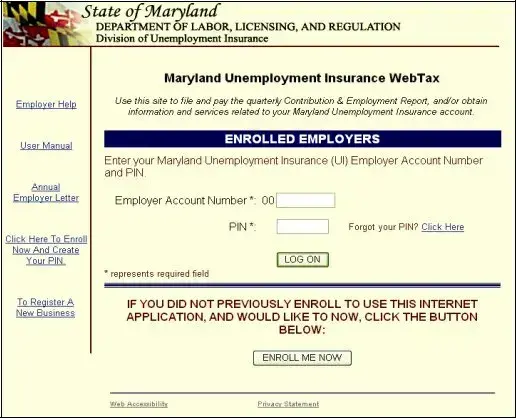
In order to use this application, you must have registered as a user.
Are you a registered user? If you previously registered on this web site, log on by entering your Maryland Unemployment Insurance employer account number and your PIN and clicking the “Log On” button.
Are you new to this site? You must register and establish your PIN to use this application. To create a PIN for this application, click on the “Enroll Me Now” button.
3
Forgot Your PIN?
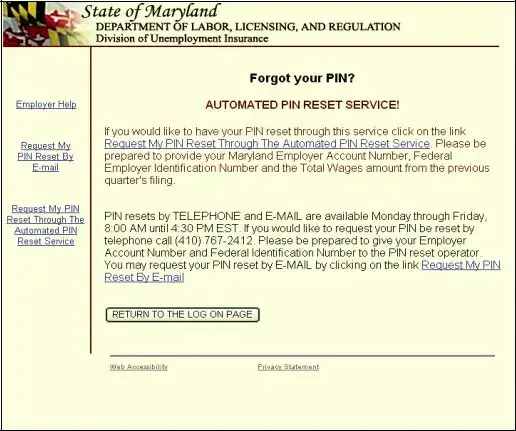
Did you previously register but forget your PIN? There are three ways to reset your PIN:
1.Automated – Available 24 hours a day, seven days a week. Click on Request My PIN Reset Through The Automated PIN Reset Process. Enter your FEIN number, your Maryland UI account number, and the previous quarter’s total wages for Maryland UI. Once reset, you are able to immediately begin your session.
2.
3.Telephone – Available during normal business days, 8:00 – 4:30 by calling
(410)
4
Automated PIN Reset Service
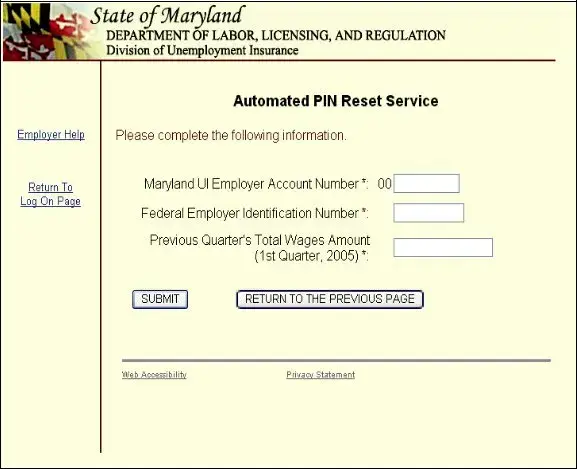
Did you forget your PIN? Now, you can
1.
2.
3.
4.
5.
6.
7.
Click on Request My PIN Reset Through The Automated PIN Reset Process Enter your Maryland Unemployment Insurance Account Number
Enter your Federal Employer Identification Number Enter your Previous Quarter’s Total Wages Amount Click “Submit”
Now you will see the “Create a PIN” page, as displayed on page 10 of this guide Follow the directions to create your new PIN
5
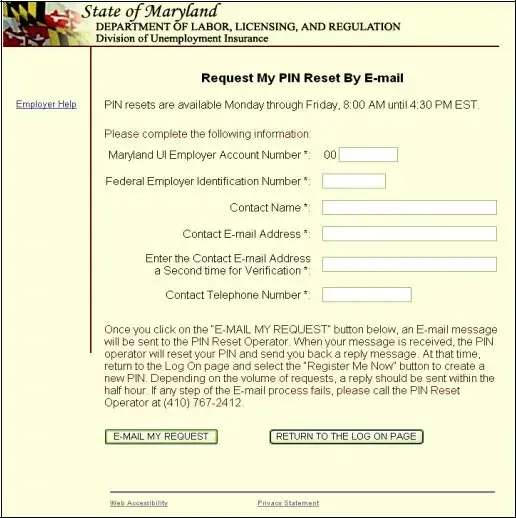
Request My PIN Reset by
If you want to contact us by
6
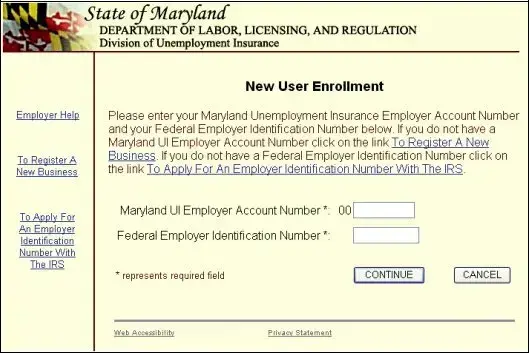
New User Enrollment
When you click “Enroll Me Now” on the Welcome page, you will see the New User Enrollment page. You must know your Maryland Unemployment Insurance Fund (MUIF)
Do you have a MUIF number?
!If you have a MUIF number, enter it now. The two leading zeros are
!If you do not have a MUIF number, you must register with the Division of Unemployment Insurance and obtain an account number before you use this application. There are two ways you can register and get a MUIF account number:
Online
For other State of Maryland
For other Maryland unemployment insurance related services visit www.mdunemployment.com .
7
Telephone – You may register by telephone if you call (410)
Do you know your FEIN?
!If you have a FEIN, enter your
!If you do not have FEIN, you must register with the Internal Revenue Service and obtain a FEIN before you use this application. You can find information for registering with the Internal Revenue Service at
8
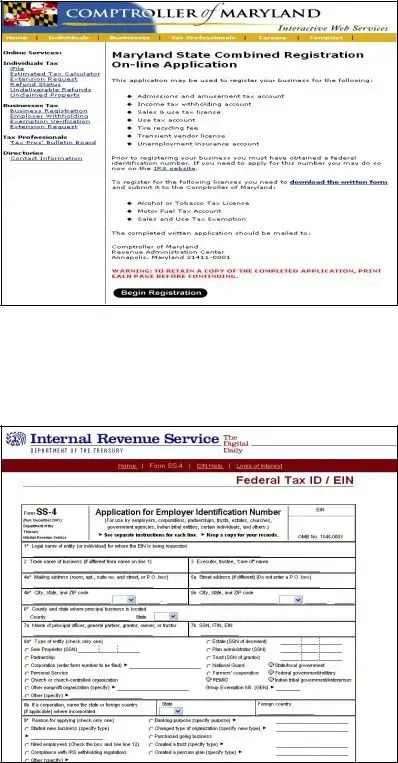
Related Web Sites
When you click on the “To Register A New Business” link to register your business online with the State of Maryland, you will see this page. After completing the Maryland State Combined Registration
When you click on the “To Apply For An Employer Identification Number With The IRS” link to register your business with the Internal Revenue Service, you will see this page. Please complete this information as requested.
9
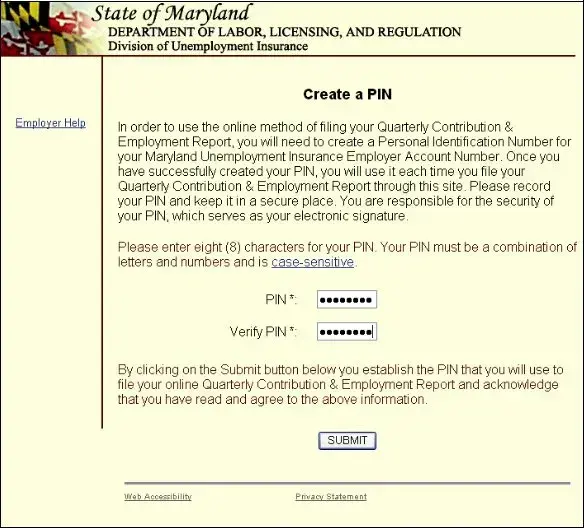
Create a PIN
Clicking on the “Enroll Me Now” button from the Welcome page will display the Create a PIN page. Follow the instructions on the page to establish a permanent PIN for this application. Your PIN will remain unchanged unless you choose to modify it within this application. (For more information about changing your PIN, refer to the Change Your PIN section on page 22)
When you have recorded your PIN and are ready to confirm the action, click “Submit”.
10
| Fact Name | Details |
|---|---|
| Governing Law | The Maryland Quarterly Contribution Report is governed by the Maryland Unemployment Insurance Law, specifically under Title 8 of the Labor and Employment Article. |
| Filing Frequency | Employers must file the Quarterly Contribution Report every three months, reflecting wages paid during the previous quarter. |
| Reporting Requirement | Employers are required to report all wages paid to employees, as well as contributions owed to the Unemployment Insurance Fund. |
| Due Dates | The report is due on the last day of the month following the end of each quarter. |
| Online Filing | Employers can file the report online through the Maryland Department of Labor's website, which streamlines the process. |
| PIN Requirement | A Personal Identification Number (PIN) is necessary for online access to the filing system, ensuring security and privacy. |
| Payment Options | Employers can pay contributions via credit card, direct debit, or paper check, providing flexibility in payment methods. |
| Automated PIN Reset | Employers can reset their PIN online through an automated service, available 24/7, for convenience. |
| Annual Rating Notice | Employers can view and print their Annual Rating Notice, which details their contribution rate and any changes. |
| Help Resources | The Maryland Department of Labor offers various resources and help options for employers needing assistance with the report. |
Completing the Maryland Quarterly Contribution Report form is essential for employers to fulfill their reporting obligations. After gathering the necessary information, follow the steps outlined below to ensure that the form is filled out correctly.
The Maryland Quarterly Contribution Report form is a document that employers in Maryland must file to report their unemployment insurance contributions and wages for each quarter. This report helps the state track employment and ensure that unemployment benefits are funded appropriately. It includes information about the total wages paid to employees and the contributions owed by the employer.
Filing the Quarterly Contribution Report can be done online through the Maryland Department of Labor's website. Here’s how:
Make sure to keep a copy of your submission for your records.
If you forget your PIN, you have several options to reset it:
To complete the Maryland Quarterly Contribution Report, you will need the following information:
Having this information ready will help streamline the filing process.
Filling out the Maryland Quarterly Contribution Report form can be a straightforward task, but many people make common mistakes that can lead to complications. One frequent error is inaccurate reporting of wages. Employers must ensure that the total wages reported match their payroll records. Discrepancies can trigger audits or delays in processing.
Another mistake involves forgetting to include all employees. Some employers may overlook part-time or temporary workers when compiling their reports. Every employee who earned wages during the quarter should be accounted for to avoid penalties and ensure compliance with state regulations.
Many individuals also struggle with incorrect PIN usage. If an employer forgets their PIN or enters it incorrectly, they may find themselves locked out of the online filing system. Utilizing the automated PIN reset service is essential to regain access quickly. However, failing to follow the reset instructions carefully can lead to further delays.
Moreover, missing deadlines is a common pitfall. The Maryland Quarterly Contribution Report has specific due dates that must be adhered to. Late submissions can result in fines and interest on unpaid contributions. Setting reminders or utilizing calendar alerts can help keep these important dates in mind.
Another issue arises from not reviewing past reports. Employers should regularly check their account history to ensure that previous submissions are accurate. Errors in past reports can carry over and complicate future filings, making it crucial to maintain accurate records.
Lastly, neglecting to verify payment options can lead to frustration. Employers have multiple payment methods available, including credit cards and electronic checks. Understanding the different options and their associated processes can streamline the filing experience and ensure timely payments.
The Maryland Quarterly Contribution Report form is essential for employers to report their unemployment insurance contributions and wages. Along with this form, several other documents are commonly used to ensure compliance and accurate reporting. Below is a list of these documents, each described briefly for your convenience.
Each of these documents plays a vital role in maintaining compliance with Maryland's unemployment insurance requirements. It's important to have them ready and understand their purposes to facilitate smooth operations for your business.
The Maryland Quarterly Contribution Report form shares similarities with several other important documents used in employment and tax reporting. Here’s a breakdown of five documents that have comparable functions or purposes:
When filling out the Maryland Quarterly Contribution Report form, it’s essential to follow certain guidelines to ensure accuracy and compliance. Here are six important do's and don'ts to keep in mind:
Misconceptions about the Maryland Quarterly Contribution Report form can lead to confusion and delays in filing. Here are seven common misunderstandings, clarified for better understanding.
Understanding these misconceptions can help employers navigate the filing process more effectively, ensuring compliance and avoiding unnecessary issues.
Filling out and using the Maryland Quarterly Contribution Report form is essential for employers to comply with state regulations. Here are key takeaways to consider:
Understanding these key points can streamline the process of filing the Maryland Quarterly Contribution Report and ensure compliance with state requirements.