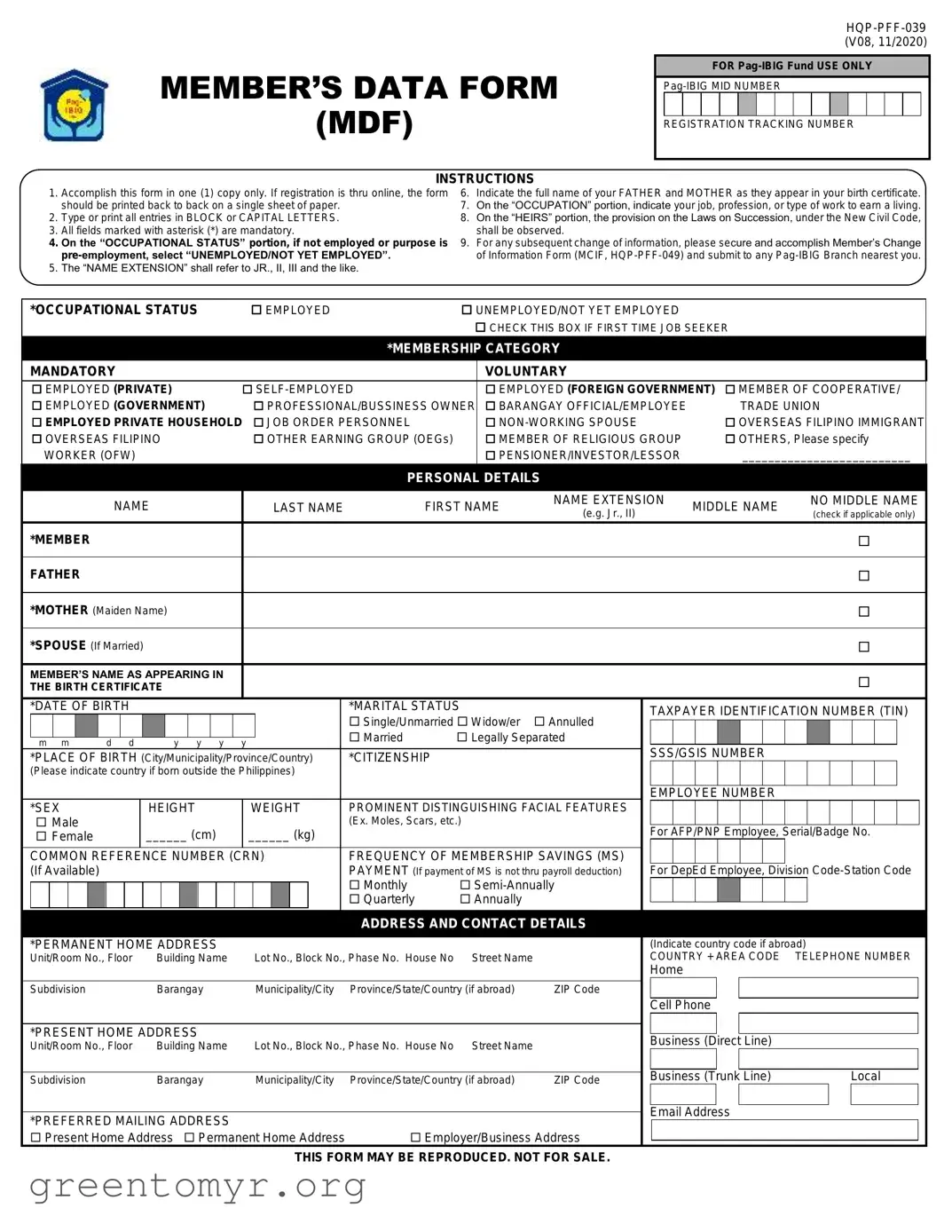
The Member Data Form (MDF) serves as a crucial document for individuals seeking to register with the Pag-IBIG Fund, a government-backed savings program designed to provide financial assistance to members. This form collects essential personal information, including the member's full name, date of birth, and marital status, which are vital for establishing a member's identity within the system. Additionally, it requires details about the member's occupational status, allowing for a clear understanding of their employment situation—whether they are employed, unemployed, or a first-time job seeker. The MDF also encompasses sections for family information, where members must list their parents and any heirs, ensuring that the benefits of the fund can be appropriately allocated in the event of a member's passing. Furthermore, the form emphasizes the importance of accuracy, mandating that all entries be completed in block letters and that mandatory fields be filled out to avoid delays in processing. Members are reminded that any changes to their information after submission must be reported through a separate form. This comprehensive approach not only streamlines the registration process but also safeguards members' rights and data privacy under current laws.
MEMBER’S DATA FORM (MDF)
INSTRUCTIONS
FOR
REGISTRATION TRACKING NUMBER
1.Accomplish this form in one (1) copy only. If registration is thru online, the form should be printed back to back on a single sheet of paper.
2.Type or print all entries in BLOCK or CAPITAL LETTERS.
3.All fields marked with asterisk (*) are mandatory.
4.On the “OCCUPATIONAL STATUS” portion, if not employed or purpose is
5.The “NAME EXTENSION” shall refer to JR., II, III and the like.
6.Indicate the full name of your FATHER and MOTHER as they appear in your birth certificate.
7.On the “OCCUPATION” portion, indicate your job, profession, or type of work to earn a living.
8.On the “HEIRS” portion, the provision on the Laws on Succession, under the New Civil Code, shall be observed.
9.For any subsequent change of information, please secure and accomplish Member’s Change of Information Form (MCIF,
|
*OCCUPATIONAL STATUS |
|
EMPLOYED |
|
UNEMPLOYED/NOT YET EMPLOYED |
|
|
|
|
|
|
|
|
|
|
|
|
|||||||||||||||||||||||||||
|
|
|
|
|
|
|
|
|
|
|
|
|
|
|
|
|
|
|
|
|
|
|
|
|
|
|
CHECK THIS BOX IF FIRST TIME JOB SEEKER |
|
|
|
|
|
|
|
||||||||||
|
|
|
|
|
|
|
|
|
|
|
|
|
|
|
|
|
|
|
|
|
|
|
|
|
|
*MEMBERSHIP CATEGORY |
|
|
|
|
|
|
|
|
|
|
|
|
|
|
||||
|
|
|
|
|
|
|
|
|
|
|
|
|
|
|
|
|
|
|
|
|
|
|
|
|
|
|
|
|
|
|
|
|
|
|
|
|
|
|
|
|
|
|
|
|
|
MANDATORY |
|
|
|
|
|
|
|
|
|
|
|
|
|
|
|
|
|
VOLUNTARY |
|
|
|
|
|
|
|
|
|
|
|
|
|
|
|||||||||||
|
|
|
|
|
|
|
|
|
|
|
|
|
|
|
|
|
|
|
|
|
|
|
|
|
|
|
|
|
|
|
|
|
|
|
|
|
|
|
|
|
|
|||
|
EMPLOYED (PRIVATE) |
|
|
|
EMPLOYED (FOREIGN GOVERNMENT) |
MEMBER OF COOPERATIVE/ |
||||||||||||||||||||||||||||||||||||||
|
EMPLOYED (GOVERNMENT) |
|
|
PROFESSIONAL/BUSSINESS OWNER |
BARANGAY OFFICIAL/EMPLOYEE |
|
|
|
TRADE UNION |
|||||||||||||||||||||||||||||||||||
|
EMPLOYED PRIVATE HOUSEHOLD JOB ORDER PERSONNEL |
|
|
|
|
|
|
OVERSEAS FILIPINO IMMIGRANT |
||||||||||||||||||||||||||||||||||||
|
OVERSEAS FILIPINO |
|
|
OTHER EARNING GROUP (OEGs) |
|
MEMBER OF RELIGIOUS GROUP |
|
|
OTHERS, Please specify |
|||||||||||||||||||||||||||||||||||
|
WORKER (OFW) |
|
|
|
|
|
|
|
|
|
|
|
|
|
|
|
|
|
PENSIONER/INVESTOR/LESSOR |
|
|
__________________________ |
|
|||||||||||||||||||||
|
|
|
|
|
|
|
|
|
|
|
|
|
|
|
|
|
|
|
|
|
|
|
|
|
|
PERSONAL DETAILS |
|
|
|
|
|
|
|
|
|
|
|
|
|
|
||||
|
|
|
|
|
|
|
|
|
|
|
|
|
|
|
|
|
|
|
|
|
|
|
|
|
|
|
|
|
|
|
|
|
|
|
|
|
|
|
|
|
|
|
|
|
|
|
|
|
|
|
|
|
NAME |
|
|
|
LAST NAME |
FIRST NAME |
NAME EXTENSION |
MIDDLE NAME |
|
NO MIDDLE NAME |
|||||||||||||||||||||||||||
|
|
|
|
|
|
|
|
|
|
|
(e.g. Jr., II) |
|
|
|
(check if applicable only) |
|||||||||||||||||||||||||||||
|
|
|
|
|
|
|
|
|
|
|
|
|
|
|
|
|
|
|
|
|
|
|
|
|
|
|
|
|
|
|
|
|
|
|
|
|
||||||||
|
|
|
|
|
|
|
|
|
|
|
|
|
|
|
|
|
|
|
|
|
|
|
|
|
|
|
|
|
|
|
|
|
|
|
|
|
|
|
|
|
|
|
|
|
|
*MEMBER |
|
|
|
|
|
|
|
|
|
|
|
|
|
|
|
|
|
|
|
|
|
|
|
|
|
|
|
|
|
|
|
|
|
|
|||||||||
|
|
|
|
|
|
|
|
|
|
|
|
|
|
|
|
|
|
|
|
|
|
|
|
|
|
|
|
|
|
|
|
|
|
|
|
|
|
|
|
|
|
|
|
|
|
FATHER |
|
|
|
|
|
|
|
|
|
|
|
|
|
|
|
|
|
|
|
|
|
|
|
|
|
|
|
|
|
|
|
|
|
|
|||||||||
|
|
|
|
|
|
|
|
|
|
|
|
|
|
|
|
|
|
|
|
|
|
|
|
|
|
|
|
|
|
|
|
|
|
|
|
|
|
|
|
|
|
|
|
|
|
*MOTHER (Maiden Name) |
|
|
|
|
|
|
|
|
|
|
|
|
|
|
|
|
|
|
|
|
|
|
|
||||||||||||||||||||
|
|
|
|
|
|
|
|
|
|
|
|
|
|
|
|
|
|
|
|
|
|
|
|
|
|
|
|
|
|
|
|
|
|
|
|
|
|
|
|
|
|
|
|
|
|
*SPOUSE (If Married) |
|
|
|
|
|
|
|
|
|
|
|
|
|
|
|
|
|
|
|
|
|
|
|
|
|
|
|
|
|
|
|
||||||||||||
|
|
|
|
|
|
|
|
|
|
|
|
|
|
|
|
|
|
|
|
|
|
|
|
|
|
|
|
|
|
|
|
|
|
|
|
|
|
|
|
|
|
|
|
|
|
MEMBER’S NAME AS APPEARING IN |
|
|
|
|
|
|
|
|
|
|
|
|
|
|
|
|
|
|
|
|
|
|
|
||||||||||||||||||||
|
THE BIRTH CERTIFICATE |
|
|
|
|
|
|
|
|
|
|
|
|
|
|
|
|
|
|
|
|
|
|
|||||||||||||||||||||
|
|
|
|
|
|
|
|
|
|
|
|
|
|
|
|
|
|
|
|
|
|
|
|
|
|
|
||||||||||||||||||
|
|
|
|
|
|
|
|
|
|
|
|
|
|
|
|
|
|
|
|
|
|
|
|
|
|
|
|
|
|
|
|
|
|
|
|
|
|
|
||||||
|
*DATE OF BIRTH |
|
|
|
|
|
|
|
|
|
|
|
|
|
|
|
*MARITAL STATUS |
|
|
TAXPAYER IDENTIFICATION NUMBER (TIN) |
||||||||||||||||||||||||
|
|
|
|
|
|
|
|
|
|
|
|
|
|
|
|
|
|
|
|
|
|
|
|
|
|
Single/Unmarried Widow/er |
Annulled |
|
|
|
|
|
|
|
|
|
|
|
|
|
|
|
||
|
|
|
|
|
|
|
|
|
|
|
|
|
|
|
|
|
|
|
|
|
|
|
|
|
|
|
|
|
|
|
|
|
|
|
|
|
|
|
|
|||||
|
|
|
|
|
|
|
|
|
|
|
|
|
|
|
|
|
|
|
|
|
|
|
|
|
|
Married |
Legally Separated |
|
|
|
|
|
|
|
|
|
|
|
|
|
|
|
||
|
m m |
d d |
|
|
y y y |
|
y |
|
|
|
|
|
|
|
|
|
|
|
|
|
|
|
||||||||||||||||||||||
|
|
|
|
|
|
|
|
|
|
SSS/GSIS NUMBER |
|
|
|
|
|
|
|
|||||||||||||||||||||||||||
|
*PLACE OF BIRTH (City/Municipality/Province/Country) |
|
*CITIZENSHIP |
|
|
|
|
|
|
|
|
|
|
|
||||||||||||||||||||||||||||||
|
(Please indicate country if born outside the Philippines) |
|
|
|
|
|
|
|
|
|
|
|
|
|
|
|
|
|
|
|
|
|||||||||||||||||||||||
|
|
|
|
|
|
|
|
|
|
|
|
|
|
|
|
|
|
|
|
|
|
|
|
|
|
|
|
|
|
|
|
|
|
|
|
|
|
|
|
|
|
|
|
|
|
|
|
|
|
|
|
|
|
|
|
|
|
|
|
|
|
|
|
|
|
|
|
|
|
|
|
|
|
|
|
EMPLOYEE NUMBER |
|
|
|
|
|
|
|
||||||
|
*SEX |
|
|
|
HEIGHT |
|
WEIGHT |
|
PROMINENT DISTINGUISHING FACIAL FEATURES |
|
|
|
|
|
|
|
|
|
|
|
|
|
|
|
||||||||||||||||||||
|
Male |
|
|
|
|
|
|
|
|
|
|
|
|
|
|
|
|
|
|
(Ex. Moles, Scars, etc.) |
|
|
|
|
|
|
|
|
|
|
|
|
|
|
|
|
||||||||
|
|
|
|
______ (cm) |
|
______ (kg) |
|
|
|
For AFP/PNP Employee, Serial/Badge No. |
||||||||||||||||||||||||||||||||||
|
Female |
|
|
|
|
|
|
|
|
|
|
|||||||||||||||||||||||||||||||||
|
|
|
|
|
|
|
|
|
|
|
|
|
|
|
|
|
|
|
|
|
|
|
||||||||||||||||||||||
|
COMMON REFERENCE NUMBER (CRN) |
|
FREQUENCY OF MEMBERSHIP SAVINGS (MS) |
|
|
|
|
|
|
|
|
|
|
|
|
|
|
|
||||||||||||||||||||||||||
|
(If Available) |
|
|
|
|
|
|
|
|
|
|
|
|
|
|
|
|
|
|
PAYMENT (If payment of MS is not thru payroll deduction) |
|
For DepEd Employee, Division |
||||||||||||||||||||||
|
|
|
|
|
|
|
|
|
|
|
|
|
|
|
|
|
|
|
|
|
|
|
|
|
|
Monthly |
|
|
|
|
|
|
|
|
|
|
|
|
|
|
|
|
||
|
|
|
|
|
|
|
|
|
|
|
|
|
|
|
|
|
|
|
|
|
|
|
|
|
|
|
|
|
|
|
|
|
|
|
|
|
|
|
|
|||||
|
|
|
|
|
|
|
|
|
|
|
|
|
|
|
|
|
|
|
|
|
|
|
|
|
|
Quarterly |
Annually |
|
|
|
|
|
|
|
|
|
|
|
|
|
|
|
|
|
|
|
|
|
|
|
|
|
|
|
|
|
|
|
|
|
|
|
|
|
|
|
|
|
|
|
|
|
|
|
|
|
|
|
|
|
|
|
|
|
|
|
|||
|
|
|
|
|
|
|
|
|
|
|
|
|
|
|
|
|
|
|
|
|
|
|
|
|
|
ADDRESS AND CONTACT DETAILS |
|
|
|
|
|
|
|
|
|
|
|
|
|
|
||||
|
|
|
|
|
|
|
|
|
|
|
|
|
|
|
|
|
|
|
|
|||||||||||||||||||||||||
|
*PERMANENT HOME ADDRESS |
|
|
|
|
|
|
|
|
|
|
|
|
(Indicate country code if abroad) |
||||||||||||||||||||||||||||||
|
Unit/Room No., Floor |
|
Building Name |
|
|
Lot No., Block No., Phase No. House No |
Street Name |
|
|
COUNTRY + AREA CODE |
TELEPHONE NUMBER |
|||||||||||||||||||||||||||||||||
|
|
|
|
|
|
|
|
|
|
|
|
|
|
|
|
|
|
|
|
|
|
|
|
|
|
|
|
|
|
|
Home |
|
|
|
|
|
|
|
|
|
|
|
|
|
|
Subdivision |
|
|
|
|
Barangay |
|
|
Municipality/City |
Province/State/Country (if abroad) |
ZIP Code |
|
|
|
|
|
|
|
|
|
|
|
|
|
|
|
||||||||||||||||||
|
|
|
|
|
|
|
|
|
|
|
|
|
|
|
|
|
|
|
|
|
|
|
|
|
|
|
|
|
|
|
|
|
|
|
|
|
|
|
|
|
|
|||
|
|
|
|
|
|
|
|
|
|
|
|
|
|
|
|
|
|
|
|
|
|
|
|
|
|
|
|
|
|
|
Cell Phone |
|
|
|
|
|
|
|
|
|
|
|||
|
|
|
|
|
|
|
|
|
|
|
|
|
|
|
|
|
|
|
|
|
|
|
|
|
|
|
|
|||||||||||||||||
|
*PRESENT HOME ADDRESS |
|
|
|
|
|
|
|
|
|
|
|
|
|
|
|
|
|
|
|
|
|
|
|
|
|
|
|||||||||||||||||
|
|
|
|
|
|
|
|
|
|
|
|
|
Business (Direct Line) |
|
|
|
|
|
|
|
||||||||||||||||||||||||
|
Unit/Room No., Floor |
|
Building Name |
|
|
Lot No., Block No., Phase No. House No |
Street Name |
|
|
|
|
|
|
|
|
|
||||||||||||||||||||||||||||
|
|
|
|
|
|
|
|
|
|
|
|
|
|
|
|
|
|
|
|
|
||||||||||||||||||||||||
|
|
|
|
|
|
|
|
|
|
|
|
|
Business (Trunk Line) |
|
|
|
Local |
|||||||||||||||||||||||||||
|
Subdivision |
|
|
|
|
Barangay |
|
|
Municipality/City |
Province/State/Country (if abroad) |
ZIP Code |
|
|
|
|
|||||||||||||||||||||||||||||
|
|
|
|
|
|
|
|
|
|
|
|
|
|
|
|
|
|
|
|
|
|
|
|
|
|
|
|
|
|
|
|
|
|
|
|
|
|
|
|
|
||||
|
|
|
|
|
|
|
|
|
|
|
|
|
|
|
|
|
|
|
|
|
|
|
|
|
|
|
|
|
|
|
Email Address |
|
|
|
|
|
|
|
||||||
|
*PREFERRED MAILING ADDRESS |
|
|
|
|
|
|
|
|
|
|
|
|
|
|
|
|
|
|
|
||||||||||||||||||||||||
|
|
|
|
|
|
|
|
|
|
|
|
|
|
|
|
|
|
|
|
|
|
|
|
|
|
|
||||||||||||||||||
|
Present Home Address Permanent Home Address |
Employer/Business Address |
|
|
|
|
|
|
|
|
|
|
|
|
|
|
|
|||||||||||||||||||||||||||
|
|
|
|
|
|
|
|
|
|
|
|
|
|
|
||||||||||||||||||||||||||||||
THIS FORM MAY BE REPRODUCED. NOT FOR SALE.
| Fact Name | Details |
|---|---|
| Form Title | Member's Data Form (MDF) |
| Instructions Version | HQP-PFF-039 (V08, 11/2020) |
| Registration Requirement | Complete the form in one copy only; for online registration, print back-to-back. |
| Mandatory Fields | Fields marked with an asterisk (*) are mandatory to fill out. |
| Occupational Status | Select "Unemployed/Not Yet Employed" if applicable. |
| Heirs Provision | Follows the Laws on Succession under the New Civil Code of the Philippines. |
| Change of Information | Use the Member's Change of Information Form (MCIF, HQP-PFF-049) for updates. |
| Tax Identification Number | Provide your 9-digit Taxpayer Identification Number (TIN). |
| Governing Laws | R.A. No. 9679 and the New Civil Code of the Philippines. |
Completing the Member Data MDF form is an essential step in your registration process with the Pag-IBIG Fund. Once you have filled out the form, you will be able to submit it for processing. Ensure all information is accurate and complete to avoid any delays in your registration.
The Member Data MDF form is used to collect essential information from individuals who wish to register as members of the Pag-IBIG Fund. This information is necessary for the Fund to manage membership records, process benefits, and ensure compliance with legal requirements. By filling out this form, members can access various services and benefits offered by the Fund.
When filling out the form, it is important to follow these guidelines:
Be sure to provide accurate information as it will be used for your membership record.
The personal details section requires the following information:
Make sure to provide accurate details as they are crucial for your registration.
If you need to update any information after submitting the Member Data MDF form, you will need to fill out the Member’s Change of Information Form (MCIF). This form is available at any Pag-IBIG branch. Ensure that you submit the MCIF to the nearest branch to process your changes promptly.
The 'Heirs' section is important as it determines how your benefits will be distributed in the event of your death. You must list your legal heirs according to the Laws of Succession under the New Civil Code. Providing this information ensures that your benefits are allocated correctly and according to your wishes.
Yes, your date of birth should be entered in the format of mm/dd/yyyy. For example, if you were born on January 14, 1980, you would write it as 01/14/1980. This format is crucial for ensuring that your birth date is accurately recorded in the system.
If you have more than one employer, you should use a separate sheet to provide details for each employment. The form allows for additional sheets to ensure that all your employment information is accurately captured. Be sure to follow the same format as outlined in the form for consistency.
Yes, if you are registering online, you can print the form back to back on a single sheet of paper. Make sure to follow all instructions provided in the form to ensure your registration is processed smoothly. After printing, you may need to submit it at a Pag-IBIG branch as required.
Filling out the Member Data MDF form is a critical step for individuals seeking to register with the Pag-IBIG Fund. However, many people make common mistakes that can lead to delays or complications in their registration process. Understanding these mistakes can help ensure that the form is completed accurately and efficiently.
One frequent error occurs when individuals fail to complete the form in the required one copy. Some registrants mistakenly submit multiple copies, which can confuse the processing system. This oversight can be easily avoided by carefully following the instructions provided on the form.
Another common mistake is the use of incorrect letter casing. The instructions clearly state that all entries must be typed or printed in BLOCK or CAPITAL LETTERS. Many applicants overlook this requirement and submit forms with mixed or lowercase letters, which can lead to misinterpretation of their information.
Additionally, many individuals neglect to fill in all mandatory fields, which are marked with an asterisk (*). Omitting this essential information can result in an incomplete application, prompting the Pag-IBIG Fund to return the form for correction. It is crucial to review the form thoroughly to ensure that all required fields are completed.
Some registrants also misunderstand the occupational status section. If a person is not currently employed or is a first-time job seeker, they should select the option for UNEMPLOYED/NOT YET EMPLOYED. Failing to do so can misrepresent their current situation and affect their eligibility.
Moreover, mistakes in providing parental names are common. Applicants often enter incorrect names for their father and mother, which should match exactly as they appear on the birth certificate. This discrepancy can complicate the verification process and lead to delays.
Another area of confusion lies within the “Occupation” section. Some individuals may list vague job titles or fail to specify their type of work. Providing clear and accurate descriptions is vital to ensure proper classification and benefits eligibility.
In the “Heirs” section, individuals sometimes overlook the legal requirements outlined in the Laws on Succession. Incorrectly listing heirs can lead to complications in the distribution of benefits, should the need arise. It is important to understand and comply with these legal guidelines.
Additionally, many applicants do not update their information when changes occur. If there is any subsequent change in personal details, individuals must complete the Member’s Change of Information Form (MCIF) and submit it to the nearest Pag-IBIG Branch. Failing to do this can result in outdated information being retained in the system.
Lastly, a significant number of people forget to sign and date the certification section of the form. This signature is not merely a formality; it is a declaration that the information provided is true and correct. Without it, the application may be deemed invalid.
By recognizing and avoiding these common mistakes, individuals can streamline their registration process with the Pag-IBIG Fund. Careful attention to detail and adherence to the provided instructions will facilitate a smoother experience.
The Member Data MDF form is an essential document for individuals registering with the Pag-IBIG Fund. Alongside this form, several other documents may be required to complete the registration process or to update member information. Below is a list of commonly used forms and documents that complement the Member Data MDF form, each serving a specific purpose in the registration or modification of member details.
These documents play a vital role in ensuring that the information provided to the Pag-IBIG Fund is complete and accurate, facilitating a smoother registration process and access to the fund's services. Proper preparation and understanding of these requirements can help members navigate their relationship with the Pag-IBIG Fund effectively.
The Member Data MDF form serves a specific purpose in collecting essential information about members of the Pag-IBIG Fund. However, it shares similarities with several other important documents. Here’s a breakdown of four such documents:
Understanding these similarities can help you navigate the paperwork associated with membership and benefits more effectively. Keeping your information updated across all these forms is essential for ensuring your rights and benefits are protected.
When filling out the Member Data MDF form, it’s essential to follow specific guidelines to ensure accuracy and compliance. Here are five things to do and five things to avoid:
This is incorrect. The instructions specify that the form must be accomplished in one copy only. If registration occurs online, the form should be printed back to back on a single sheet of paper.
This is not true. Fields marked with an asterisk (*) are mandatory. Failing to complete these sections may result in delays or issues with the registration process.
This assumption is misleading. The form accommodates various membership categories, including unemployed individuals and those seeking their first job. It is essential to select the appropriate occupational status when completing the form.
This is a common misunderstanding. Membership registration does not automatically qualify an individual for loan programs. Members must satisfy eligibility requirements and comply with documentary requirements, which are subject to verification and approval.
Here are some key takeaways for filling out and using the Member Data MDF form: