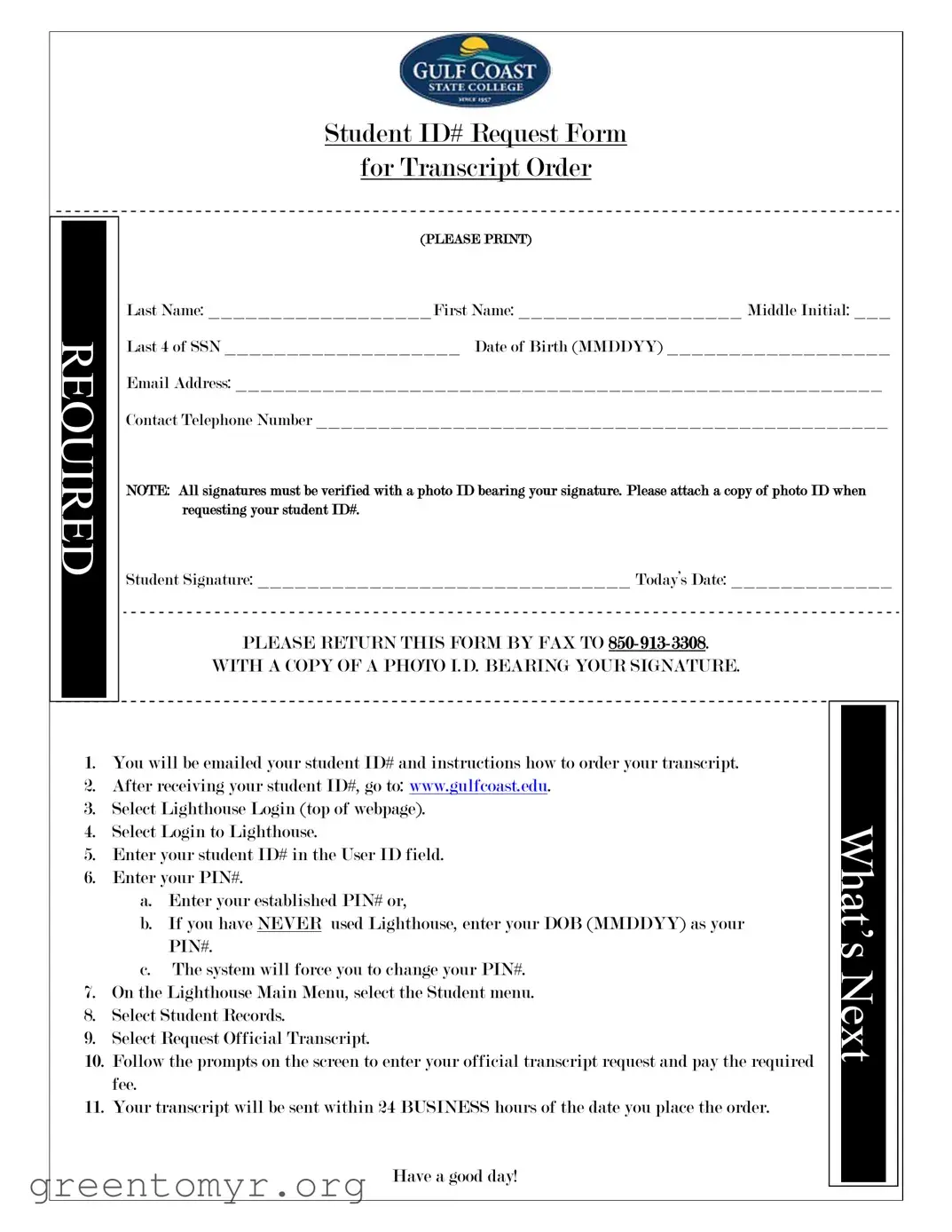
The Mgccc form is a crucial document for students seeking to order their official transcripts. It begins with essential personal information, including your last name, first name, middle initial, last four digits of your Social Security Number, and date of birth. Providing a valid email address and contact telephone number is also necessary for effective communication. To ensure the authenticity of the request, all signatures must be verified with a photo ID that includes your signature; therefore, attaching a copy of this ID is mandatory. After completing the form, you must return it via fax to the designated number, along with the photo ID. Once processed, you will receive your student ID number via email, along with detailed instructions on how to access the online portal for transcript requests. The process is straightforward: log into the Lighthouse system, enter your student ID and PIN, navigate to the Student Records section, and follow the prompts to submit your transcript request. The entire process is designed for efficiency, with transcripts typically sent out within 24 business hours of the order being placed. Understanding these steps is essential for a smooth experience in obtaining your academic records.

Student ID# Request Form
for Transcript Order
REQUIRED
(PLEASE PRINT)
Last Name: __________________First Name: __________________ Middle Initial: ___
Last 4 of SSN ___________________ Date of Birth (MMDDYY) __________________
Email Address: ____________________________________________________
Contact Telephone Number ______________________________________________
NOTE: All signatures must be verified with a photo ID bearing your signature. Please attach a copy of photo ID when requesting your student ID#.
Student Signature: ______________________________ Today’s Date: _____________
PLEASE RETURN THIS FORM BY FAX TO
WITH A COPY OF A PHOTO I.D. BEARING YOUR SIGNATURE.
1.You will be emailed your student ID# and instructions how to order your transcript.
2.After receiving your student ID#, go to: www.gulfcoast.edu.
3.Select Lighthouse Login (top of webpage).
4.Select Login to Lighthouse.
5.Enter your student ID# in the User ID field.
6.Enter your PIN#.
a.Enter your established PIN# or,
b.If you have NEVER used Lighthouse, enter your DOB (MMDDYY) as your PIN#.
c.The system will force you to change your PIN#.
7.On the Lighthouse Main Menu, select the Student menu.
8.Select Student Records.
9.Select Request Official Transcript.
10.Follow the prompts on the screen to enter your official transcript request and pay the required fee.
11.Your transcript will be sent within 24 BUSINESS hours of the date you place the order.
WHAT’S NEXT
Have a good day!
| Fact Name | Description |
|---|---|
| Student ID Requirement | To request a transcript, you must provide your Student ID#. This ID will be emailed to you after submitting the request form. |
| Photo ID Verification | A copy of your photo ID, which bears your signature, must be attached to the request form for verification purposes. |
| Online Access | After receiving your Student ID#, you can log in to the Lighthouse portal at www.gulfcoast.edu to request your official transcript. |
| Transcript Processing Time | Your official transcript will be processed and sent within 24 business hours after placing your order. |
Filling out the Mgccc form is straightforward. Once you complete it, you will receive your student ID number via email, along with instructions on how to order your transcript. Follow the steps below to ensure you fill out the form correctly.
After you submit the form, you will receive your student ID number and further instructions via email. Be sure to check your inbox for these details.
The Mgccc form is a Student ID Request Form used to order transcripts from Gulf Coast State College. It collects essential information such as your name, date of birth, and Social Security number to verify your identity. Completing this form is the first step to obtaining your student ID number, which is necessary for transcript requests.
To fill out the Mgccc form, provide the following information:
Additionally, you must sign the form and include a copy of a photo ID that has your signature for verification purposes.
Once you have completed the Mgccc form, send it by fax to 850-913-3308. Make sure to include a copy of your photo ID that bears your signature, as this is a requirement for processing your request.
After your form is processed, you will receive an email containing your student ID number along with instructions on how to order your transcript. This email is crucial, as you will need the student ID to access the transcript ordering system.
To order your transcript, follow these steps:
Your transcript will be sent within 24 business hours after you place your order. Ensure that you have completed all necessary steps and paid the required fee to avoid any delays.
If you encounter any issues while filling out the Mgccc form or ordering your transcript, you can reach out to the Gulf Coast State College admissions office for assistance. They can provide guidance and help resolve any problems you may face during the process.
Filling out the Mgccc form can seem straightforward, but many people make common mistakes that can delay their transcript requests. One frequent error is leaving out essential personal information. Students often forget to provide their Last Name, First Name, or even their Date of Birth. Omitting any of these details can lead to confusion and may result in the request being processed incorrectly.
Another mistake involves the Last 4 of SSN. Some individuals mistakenly input their entire Social Security Number instead of just the last four digits. This can raise privacy concerns and may cause the processing team to reject the form entirely. It is crucial to ensure that only the last four digits are provided to maintain security while ensuring accurate identification.
Contact information is also a common area where errors occur. Students sometimes forget to include their Email Address or provide an incorrect Contact Telephone Number. Without accurate contact information, it becomes difficult for the institution to reach out with important updates or clarifications regarding the transcript request.
Additionally, many people overlook the requirement to attach a copy of a photo ID. This step is vital for verifying signatures. If a photo ID is not included, the request may be delayed or denied altogether. Always double-check that this document is attached before submitting the form.
Another frequent oversight is not signing the form. The Student Signature is a crucial component of the request. Without it, the form lacks authenticity, and processing cannot proceed. Make sure to sign the form clearly and legibly.
Some students also misinterpret the instructions for submitting the form. The form must be returned by fax to the specified number, 850-913-3308. Failing to follow this instruction can lead to significant delays in processing. It’s essential to double-check that the fax is sent to the correct number.
Lastly, students may not follow the subsequent steps after receiving their student ID#. Many assume that the process ends with the form submission. However, it’s important to proceed to the Gulf Coast website and follow the steps to log in and request the transcript. Skipping this can result in not receiving the transcript in a timely manner.
By being aware of these common mistakes, students can ensure that their transcript requests are processed smoothly and efficiently. Taking the time to double-check each section of the Mgccc form can save a lot of time and hassle in the long run.
When requesting a transcript using the Mgccc form, several other documents may also be needed to facilitate the process. Each of these forms serves a specific purpose and helps ensure that your request is processed smoothly.
Gathering these documents ahead of time can streamline the process and reduce delays. Make sure to check the specific requirements for your situation to ensure all necessary forms are completed accurately.
The Mgccc form is essential for requesting a student ID number and ordering transcripts. Several other documents serve similar purposes in educational and administrative contexts. Here’s a list of ten documents that are comparable to the Mgccc form, along with explanations of their similarities:
Understanding these documents can help streamline administrative processes in educational settings. Each form serves a specific purpose, but they all share the commonality of requiring personal information and verification.
When filling out the Mgccc form, it is important to approach the task with care and attention to detail. Here is a list of things you should and shouldn't do to ensure a smooth process.
By following these guidelines, you can help ensure that your request is processed efficiently and without unnecessary delays. Take your time, and make sure every detail is correct before submitting your form.
This is incorrect. A photo ID is required to verify your identity. You must attach a copy of your ID when submitting the form.
In reality, you will receive your student ID# via email after your request is processed. Be sure to check your email for instructions on how to order your transcript.
This is not true. A fee is required when you submit your official transcript request. Ensure you are prepared to pay this fee during the process.
Actually, transcripts will be sent within 24 business hours of your order. Plan accordingly, especially if you have urgent deadlines.
This is false. The Mgccc form is a required document for requesting your transcript. Completing and submitting it is essential to proceed with your request.
Filling out the Mgccc form for transcript orders is a straightforward process, but attention to detail is essential. Here are some key takeaways to guide you:
By following these steps, you can ensure a smooth process in obtaining your transcript. Best of luck!