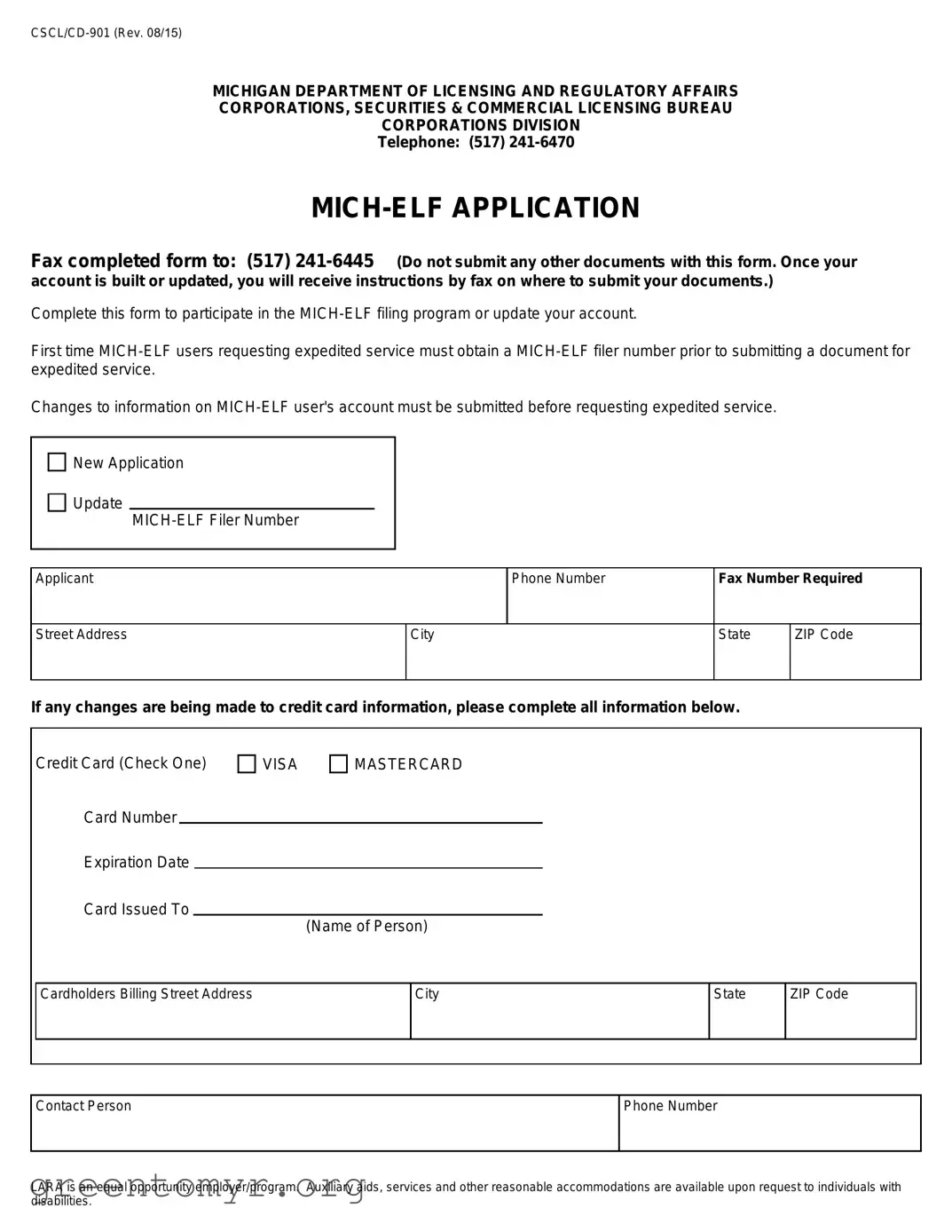
The MICH-ELF Application form is an essential tool for individuals and businesses looking to participate in Michigan's electronic filing program. This form facilitates the creation or updating of a MICH-ELF account, which is crucial for those who wish to file documents electronically with the state. First-time users seeking expedited service must first obtain a MICH-ELF filer number before submitting any documents. It is important to note that any changes to an existing account must be completed prior to requesting expedited service. The application requires basic information such as the applicant's name, phone number, and address, as well as credit card details if there are changes to payment information. The form also emphasizes the need for accurate information to ensure smooth processing. Additionally, the Michigan Department of Licensing and Regulatory Affairs (LARA) is committed to providing equal opportunities and accommodations for individuals with disabilities, ensuring that all applicants can access the services they need. Completing this form accurately is vital for a successful filing experience.
MICHIGAN DEPARTMENT OF LICENSING AND REGULATORY AFFAIRS
CORPORATIONS, SECURITIES & COMMERCIAL LICENSING BUREAU
CORPORATIONS DIVISION
Telephone: (517)
Fax completed form to: (517)
Complete this form to participate in the
First time
Changes to information on
New Application
Update
Applicant
Phone Number
Fax Number Required
Street Address
City
State
ZIP Code
If any changes are being made to credit card information, please complete all information below.
Credit Card (Check One)
Card Number
Expiration Date
Card Issued To
VISA |
MASTERCARD |
(Name of Person)
Cardholders Billing Street Address
City
State
ZIP Code
Contact Person
Phone Number
LARA is an equal opportunity employer/program. Auxiliary aids, services and other reasonable accommodations are available upon request to individuals with disabilities.
| Fact Name | Details |
|---|---|
| Form Title | MICH-ELF Application |
| Governing Body | Michigan Department of Licensing and Regulatory Affairs |
| Form Number | CSCL/CD-901 (Rev. 08/15) |
| Contact Phone | (517) 241-6470 |
| Fax Number | (517) 241-6445 |
| Purpose | To participate in the MICH-ELF filing program or update an account. |
| First-time Users | Must obtain a MICH-ELF filer number for expedited service. |
| Credit Card Information | Required for changes to credit card details. |
| Equal Opportunity Statement | LARA provides auxiliary aids and services for individuals with disabilities. |
Filling out the Mich Elf Application form is a straightforward process that requires attention to detail. Once the form is completed, it should be faxed to the appropriate number provided. After submission, you will receive further instructions regarding your account or any necessary follow-up actions.
The Mich Elf Application form is used to participate in the MICH-ELF filing program. It allows users to file documents electronically with the Michigan Department of Licensing and Regulatory Affairs. This form is essential for both new applicants and those who need to update their existing accounts.
Anyone who wants to participate in the MICH-ELF filing program must complete this form. This includes first-time users and current users who need to update their account information. If you are seeking expedited service, you must obtain a MICH-ELF filer number before submitting documents.
To submit the Mich Elf Application form, fax it to (517) 241-6445. It is important to note that no other documents should be submitted along with this form. After your account is built or updated, you will receive instructions via fax on where to submit your additional documents.
You will need to provide the following information:
Yes, you can use this form to update your account information. If you need to make changes, ensure that you submit those updates before requesting expedited service.
If you are a first-time MICH-ELF user and need expedited service, you must first obtain a MICH-ELF filer number. After you have your filer number, you can proceed with submitting your documents for expedited processing.
The Mich Elf Application form itself does not have a fee. However, if you are using a credit card for any transactions related to the filing, ensure that you provide accurate billing information to avoid issues.
If you experience any difficulties while completing the form, you can contact the Corporations Division at (517) 241-6470 for assistance. They can help clarify any questions or concerns you may have.
After you submit the Mich Elf Application form, you will receive instructions via fax on how to submit any additional documents. Your account will be built or updated based on the information you provided.
Yes, the Michigan Department of Licensing and Regulatory Affairs offers auxiliary aids, services, and other reasonable accommodations upon request to individuals with disabilities. If you need assistance, do not hesitate to ask for help.
Filling out the Mich Elf Application form can be straightforward, but many applicants make common mistakes that can delay their processing. One frequent error is failing to provide complete contact information. Applicants often forget to include their phone number or fax number, which are essential for communication. Without these details, the processing bureau may struggle to reach out for any necessary clarifications.
Another mistake is neglecting to specify the purpose of the application. Whether it’s a new application or an update, this section is crucial. Applicants sometimes skip this part or misinterpret the options. This can lead to confusion and could result in the application being rejected or delayed. Always double-check that you’ve indicated your intent clearly.
Additionally, many people overlook the importance of accuracy when entering their credit card information. Errors in the card number or expiration date can cause significant issues. Even a single digit wrong can lead to a failed transaction, which might hinder the processing of your application. It’s wise to double-check this information before submitting the form.
Moreover, applicants often forget to complete the billing address for the credit card. This detail is not just a formality; it’s a requirement for processing payments. Omitting this information can lead to complications and may require resubmission of the application, adding unnecessary delays.
Lastly, some individuals do not follow the submission guidelines properly. The instructions clearly state to fax the completed form without any additional documents. However, applicants sometimes include extra paperwork, thinking it might help their case. This can lead to confusion and may result in the application being set aside. Adhering strictly to the submission guidelines is crucial for a smooth application process.
The MICH-ELF Application form is an essential document for those looking to participate in the Michigan Electronic Filing (MICH-ELF) program. Alongside this form, several other documents may be necessary for a complete application or update process. Below is a list of these forms, each serving a specific purpose in the application process.
Having these documents prepared and understanding their purposes can streamline the application process. It is crucial to ensure that all necessary forms are submitted accurately to avoid delays in processing your MICH-ELF application.
The Mich Elf Application form shares similarities with several other documents often used in business and regulatory contexts. Below is a list detailing five such documents and how they relate to the Mich Elf Application form.
When filling out the Mich Elf Application form, attention to detail is crucial. Here are seven important things to keep in mind:
By following these guidelines, you can help ensure a smooth application process. Prompt attention to these details can save you time and potential complications.
Misconceptions about the Mich Elf Application form can lead to confusion and delays in processing. Here are nine common misunderstandings:
This is incorrect. Existing users can also use this form to update their account information.
In fact, the instructions specify that no other documents should be submitted with the Mich Elf Application form.
This is a misconception. First-time users must obtain a MICH-ELF filer number before they can request expedited service.
Changes must be submitted prior to requesting expedited service; otherwise, the request may be denied.
This is not true. The form must be faxed to the designated number provided in the instructions.
Many fields are required, such as the applicant's phone number and address, which must be completed for the application to be processed.
If changes are being made to credit card information, the applicant must complete the relevant sections of the form.
This is false. The instructions indicate that auxiliary aids and services are available upon request.
While the application is submitted, users can still update their information as needed, following the proper procedures.
Understanding these points can help ensure a smoother application process for all users of the Mich Elf Application form.
Here are some key takeaways about filling out and using the Mich Elf Application form: