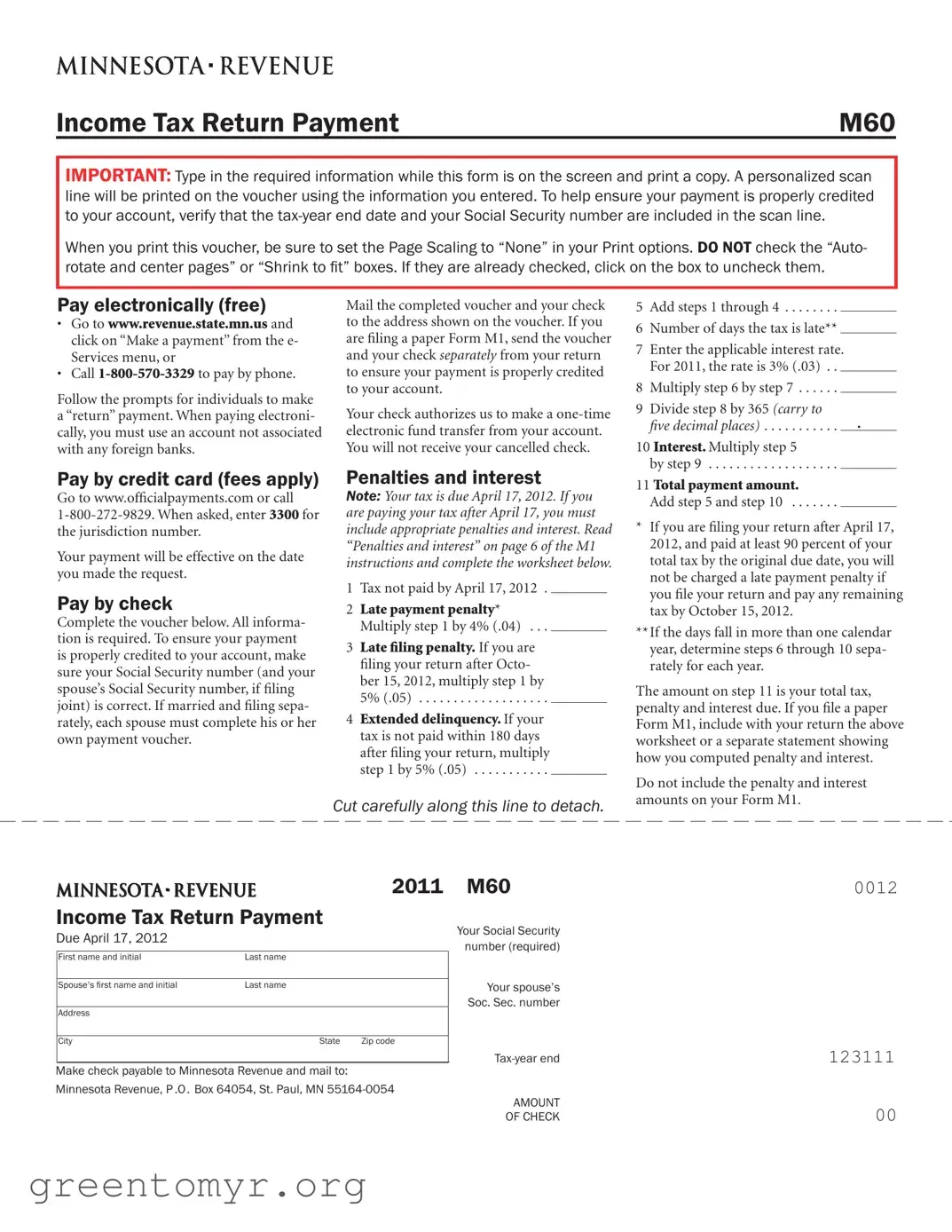
The Minnesota Tax Return Payment form, also known as M60, is an essential document for taxpayers looking to submit their income tax payments. This form allows individuals to ensure their payments are accurately credited to their accounts. When filling out the form, it’s crucial to enter the required information directly on the screen before printing a copy. This process generates a personalized scan line that includes important details like your Social Security number and the tax-year end date. To avoid any issues, check your print settings to ensure the page scaling is set to "None" and avoid options like "Auto-rotate and center pages." Taxpayers have multiple payment options: they can pay electronically for free through the Minnesota Department of Revenue website or by phone, use a credit card (with applicable fees), or send a check along with the completed voucher. If paying by check, it’s vital to include the correct Social Security numbers, especially for joint filers. Additionally, understanding penalties and interest for late payments is crucial, as these can significantly increase the amount owed. By carefully following the instructions and ensuring all information is accurate, taxpayers can navigate the payment process smoothly.
Income Tax Return Payment |
M60 |
IMPORTANT: Type in the required information while this form is on the screen and print a copy. A personalized scan line will be printed on the voucher using the information you entered. To help ensure your payment is properly credited to your account, verify that the
When you print this voucher, be sure to set the Page Scaling to “None” in your Print options. DO NOT check the “Auto- rotate and center pages” or “Shrink to it” boxes. If they are already checked, click on the box to uncheck them.
Pay electronically (free)
• Gotowww.revenue.state.mn.us and click on “Make a payment” from the e- Services menu, or
•
Follow the prompts for individuals to make a “return” payment. When paying electroni- cally, you must use an account not associated with any foreign banks.
Pay by credit card (fees apply)
Gotowww.oficialpayments.comorcall
Your payment will be effective on the date you made the request.
Pay by check
Completethevoucherbelow.Allinforma- tion is required. To ensure your payment is properly credited to your account, make sure your Social Security number (and your spouse’s Social Security number, if filing joint) is correct. If married and filing sepa- rately, each spouse must complete his or her own payment voucher.
Mail the completed voucher and your check to the address shown on the voucher. If you are filing a paper Form M1, send the voucher and your check separately from your return to ensure your payment is properly credited to your account.
Your check authorizes us to make a
Penalties and interest
NOTE: Your tax is due April 17, 2012. If you are paying your tax after April 17, you must include appropriate penalties and interest. Read “Penalties and interest” on page 6 of the M1 instructions and complete the worksheet below.
1 Tax not paid by April 17, 2012 .
2Late payment penalty* Multiply step 1 by 4% (.04) . . .
3Late filing penalty. If you are filing your return after Octo- ber 15, 2012, multiply step 1 by 5% (.05) . . . . . . . . . . . . . . . . . . .
4Extended delinquency. If your tax is not paid within 180 days after filing your return, multiply step 1 by 5% (.05) . . . . . . . . . . .
5Add steps 1 through 4 . . . . . . . .
6 Number of days the tax is late**
7Enter the applicable interest rate. For 2011, the rate is 3% (.03) . .
8 Multiply step 6 by step 7 . . . . . .
9Divide step 8 by 365 (carry to
five decimal places) . . . . . . . . . . . .
10 Interest. Multiply step 5
by step 9 . . . . . . . . . . . . . . . . . . .
11 Total payment amount.
Add step 5 and step 10 . . . . . . .
*If you are filing your return after April 17, 2012, and paid at least 90 percent of your total tax by the original due date, you will not be charged a late payment penalty if you file your return and pay any remaining tax by October 15, 2012.
**If the days fall in more than one calendar year, determine steps 6 through 10 sepa- rately for each year.
The amount on step 11 is your total tax, penalty and interest due. If you file a paper Form M1, include with your return the above worksheet or a separate statement showing how you computed penalty and interest.
Cut carefully along this line to detach.
Do not include the penalty and interest amounts on your Form M1.
2011 Income Tax Return Payment
Due April 17, 2012
First name and initial |
Last name |
|
|
|
|
Spouse’s irst name and initial |
Last name |
|
|
|
|
Address |
|
|
|
|
|
City |
State |
Zip code |
|
|
|
Make check payable to Minnesota Revenue and mail to:
Minnesota Revenue, P.O. Box 64054, St. Paul, MN
M60 |
0012 |
Your Social Security |
|
number (required) |
|
Your spouse’s |
|
Soc. Sec. number |
|
123111 |
|
AMOUNT |
|
OF CHECK |
00 |
| Fact Name | Details |
|---|---|
| Form Purpose | The Mn Tax Return Payment form (M60) is used to submit income tax payments to the state of Minnesota. |
| Filing Deadline | Payments are due by April 17, 2012, for the tax year specified. |
| Electronic Payments | Taxpayers can pay electronically for free via the Minnesota Department of Revenue website or by calling 1-800-570-3329. |
| Check Payments | When paying by check, the voucher must be completed accurately, and the check should be mailed to the designated address. |
| Joint Filers | If filing jointly, both spouses must ensure their Social Security numbers are included and correct on the form. |
| Penalties and Interest | Payments made after the due date incur penalties and interest as outlined in the instructions. |
| Payment Processing | Payments made by check authorize a one-time electronic fund transfer from the taxpayer's account. |
| Governing Law | This form is governed by Minnesota Statutes, Chapter 290, which pertains to income tax regulations. |
To complete the Minnesota Tax Return Payment form, follow these steps carefully. Ensure that all required information is accurate to avoid delays in processing your payment.
After submitting your payment, you can expect it to be processed according to the payment method you selected. If you chose to pay by check, it is essential to keep a record of your payment for your records.
The Mn Tax Return Payment form is used to submit your income tax payment to the Minnesota Department of Revenue. This form ensures that your payment is properly credited to your account, especially when you provide your Social Security number and the tax-year end date.
To complete the form, enter the required information while it is displayed on your screen. After filling it out, print a copy. Make sure to set your print options to “None” for Page Scaling and uncheck any options that may center or shrink the pages. This will ensure that the personalized scan line is correctly printed on the voucher.
You have several options for making your payment:
When paying by check, ensure that all required information is filled out on the voucher. This includes your Social Security number, and if filing jointly, your spouse’s Social Security number. Mail the completed voucher and check to the address provided on the form. If you are also filing a paper Form M1, send the voucher and check separately from your return.
If your tax payment is not made by the deadline, which is April 17, 2012, you will incur penalties and interest. It is important to calculate these amounts using the worksheet provided in the instructions. This worksheet will guide you through determining the late payment penalty, late filing penalty, and applicable interest.
To avoid penalties, ensure that you pay at least 90 percent of your total tax by the original due date. If you file your return and pay any remaining tax by October 15, 2012, you will not be charged a late payment penalty. Always check the specific instructions for any updates regarding penalties and interest.
If you have additional questions regarding the Mn Tax Return Payment form or the payment process, consider visiting the Minnesota Department of Revenue website or contacting their customer service for assistance. They can provide the most accurate and up-to-date information.
When filling out the Minnesota Tax Return Payment form, several common mistakes can occur that may lead to issues with payment processing. One frequent error is not verifying the Social Security number. It is essential to ensure that both the taxpayer's and spouse's Social Security numbers are correct, especially when filing jointly. An incorrect number can delay the crediting of the payment to the taxpayer's account.
Another mistake involves the tax-year end date. Failing to include the correct tax-year end date in the scan line can result in confusion regarding which tax year the payment applies to. This information is crucial for the proper allocation of the payment and should be double-checked before submission.
Many individuals also overlook the printing instructions. The form specifically advises users to set the Page Scaling to “None” and to avoid checking the “Auto-rotate and center pages” or “Shrink to fit” options. Ignoring these instructions may cause the scan line to be misaligned, which can affect the processing of the payment.
Some taxpayers choose to pay by check but forget to complete the voucher fully. All information is required on the voucher, and incomplete forms can lead to delays or rejection of the payment. It is advisable to review the voucher for completeness before mailing.
Additionally, individuals often fail to include penalties and interest when paying after the due date. The form outlines specific calculations for late payment penalties and interest that need to be considered. Neglecting to account for these amounts can lead to an underpayment situation, which may result in further penalties.
Finally, mailing the payment and the tax return together is another common oversight. If filing a paper Form M1, it is recommended to send the voucher and check separately from the return. This separation helps ensure that the payment is properly credited to the account and minimizes the risk of processing errors.
The Minnesota Tax Return Payment form is an essential document for individuals looking to settle their state tax obligations. Alongside this form, several other documents and forms may be necessary to ensure compliance with tax regulations. Below is a list of commonly used forms that complement the Minnesota Tax Return Payment form.
Understanding these forms and their purposes can help individuals navigate the tax filing process more effectively. It is advisable to keep all related documents organized to ensure a smooth experience when fulfilling tax obligations.
The Minnesota Tax Return Payment form shares similarities with several other important documents related to tax payments and filings. Each of these documents serves a specific purpose in ensuring that taxpayers fulfill their obligations accurately and on time. Here are six documents that are comparable to the Mn Tax Return Payment form:
Understanding these documents can help ensure that all tax-related obligations are met efficiently and accurately.
When filling out the Minnesota Tax Return Payment form, there are important guidelines to follow to ensure your payment is processed correctly. Here’s a list of things you should and shouldn’t do:
Following these guidelines will help ensure that your payment is credited to your account without issues. Be careful and thorough as you complete the form, and if you have any questions, consider reaching out to a tax professional for assistance.
Misconception 1: You can submit the Mn Tax Return Payment form electronically without any restrictions.
While electronic payments are encouraged, they must be made from a bank account not associated with any foreign banks. This ensures that your payment is processed smoothly.
Misconception 2: The payment voucher can be printed without any specific settings.
It is crucial to set the Page Scaling to “None” when printing the voucher. If you do not adjust this setting, the scan line may not print correctly, which could lead to issues with crediting your payment.
Misconception 3: You can combine your payment voucher with your tax return when mailing.
To ensure proper crediting, it is advised to send the payment voucher and your tax return separately. This helps avoid confusion and ensures that your payment is processed accurately.
Misconception 4: You will receive your canceled check after making a payment.
When you pay by check, you will not receive a canceled check. Your check authorizes a one-time electronic fund transfer, so it is important to keep your own records of the payment.
Misconception 5: Late penalties and interest do not need to be calculated if you file on time.
If you pay your tax after the due date, you must include penalties and interest. Even if you file your return on time, failing to pay the full amount by the deadline can result in additional charges.
Here are key takeaways for filling out and using the Minnesota Tax Return Payment form: