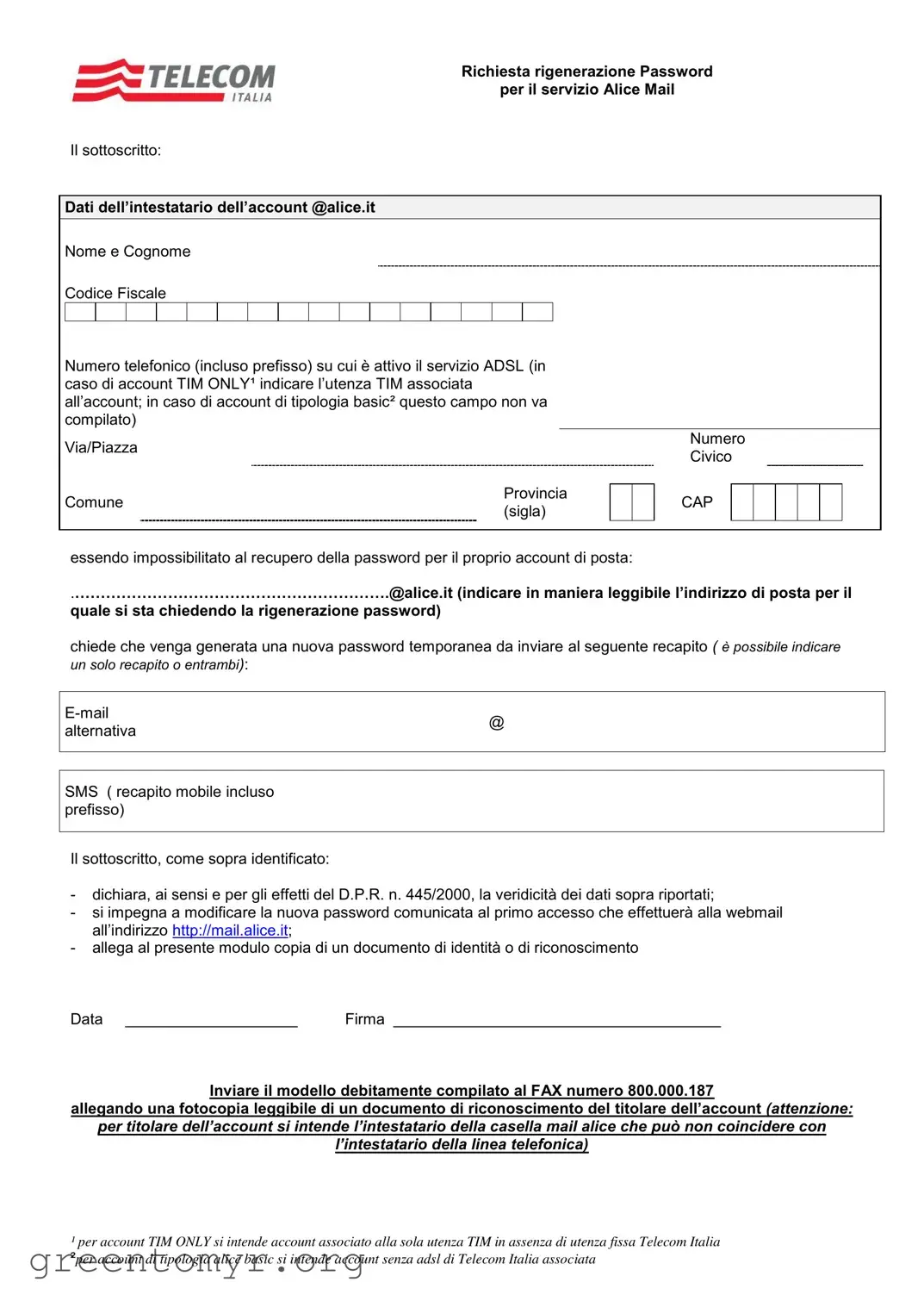
The Moduli Telecom Reset Password form serves as a crucial tool for users of the Alice Mail service who find themselves unable to recover their password. This form requires users to provide essential information, including their full name, tax code, and a contact phone number associated with their ADSL service. For those with a TIM ONLY account, it's necessary to specify the TIM number linked to the account, while users with a basic account do not need to fill this section. Additionally, the form asks for the user's email address, which must be clearly stated, as this is the account for which a new password is being requested. Users can choose to receive the new temporary password via email or SMS, but only one method can be selected. Furthermore, the form includes a declaration of the truthfulness of the provided data, as mandated by Italian law, and requires users to commit to changing their password upon first access to the webmail interface. To complete the process, individuals must attach a copy of an identification document and send the completed form via fax, ensuring that the identity of the account holder is verified. This structured approach not only safeguards user information but also streamlines the password recovery process for Alice Mail users.
Richiesta rigenerazione Password
per il servizio Alice Mail
Il sottoscritto:
Dati dell’intestatario dell’account @alice.it
Nome e Cognome
Codice Fiscale
Numero telefonico (incluso prefisso) su cui è attivo il servizio ADSL (in caso di account TIM ONLY¹ indicare l’utenza TIM associata all’account; in caso di account di tipologia basic² questo campo non va
compilato)
Via/Piazza
Numero Civico
Comune
Provincia (sigla)
CAP
essendo impossibilitato al recupero della password per il proprio account di posta:
.……………………………………………………[email protected] (indicare in maniera leggibile l’indirizzo di posta per il
quale si sta chiedendo la rigenerazione password)
chiede che venga generata una nuova password temporanea da inviare al seguente recapito ( è possibile indicare un solo recapito o entrambi):
SMS ( recapito mobile incluso prefisso)
Il sottoscritto, come sopra identificato:
-dichiara, ai sensi e per gli effetti del D.P.R. n. 445/2000, la veridicità dei dati sopra riportati;
-si impegna a modificare la nuova password comunicata al primo accesso che effettuerà alla webmail all’indirizzo http://mail.alice.it;
-allega al presente modulo copia di un documento di identità o di riconoscimento
Data ____________________ |
Firma ______________________________________ |
Inviare il modello debitamente compilato al FAX numero 800.000.187
allegando una fotocopia leggibile di un documento di riconoscimento del titolare dell’account (attenzione:
per titolare dell’account si intende l’intestatario della casella mail alice che può non coincidere con
l’intestatario della linea telefonica)
¹per account TIM ONLY si intende account associato alla sola utenza TIM in assenza di utenza fissa Telecom Italia ²per account di tipologia alice basic si intende account senza adsl di Telecom Italia associata
| Fact Name | Details |
|---|---|
| Purpose of Form | This form is used to request a temporary password reset for the Alice Mail service. |
| Required Information | The applicant must provide personal details, including their name, tax code, phone number, and the email address for which the password reset is requested. |
| Submission Method | The completed form must be sent via fax to the number 800.000.187, along with a readable copy of an identification document. |
| Governing Law | This form is governed by Italian law, specifically the provisions of D.P.R. n. 445/2000 concerning the authenticity of the provided data. |
After completing the Moduli Telecom Reset Password form, the next step involves submitting it to the designated fax number along with a copy of a valid identification document. Ensure all information is accurate and legible to facilitate a smooth password reset process.
The Moduli Telecom Reset Password form is a document used by users of Alice Mail to request a new temporary password for their email accounts. This form is essential for individuals who are unable to recover their passwords through standard methods.
Anyone who has an Alice Mail account and cannot access it due to a forgotten password should fill out this form. It is specifically designed for the account holder, who must provide personal information to verify their identity.
To complete the form, you must provide:
Once you have filled out the form, you must send it via fax to the number 800.000.187. Additionally, you need to attach a readable photocopy of an identification document to confirm your identity.
If you have a TIM ONLY account, you must indicate the associated TIM phone number on the form. This is crucial as it helps verify your identity and link the request to the correct account.
Upon receiving the new temporary password, you should log in to your Alice Mail account at mail.alice.it . It is important to change this temporary password to something secure during your first access to ensure your account remains protected.
While the form does not specify a strict deadline, it is advisable to submit your request as soon as you realize you cannot access your account. Prompt action can help minimize any disruptions to your email service.
If you face any difficulties while completing the form, consider reaching out to customer support for assistance. They can provide guidance and ensure that you submit the necessary information correctly.
The form must be submitted by the account holder themselves. This is to ensure that the request is legitimate and that sensitive information is protected. If you are unable to submit it personally, you may need to seek assistance directly from customer support.
Filling out the Moduli Telecom Reset Password form can be straightforward, but many people make common mistakes that can delay the process. One frequent error is failing to provide the correct account holder's name. It’s essential to ensure that the name matches exactly with what is on file. A mismatch can lead to confusion and result in the request being denied.
Another mistake is not including the Codice Fiscale, or tax code. This is a crucial piece of information that helps verify the identity of the account holder. Omitting it can lead to delays or rejection of the request. Make sure this information is accurately filled out to avoid unnecessary complications.
Many individuals also overlook the phone number field. When applicable, this number should include the prefix. For accounts associated with TIM, it’s vital to provide the correct number linked to the ADSL service. Failing to do so can result in the inability to receive the temporary password.
People often forget to specify the email address for receiving the new password. It’s important to write this clearly, as it is the primary method of communication for password resets. Double-checking the spelling can save time and frustration.
Another common issue arises when individuals neglect to include their document of identity. This document must be attached to the form to validate the request. Not including it can halt the entire process, as the request cannot be processed without proper identification.
Some users also fail to sign the form, which is a critical step. The signature confirms that the information provided is accurate and that the individual is authorized to request the password reset. Skipping this step can lead to automatic rejection of the application.
Lastly, many applicants do not send the form to the correct fax number. Double-checking the number before sending can prevent unnecessary delays. Ensure that all required information is included and that the form is sent to the right place to facilitate a smooth password reset process.
The Moduli Telecom Reset Password form is essential for users needing to regain access to their Alice Mail accounts. However, several other documents and forms often accompany this request to ensure a smooth and efficient process. Below is a list of these additional forms and documents, each serving a specific purpose in the password reset procedure.
Each of these documents plays a crucial role in the password reset process. Ensuring that all required forms are completed and submitted correctly can significantly expedite the recovery of access to the Alice Mail account. Timely action is essential to prevent any disruption in communication.
When filling out the Moduli Telecom Reset Password form, it’s important to follow certain guidelines to ensure your request is processed smoothly. Here’s a list of things you should and shouldn’t do:
By following these guidelines, you can help ensure that your request for a password reset is handled efficiently.
Understanding the Moduli Telecom Reset Password form can be challenging due to common misconceptions. Here are six prevalent misunderstandings:
In reality, a copy of a valid identification document is mandatory for processing the request. This ensures that the requestor is indeed the account holder.
This is incorrect. The form is specifically for the account associated with the @alice.it domain. Requests for other domains will not be processed.
The new password will only be sent to the email or mobile number specified in the form. Users should ensure they provide accurate contact information.
This is a misunderstanding. Users are required to change the temporary password immediately after their first login to enhance security.
This is not true. The account holder of the email may differ from the subscriber of the telephone line. The form accommodates such situations.
This is incorrect. The completed form must be sent via fax, along with the necessary identification document, to the specified fax number.
When using the Moduli Telecom Reset Password form, consider the following key takeaways: