Content Navigation

The Money Instructor Check Register form serves as an essential tool for individuals managing their finances. It provides a structured format for recording all transactions that impact a bank account, including both charges and credits. Users can document check payments, debit fees, deposits, and any other credits that may affect their balance. Each entry requires the date of the transaction, a brief description, and the corresponding amount, whether it is a deduction or an addition to the account. This organized approach helps individuals keep track of their spending and savings, ensuring they maintain an accurate overview of their financial situation. By regularly updating the check register, users can avoid overdrafts and better plan their budgets, ultimately leading to improved financial health.
Money Instructor Check Register Example

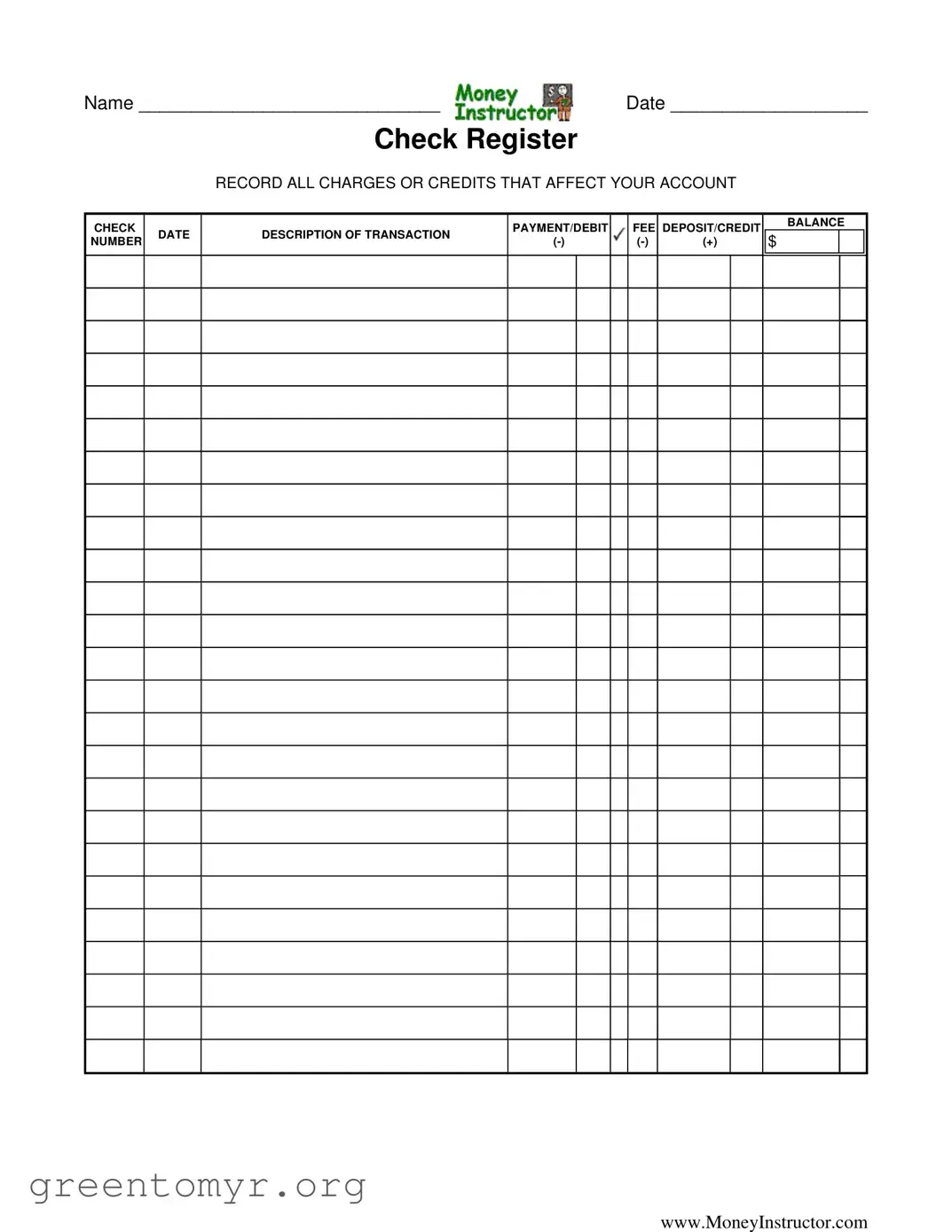
NAME _____________________________

DATE ___________________

Check Register

RECORD ALL CHARGES OR CREDITS THAT AFFECT YOUR ACCOUNT

CHECK


PAYMENT/DEBIT


FEE DEPOSIT/CREDIT

BALANCE

DATE

DESCRIPTION OF TRANSACTION


$


NUMBER

(-)


(-)

(+)


www.MoneyInstructor.com

File Breakdown

Fact Name Description
Name Field The form includes a space for the user to enter their name, ensuring personalized record-keeping.
Date Field A date field allows users to document when each transaction occurs, which is crucial for tracking financial activity over time.
Transaction Recording Users are prompted to record all charges or credits that affect their account, promoting comprehensive financial management.
Check Payment/Debit Fee A section for recording check payments or debit fees ensures users can track expenses accurately.
Deposit/Credit Section This section allows users to log deposits or credits, helping them maintain an accurate balance.
Balance Calculation The form includes a space for users to calculate their balance after each transaction, aiding in financial oversight.
Website Reference The form provides a link to www.MoneyInstructor.com, offering users additional resources for financial education.
State-Specific Forms While this form is general, users should consult state-specific laws governing check registers and financial documentation.

Guide to Using Money Instructor Check Register

Filling out the Money Instructor Check Register form is an important step in managing your finances. By accurately recording your transactions, you can keep track of your spending and ensure your account balance is correct. Follow these steps to complete the form effectively.

  1. Write your name: In the space provided, fill in your full name.
  2. Enter the date: Next to your name, write the date you are filling out the form.
  3. Record transactions: For each transaction, fill out the following information:
    • Date: Write the date of the transaction.
    • Description of transaction: Provide a brief description of what the transaction was for.
    • Check number: If applicable, write the check number or debit fee.
    • Amount: Enter the amount of the transaction. Use a minus sign (-) for payments or fees and a plus sign (+) for deposits or credits.
    • Balance: After each transaction, calculate your new balance and write it in the balance column.
  4. Review your entries: Double-check all the information for accuracy before moving on.

Get Answers on Money Instructor Check Register

What is the purpose of the Money Instructor Check Register form?

The Money Instructor Check Register form is designed to help you keep track of all transactions that affect your bank account. By recording every charge and credit, you can maintain an accurate balance and monitor your spending habits. This practice not only helps you avoid overdraft fees but also empowers you to make informed financial decisions.

How do I fill out the Check Register form?

Filling out the Check Register form is straightforward. Follow these steps:

  1. Start by entering your name and the date at the top of the form.
  2. For each transaction, record the date it occurred.
  3. In the description column, write a brief note about the transaction (e.g., grocery shopping, rent payment).
  4. Enter the amount in the appropriate column: use a negative sign (-) for expenses and a positive sign (+) for deposits.
  5. After each entry, calculate your new balance and write it down.

By consistently updating this register, you can keep a close eye on your finances.

What types of transactions should I record?

You should record any transaction that affects your account balance. This includes:

  • Check payments
  • Debit card purchases
  • Fees charged by your bank
  • Deposits, such as paychecks or cash deposits
  • Any other credits that add to your balance

Keeping a comprehensive record of these transactions will help you maintain financial clarity.

Why is it important to maintain a Check Register?

Maintaining a Check Register is crucial for several reasons. First, it helps you avoid overdrafts by keeping your balance accurate. Second, it allows you to track your spending patterns, making it easier to budget effectively. Lastly, having a clear record can be beneficial for resolving disputes with your bank or understanding discrepancies in your account.

Can I use the Check Register form for online banking?

Absolutely! The Check Register form can be used alongside online banking. While many online banking platforms provide transaction histories, manually recording your transactions can offer a clearer view of your financial situation. It also allows you to track pending transactions that may not yet appear in your online account. This dual approach can enhance your financial management.

Common mistakes

Filling out the Money Instructor Check Register form can be straightforward, but many people make common mistakes that can lead to confusion and errors in their financial records. One frequent error is forgetting to include the date of each transaction. Without the date, it becomes challenging to track when charges or credits occurred, which can complicate budgeting and reconciliation efforts.

Another common mistake is not accurately recording the description of the transaction. A vague description can make it difficult to remember what a specific charge or credit was for. Providing clear and concise descriptions helps maintain a better understanding of spending habits and financial activities over time.

Many individuals also overlook the importance of properly calculating the balance after each transaction. After entering a charge or credit, it’s crucial to update the balance accurately. Failing to do so can result in an inaccurate picture of one’s financial status, leading to potential overdrafts or missed payments.

Some people mistakenly enter the amounts in the wrong columns. Charges or debits should be recorded as negative amounts, while deposits or credits should be positive. Mixing these up can distort the balance and create confusion when reviewing the account.

Additionally, neglecting to regularly update the check register can be a significant oversight. It’s essential to record transactions promptly to ensure that the register reflects the most current account status. Delays in recording can lead to discrepancies between the check register and the actual bank statement.

Lastly, many users fail to review their entries for accuracy before finalizing the form. Taking a moment to double-check for any errors can save time and prevent future issues. A careful review can help catch mistakes that might otherwise lead to financial mismanagement.

Documents used along the form

The Money Instructor Check Register form is a valuable tool for tracking your financial transactions. To help manage your finances more effectively, consider using these additional forms and documents that complement the check register. Each of these documents serves a unique purpose in maintaining an organized financial record.

  • Bank Statement: A monthly summary provided by your bank that details all transactions, including deposits, withdrawals, and fees. It helps verify the accuracy of your check register.
  • Budget Worksheet: A document that outlines your income and expenses. This helps you plan your spending and savings, ensuring you stay within your financial limits.
  • Expense Report: A form used to track and categorize your expenses over a specific period. It can be useful for personal budgeting or for business purposes.
  • Deposit Slip: A form used to deposit cash or checks into your bank account. It provides a record of the funds added to your account.
  • Withdrawal Slip: A form used to withdraw cash from your bank account. It documents the amount taken out and can be useful for tracking cash flow.
  • Transaction Log: A detailed record of all financial transactions, including dates, amounts, and descriptions. It can help you keep track of your spending habits.
  • Credit Card Statement: A monthly summary from your credit card issuer detailing your purchases, payments, and any interest charges. This helps you manage credit card debt effectively.
  • Financial Goals Worksheet: A document that outlines your short-term and long-term financial goals. It can help you stay focused on achieving your financial objectives.

Using these forms and documents alongside the Money Instructor Check Register can enhance your financial management skills. Staying organized and informed about your finances is essential for making sound financial decisions.

Similar forms

The Money Instructor Check Register form serves as a valuable tool for tracking financial transactions. Several other documents share similarities with this form in their purpose and structure. Below is a list of eight such documents, highlighting how each relates to the Check Register:

  • Bank Statement: Like the Check Register, a bank statement provides a detailed record of all transactions, including deposits and withdrawals, for a specific period. Both documents help individuals monitor their account balances and spending habits.
  • Expense Report: An expense report outlines the costs incurred during a specific time frame. Similar to the Check Register, it tracks both debits and credits, allowing users to manage their finances effectively.
  • Budget Worksheet: A budget worksheet helps individuals plan their income and expenses. It shares the Check Register's goal of maintaining financial awareness, as both require users to record and categorize transactions.
  • Transaction Log: A transaction log is used to keep a running tally of all financial activities. It mirrors the Check Register in that it records both incoming and outgoing funds, facilitating better financial tracking.
  • Invoice: An invoice details goods or services provided and the amount owed. Like the Check Register, it serves as a record of financial transactions, ensuring that both parties are aware of payments due or received.
  • Receipt Tracker: A receipt tracker compiles all receipts from purchases. This document is similar to the Check Register as it helps users keep track of their spending and maintain an accurate account of their finances.
  • Financial Ledger: A financial ledger records all financial transactions within a business or personal account. It shares the Check Register's function of providing a comprehensive overview of account activity.
  • Credit Card Statement: A credit card statement lists all transactions made on a credit card account, including payments and charges. Like the Check Register, it helps users monitor their spending and manage their overall financial health.

Dos and Don'ts

When filling out the Money Instructor Check Register form, it is important to follow certain guidelines to ensure accuracy and clarity. Here are five things you should and shouldn't do:

  • Do write your name and the date clearly at the top of the form.
  • Don't leave any fields blank; every section should be completed.
  • Do record all transactions, including charges and credits, as they occur.
  • Don't use abbreviations or shorthand that may confuse the entries.
  • Do double-check your math when calculating the balance after each transaction.

Misconceptions

Understanding the Money Instructor Check Register form is crucial for effective personal finance management. However, several misconceptions can lead to confusion. Here are eight common misconceptions and clarifications about the form:

  1. It’s only for checks. Many people believe that a check register is solely for tracking checks. In reality, it’s designed to record all transactions that affect your account, including debit card purchases and deposits.
  2. You only need to update it once a month. Some think that updating the register once a month is sufficient. Regular updates after each transaction can help you maintain an accurate balance and avoid overdrafts.
  3. It’s only for bank accounts. The misconception exists that this form is only applicable to checking accounts. In fact, it can be used for any account where you need to track transactions, including savings accounts.
  4. It’s too complicated to use. Many people shy away from using a check register, believing it’s too complex. The form is straightforward, with clear sections for recording transactions, making it easy to manage.
  5. You can skip the balance section. Some users may think they can ignore the balance calculation. Keeping track of your balance is essential to avoid overspending and ensure financial health.
  6. Only large transactions need to be recorded. There’s a belief that only significant transactions matter. However, recording all charges and credits, regardless of size, provides a complete picture of your finances.
  7. It’s outdated in the digital age. Some individuals feel that check registers are obsolete due to online banking. While digital tools are helpful, a physical register can enhance your understanding of your spending habits.
  8. You don’t need to keep it once the month is over. Many think they can discard the register after the month ends. Keeping past records can be beneficial for budgeting and tracking long-term financial trends.

By addressing these misconceptions, you can better utilize the Money Instructor Check Register form to manage your finances effectively.

Key takeaways

Using the Money Instructor Check Register form can help you manage your finances effectively. Here are some key takeaways to keep in mind:

  1. Record Transactions Promptly: Fill out the form as soon as you make a transaction to avoid forgetting details.
  2. Include All Types of Transactions: Don’t just record checks; include debit fees and any deposits or credits.
  3. Maintain Accuracy: Double-check amounts and descriptions to ensure your records are precise.
  4. Track Your Balance: Regularly update your balance after each transaction to know your available funds.
  5. Use Clear Descriptions: Write clear descriptions for each transaction to easily recall details later.
  6. Stay Organized: Keep your check register in a safe place for easy access and reference.
  7. Review Regularly: Set aside time weekly or monthly to review your check register and reconcile it with bank statements.
  8. Identify Spending Patterns: Analyze your transactions to understand where your money goes each month.
  9. Prevent Overdrafts: By keeping an accurate balance, you can avoid overdraft fees and maintain financial health.
  10. Be Consistent: Use the check register consistently for all transactions to develop a good financial habit.

By following these tips, you can make the most of your Money Instructor Check Register form and take control of your financial journey.