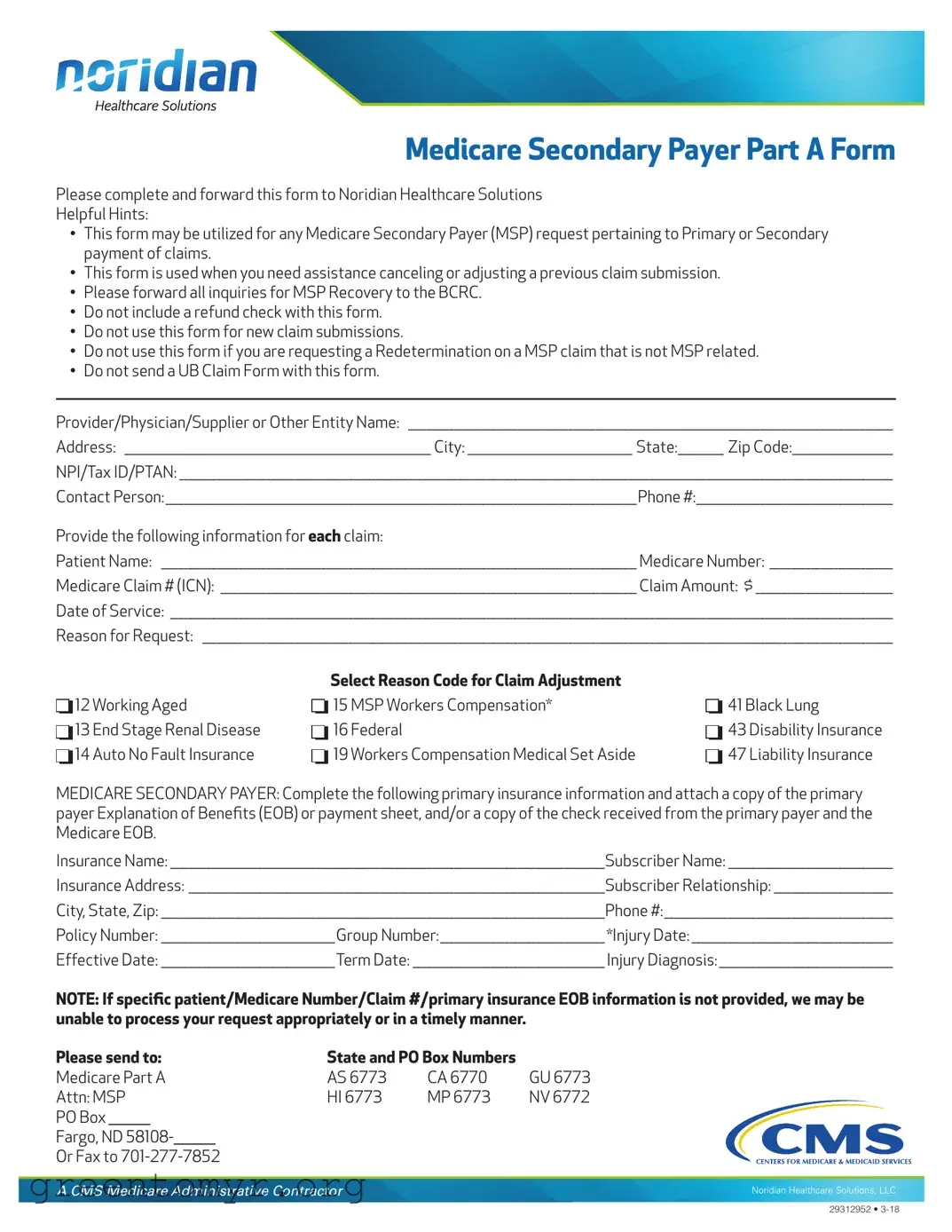
The Medicare Secondary Payer (MSP) form is a crucial tool for healthcare providers and patients navigating the complexities of Medicare billing. This form assists in addressing requests related to the primary or secondary payment of claims. Whether you need to cancel or adjust a previously submitted claim, the MSP form serves as a formal request for assistance. It is important to note that this form is not intended for new claim submissions or for redeterminations on claims that are not related to MSP issues. To ensure efficient processing, specific information must be provided, including patient details, Medicare numbers, and primary insurance information, along with any necessary documentation such as Explanation of Benefits (EOB) from the primary payer. By following the guidelines outlined in the form, individuals can help facilitate a smoother resolution to their billing inquiries. Remember, all inquiries regarding MSP recovery should be directed to the Benefits Coordination & Recovery Center (BCRC), and a refund check should never be included with this form.
nor;d1an
HealthcareSolutions
Medicare Secondary Payer Part A Form
Please complete and forward this form to Noridian Healthcare Solutions
Helpful Hints:
•This form may be utilized for any Medicare Secondary Payer (MSP) request pertaining to Primary or Secondary payment of claims.
•This form is used when you need assistance canceling or adjusting a previous claim submission.
•Please forward all inquiries for MSP Recovery to the BCRC.
•Do not include a refund check with this form.
•Do not use this form for new claim submissions.
•Do not use this form if you are requesting a Redetermination on a MSP claim that is not MSP related.
•Do not send a UB Claim Form with this form.
Provider/Physician/Supplier or Other Entity Name: __________________________________________________________________________________________________________
Address: ___________________________________________________________________ City: ____________________________________ State:__________ Zip Code:______________________
NPI/Tax ID/PTAN: ____________________________________________________________________________________________________________________________________________________________
Contact Person:_______________________________________________________________________________________________________Phone #:___________________________________________
Provide the following information for each claim:
Patient Name: ________________________________________________________________________________________________________ Medicare Number: ___________________________
Medicare Claim # (ICN): ___________________________________________________________________________________________ Claim Amount: $ ______________________________
Date of Service: ______________________________________________________________________________________________________________________________________________________________
Reason for Request: _______________________________________________________________________________________________________________________________________________________
D D D
12 Working Aged
13 End Stage Renal Disease
14 Auto No Fault Insurance
D D D
Select Reason Code for Claim Adjustment
15 MSP Workers Compensation*
16 Federal
19 Workers Compensation Medical Set Aside
D D D
41 Black Lung
43 Disability Insurance
47 Liability Insurance
MEDICARE SECONDARY PAYER: Complete the following primary insurance information and attach a copy of the primary payer Explanation of Benefts (EOB) or payment sheet, and/or a copy of the check received from the primary payer and the Medicare EOB.
Insurance Name: _______________________________________________________________________________________________Subscriber Name: ____________________________________
Insurance Address: ___________________________________________________________________________________________Subscriber Relationship: __________________________
City, State, Zip: _________________________________________________________________________________________________Phone #:__________________________________________________
Policy Number: ______________________________________Group Number:____________________________________ *Injury Date: ____________________________________________
Effective Date: ______________________________________Term Date: __________________________________________ Injury Diagnosis: ______________________________________
NOTE: If specifc patient/Medicare Number/Claim #/primary insurance EOB information is not provided, we may be unable to process your request appropriately or in a timely manner.
Please send to: |
State and PO Box Numbers |
|
|||
Medicare Part A |
AS 6773 |
CA 6770 |
GU 6773 |
||
Attn: MSP |
HI 6773 |
MP 6773 |
NV 6772 |
||
PO Box |
|
|
|
|
|
Fargo, ND 58108-
Or Fax to
A CMS Medicare Administrative Contractor
Noridian Healthcare Solutions, LLC
29312952 •
| Fact Name | Description | Governing Law |
|---|---|---|
| Purpose | This form is used for Medicare Secondary Payer requests related to primary or secondary payment of claims. | Medicare Secondary Payer Act |
| Claim Adjustments | It assists in canceling or adjusting previous claim submissions but should not be used for new claims. | CMS Guidelines |
| Required Documentation | Submit a copy of the primary payer's Explanation of Benefits (EOB) along with the form. | Medicare Program Regulations |
| Inquiries | All inquiries regarding MSP Recovery must be directed to the Benefits Coordination & Recovery Center (BCRC). | CMS Policies |
Once you have gathered all the necessary information, you can proceed to fill out the Medicare Secondary Payer (MSP) form. This form is essential for adjusting or canceling previous claim submissions related to Medicare. Follow these steps carefully to ensure that your form is completed correctly and submitted without any issues.
Once you have completed the form, send it to the designated address or fax it to the provided number. Make sure to keep a copy for your records. This will help ensure that your request is processed efficiently.
The MSP form, or Medicare Secondary Payer Part A Form, is designed to assist healthcare providers in managing claims related to Medicare. Specifically, it is used for requests involving primary or secondary payments. If you need to cancel or adjust a previous claim submission, this form is your go-to resource.
You should use the MSP form when you have a claim that requires adjustment or cancellation. It’s important to note that this form is not for new claim submissions or for redeterminations on claims that are not related to MSP. If you have questions about MSP Recovery, those inquiries should be directed to the Benefits Coordination & Recovery Center (BCRC).
When filling out the MSP form, you’ll need to provide detailed information, including:
Completing this information accurately is crucial for timely processing.
No, you should not include a refund check with the MSP form. The submission of checks is not permitted and could delay the processing of your request.
If you have questions or need assistance while completing the MSP form, it’s best to reach out to Noridian Healthcare Solutions directly. They can provide guidance and help clarify any uncertainties you may have.
Providing incomplete information can lead to delays in processing your request. If specific details such as patient Medicare number, claim number, or primary insurance EOB are missing, your request may not be processed appropriately or in a timely manner.
You can submit the completed MSP form by mailing it to the designated address or by faxing it to the provided number. Ensure that all required documents are attached, such as the primary payer Explanation of Benefits (EOB) or payment sheet.
While the MSP form does not have a specific deadline mentioned, it is advisable to submit it as soon as possible after identifying the need for a claim adjustment or cancellation. Prompt submission helps ensure that your request is processed quickly and efficiently.
Filling out the Medicare Secondary Payer (MSP) form can be a straightforward process, but there are common mistakes that people often make. Avoiding these pitfalls can help ensure that your request is processed quickly and accurately.
One frequent error is failing to provide complete information. Each section of the form must be filled out thoroughly. For example, if the patient's Medicare number or the claim amount is missing, it can lead to delays or even rejection of your request. Always double-check that all required fields are filled in before submitting.
Another mistake is not including the necessary supporting documents. The form specifically asks for a copy of the primary payer's Explanation of Benefits (EOB) or payment sheet. Without these documents, your request may be deemed incomplete. Make sure to attach all relevant paperwork to avoid unnecessary back-and-forth communication.
People sometimes forget to specify the reason for their request. The form includes a section where you can select a reason code for claim adjustment. If this is left blank, it can cause confusion and result in delays. Take the time to review the options and select the most appropriate reason for your situation.
Additionally, some individuals mistakenly use the MSP form for new claim submissions. This form is strictly for adjustments or cancellations of previous claims. If you need to submit a new claim, you should use the appropriate form designated for that purpose. Misusing the form can lead to complications in processing your request.
Another common issue is providing incorrect or outdated contact information. It’s important to ensure that the contact person’s name and phone number are current. If the processing team needs to reach you for clarification or additional information, having accurate contact details is crucial for timely communication.
Lastly, some individuals neglect to review the form for errors before submission. Simple typos or miswritten numbers can lead to significant delays. Taking a moment to proofread can save you time and frustration down the line. Remember, attention to detail is key when filling out official forms.
The Medicare Secondary Payer (MSP) form is often accompanied by several other forms and documents that facilitate the processing of claims and requests related to Medicare. Below is a list of commonly used forms that may be relevant in conjunction with the MSP form.
These forms and documents play a crucial role in ensuring that claims are processed accurately and efficiently. It is important to provide all necessary information to facilitate timely resolution of any issues related to Medicare payments.
The MSP form is a key document used for managing Medicare Secondary Payer requests. There are several other documents that share similarities with the MSP form in terms of purpose and function. Here’s a list of seven such documents:
When filling out the Medicare Secondary Payer (MSP) form, it's important to follow specific guidelines to ensure your request is processed efficiently. Below are six things you should and shouldn't do:
Adhering to these guidelines will help ensure a smoother processing of your request. Timely and accurate submissions are crucial for efficient handling of claims.
Misconceptions about the Medicare Secondary Payer (MSP) form can lead to confusion and delays in processing claims. Here are ten common misconceptions and clarifications regarding the MSP form:
Understanding these misconceptions can help ensure that the MSP form is completed correctly and submitted effectively, reducing the likelihood of delays or denials.
When filling out the Medicare Secondary Payer (MSP) form, keep the following key takeaways in mind:
Following these guidelines will help ensure that your MSP request is processed smoothly and efficiently.