Managing your child's healthcare can often feel overwhelming, but the MyChart Child Proxy Form simplifies this process by granting parents or legal guardians access to their child's medical records. To initiate this access, you need to complete both pages of the form, which establishes a MyChart account for you, allowing you to view your child's health information conveniently through your own MyChart record. It’s important to note that only birth or adoptive parents, or individuals with legal guardianship, can request access. Each parent or guardian must also have their own MyChart account. The form requires essential details such as your name, social security number, date of birth, and contact information, along with information about your child or children, including their names, social security numbers, and dates of birth. Additionally, there are specific age-related access limitations: you will have full access to your child’s MyChart records until they turn 15, at which point your access will expire. Once the form is completed, it should be returned to your primary care provider's office. By signing the form, you also acknowledge that you have read and understood the MyChart Terms and Conditions, ensuring that you are informed about your rights and responsibilities regarding your child's medical information.
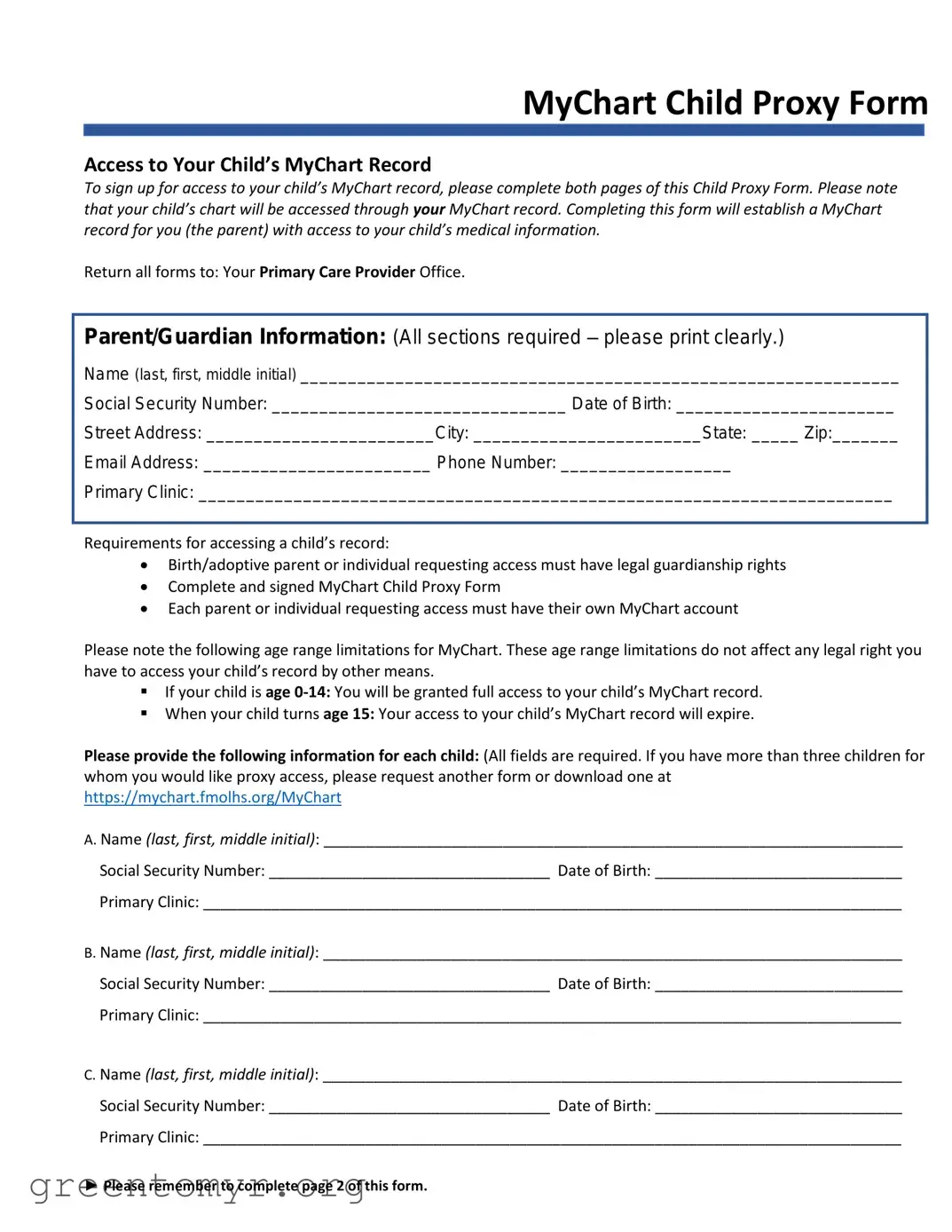
MyChart Child Proxy Form
Access to Your Child’s MyChart Record
To sign up for access to your child’s MyChart record, please complete both pages of this Child Proxy Form. Please note that your child’s chart will be accessed through your MyChart record. Completing this form will establish a MyChart record for you (the parent) with access to your child’s medical information.
Return all forms to: Your Primary Care Provider Office.
Parent/Guardian Information: (All sections required – please print clearly.)
Name (last, first, middle initial) _______________________________________________________________
Social Security Number: _______________________________ Date of Birth: _______________________
Street Address: ________________________City: ________________________State: _____ Zip:_______
Email Address: ________________________ Phone Number: __________________
Primary Clinic: _________________________________________________________________________
Requirements for accessing a child’s record:
Birth/adoptive parent or individual requesting access must have legal guardianship rights
Complete and signed MyChart Child Proxy Form
Each parent or individual requesting access must have their own MyChart account
Please note the following age range limitations for MyChart. These age range limitations do not affect any legal right you have to access your child’s record by other means.
If your child is age
When your child turns age 15: Your access to your child’s MyChart record will expire.
Please provide the following information for each child: (All fields are required. If you have more than three children for whom you would like proxy access, please request another form or download one at https://mychart.fmolhs.org/MyChart
A. Name (last, first, middle initial): ____________________________________________________________________
Social Security Number: _________________________________ Date of Birth: _____________________________
Primary Clinic: __________________________________________________________________________________
B. Name (last, first, middle initial): ____________________________________________________________________
Social Security Number: _________________________________ Date of Birth: _____________________________
Primary Clinic: __________________________________________________________________________________
C. Name (last, first, middle initial): ____________________________________________________________________
Social Security Number: _________________________________ Date of Birth: _____________________________
Primary Clinic: __________________________________________________________________________________
►Please remember to complete page 2 of this form.

MyChart Child Proxy Form (page 2)
MyChart Terms and Agreement
By signing below, I acknowledge that I have read, understand, and agree to the MyChart Terms and Conditions.
A copy of the MyChart Terms and Conditions can be requested at your physician’s office and can be obtained online at https://mychart.fmolhs.org/MyChart
►___________________/___________/___________/_______
Signature of Parent/Guardian |
Relationship to Patient |
Date |
Time |
| Fact Name | Description |
|---|---|
| Purpose | The MyChart Child Proxy Form allows parents or guardians to access their child's MyChart medical records. |
| Eligibility | Only birth or adoptive parents and legal guardians can request access to a child's MyChart record. |
| MyChart Account Requirement | Each parent or individual requesting access must have their own MyChart account. |
| Age Limitations | Full access is granted for children aged 0-14. Access expires when the child turns 15. |
| Form Submission | Completed forms must be returned to the primary care provider's office for processing. |
| Information Required | All sections of the form must be completed clearly, including personal details of the parent and child. |
| Legal Guardianship | Individuals requesting access must demonstrate legal guardianship rights over the child. |
| Proxy Access for Multiple Children | For more than three children, an additional form must be requested or downloaded online. |
| Terms Agreement | By signing the form, parents acknowledge that they have read and agree to the MyChart Terms and Conditions. |
| State-Specific Laws | Access rights may vary by state. Consult local laws for specific regulations regarding medical records access. |
Filling out the MyChart Child Proxy form is an important step to gain access to your child’s medical information through MyChart. By completing this form, you will establish a record that allows you to view and manage your child’s health data. Make sure to provide accurate information and return the completed form to your primary care provider's office.
Next, you will need to provide information for each child for whom you are requesting access. This section requires you to fill out the details for up to three children.
After providing the necessary details for all children, proceed to the second page of the form.
Once you have completed both pages of the form, return it to your primary care provider’s office to finalize the process.
The MyChart Child Proxy Form allows a parent or legal guardian to access their child's medical information through the MyChart system. By completing this form, you establish a MyChart account that grants you access to your child's health records, appointments, and other relevant information.
Eligibility is limited to birth or adoptive parents and individuals with legal guardianship rights over the child. Each individual requesting access must also have their own MyChart account. This ensures that only authorized individuals can view the child's medical information.
You must provide the following information:
Make sure to print clearly and complete all required fields to avoid delays in processing your request.
The access granted through the MyChart Child Proxy Form varies based on the child's age:
These age limitations do not affect your legal right to access your child's medical records through other means.
After completing both pages of the MyChart Child Proxy Form, return it to your primary care provider's office. Ensure that you have signed the form and that all required information is accurately filled out to facilitate a smooth processing experience.
Filling out the MyChart Child Proxy Form can be straightforward, but there are common mistakes that can lead to delays or complications. One frequent error is not providing complete information in the parent or guardian section. All fields are required, and any missing details can result in the form being rejected. It is essential to print clearly and ensure that the name, social security number, date of birth, and contact information are accurate.
Another mistake involves misunderstanding the legal requirements for access. The form states that the individual requesting access must have legal guardianship rights. If this requirement is overlooked, the application may be denied. Parents should double-check their legal status before submitting the form to avoid unnecessary issues.
Many people also forget to create a MyChart account for themselves before applying for proxy access. Each parent or guardian must have their own account to access their child’s medical information. Without this step completed, the request cannot be processed. It is crucial to follow the instructions closely to ensure that all necessary accounts are set up.
Lastly, some individuals neglect to complete both pages of the form. The second page contains important terms and conditions that must be acknowledged. Failing to sign and date this section can lead to delays in gaining access to the child’s MyChart record. Parents should carefully review the entire form before submission to confirm that all sections are completed and signed.
When seeking access to your child's medical information through the MyChart Child Proxy Form, there are several other documents that may be required or helpful in the process. These documents ensure that you have the necessary permissions and information to manage your child's healthcare effectively. Below are some commonly used forms alongside the MyChart Child Proxy Form.
Having these documents ready can streamline the process of accessing your child's medical records and ensure that you are prepared for any healthcare needs that may arise. Always check with your healthcare provider to confirm which documents are necessary for your specific situation.
When filling out the MyChart Child Proxy form, there are important steps to follow to ensure everything is completed correctly. Below is a list of things you should and shouldn't do:
By following these guidelines, you can ensure a smooth process in obtaining access to your child's MyChart record.
This is not true. Both parents can access the child's record, provided they each have their own MyChart account and complete the necessary forms.
In fact, any legal guardian or adoptive parent can fill out this form to gain access to their child's medical information.
This is incorrect. Each parent or guardian must have their own MyChart account to access their child's information.
Access will expire when the child turns 15. At that point, parents will need to discuss access directly with the child.
While completing the form is necessary, access will only be granted once the form is processed by the primary care provider's office.
The form must be returned specifically to your child’s primary care provider's office for processing.
Providing the Social Security Number is essential for verifying the child's identity and ensuring accurate access.
On the contrary, the form is straightforward. It requires basic information and can be completed quickly if all necessary details are on hand.
Filling out the MyChart Child Proxy Form is an important step for parents or guardians who wish to access their child’s medical information. Here are some key takeaways to keep in mind:
Understanding these points will help you navigate the process of obtaining access to your child's medical information with ease and confidence.