Content Navigation

The NC-3 form serves as a crucial document for businesses in North Carolina, specifically designed for the annual reconciliation of withholding taxes. This form requires employers to report the total amount of tax withheld from employee wages throughout the calendar year, ensuring compliance with state tax regulations. It encompasses several key components, including the legal name of the business, account identification numbers, and a detailed breakdown of taxes withheld by month. The NC-3 also prompts employers to compare the total tax withheld as reported to the Department of Revenue with the amounts documented on W-2 and 1099 statements. If discrepancies arise, the form provides a structured method for identifying overpayments or underpayments. Additionally, it outlines potential penalties for failure to file electronically and includes instructions for submitting the form, either electronically or by mail. Understanding the NC-3 form is essential for maintaining accurate records and fulfilling tax obligations in North Carolina.
Nc 3 Example


Guidelines


®
Do not use dollar
signs, commas, or
other punctuation
marks.
,
1
t®I


==

===
=
=

.
:::
:
••
·
··=!!!
:::
!
:
Instructions
For Handwritten
Forms
Printing


N
C


DR I

Before
Sending






1


c; ;1


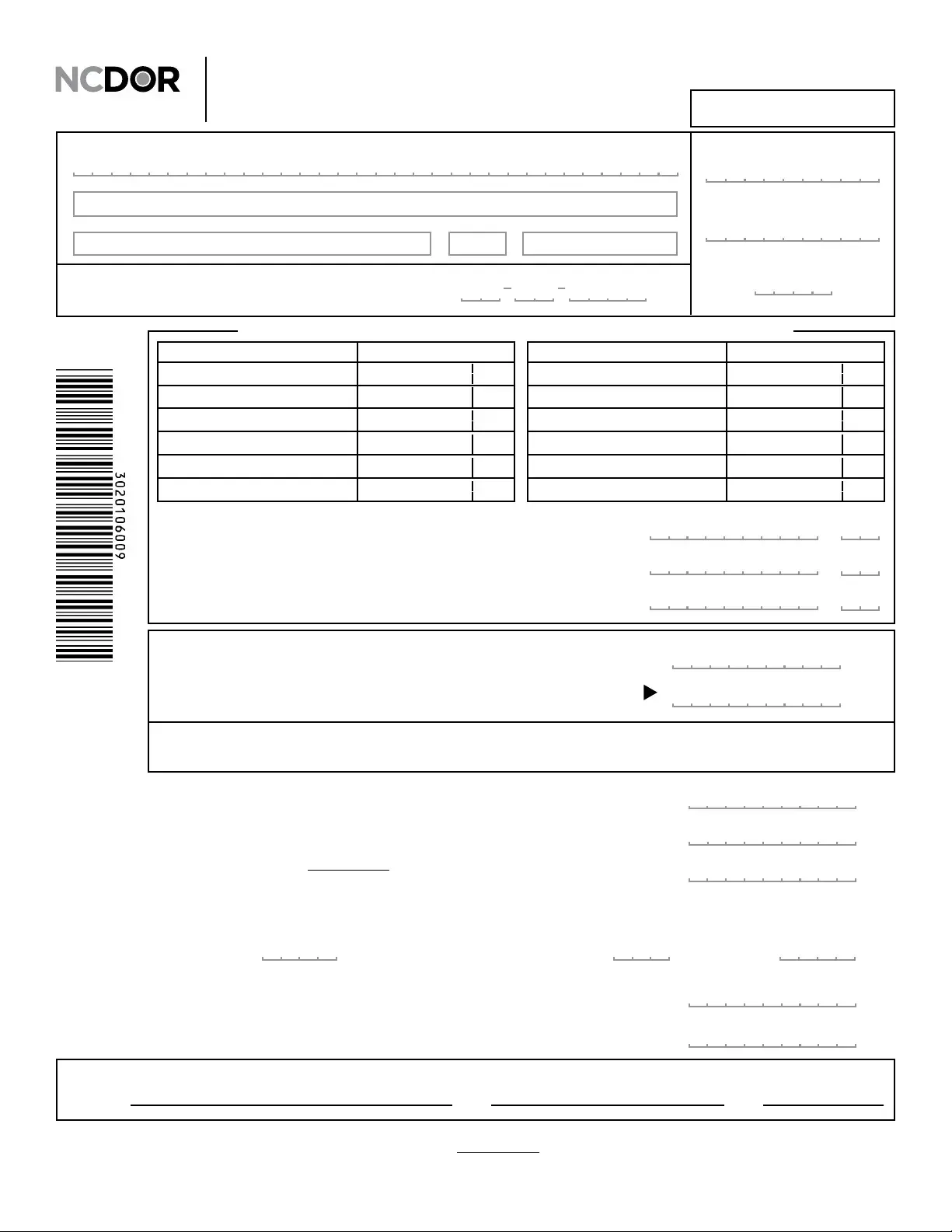
Annual Withholding Reconciliation
NC-3
Web
8-18
North Carolina law requires Form NC-3 and the required statements to be led in an electronic format as prescribed by the Department. Electronic ling
and payment methods are available through the Department’s website at www.ncdor.gov. If you are unable to le Form NC-3 and the required statements
electronically, mail this form and the required statements with your check or money order to: North Carolina Department of Revenue, PO Box 25000,
Raleigh, North Carolina 27640-0001. You will be subject to a penalty for failure to le the form and required statements electronically.
Signature:
Date:
Title:
I certify that, to the best of my knowledge, this claim is accurate and complete.
Street Address
City State Zip Code
FEIN or SSN
(YYYY)
For Calendar Year
(MM-DD-YYYY)
If your business closed or if you stopped paying wages during
the calendar year, enter the nal date you paid wages:
Account ID
Legal Name (First 32 Characters) (USE CAPITAL LETTERS FOR YOUR NAME AND ADDRESS)
13. Total Tax Withheld as Reported to the Department
Add Lines 1 through 12. Enter total here and on Line 16.
,,
.
Tax Withheld as Reported on W-2 Statements14.
,,
.
Tax Withheld as Reported on 1099 Statements15.
,,
.
Month Amount
11. November
10. October
8. August
7. July
9. September - End of 3rd Quarter
12. December - End of 4th Quarter
5. May
4. April
2. February
1. January
3. March - End of 1st Quarter
6. June - End of 2nd Quarter
AmountMonth
Enter total tax withheld as reported to the Department for each period
Interest (See the Department’s website, www.ncdor.gov, for current interest rate.)
Multiply Line 19 by applicable rate
20.
.
00
,,
Additional Tax Due19.
.
00
,,
Overpayment18.
.
00
,,
00
Amount of Refund Requested - If Line 18 is blank or zero, skip to Line 23. Otherwise, compare Line 18 with
Line 21c. If Line 18 is more than Line 21c, subtract Line 21c from Line 18 and enter the amount of refund
here. If Line 18 is less than Line 21c, subtract Line 18 from Line 21c and enter the amount due on Line 23.
22.
.
,,
21. Informational Return Penalties (See instructions)
Add Lines 21a and 21b and enter the total on Line 21c
a. Failure to File by Due Date
,
.
00
,
.
00
b. Failure to File in Format
Prescribed by the Secretary
00
.
c.
Total Amount Due
Add Lines 19, 20, and 21c
23.
00
.
,,
Pay in U.S. Currency From a Domestic Bank
Total Tax Withheld as Reported on W-2 and 1099 Statements
Add Lines 14 and 15; round to the nearest whole dollar
17.
00
.
,,
16. Total Tax Withheld as Reported to the Department
From Line 13; round to the nearest whole dollar
00
.
,,
Compare Line 16 and Line 17. If Line 16 and Line 17 are the same, skip to Line 21. If Line 16 is more than Line 17, the account
is overpaid. Subtract Line 17 from Line 16 and enter the amount of overpayment on Line 18. If Line 16 is less than Line 17, the
account is underpaid. Subtract Line 16 from Line 17 and enter the amount of tax due on Line 19.
DOR
Use
Only

File Breakdown

Fact Name Description
Purpose The NC-3 form is used for annual withholding reconciliation in North Carolina, summarizing total tax withheld by employers.
Filing Requirement Employers must file the NC-3 form electronically, as mandated by North Carolina law.
Tax Reporting The form requires reporting total tax withheld for each month of the calendar year, including amounts from W-2 and 1099 statements.
Overpayment and Underpayment If the total tax withheld reported differs between Line 16 and Line 17, the employer must calculate any overpayment or additional tax due.
Penalties Failure to file the NC-3 electronically may result in penalties, as specified by the North Carolina Department of Revenue.
Refund Process If there is an overpayment, the form allows for a refund request, contingent on calculations made on Line 18.
Submission Address If electronic filing is not possible, employers can mail the NC-3 form to the North Carolina Department of Revenue in Raleigh.

Guide to Using Nc 3

Filling out the NC-3 form is a straightforward process. Ensure you have all necessary information on hand before you begin. Follow the steps below to complete the form accurately and efficiently.

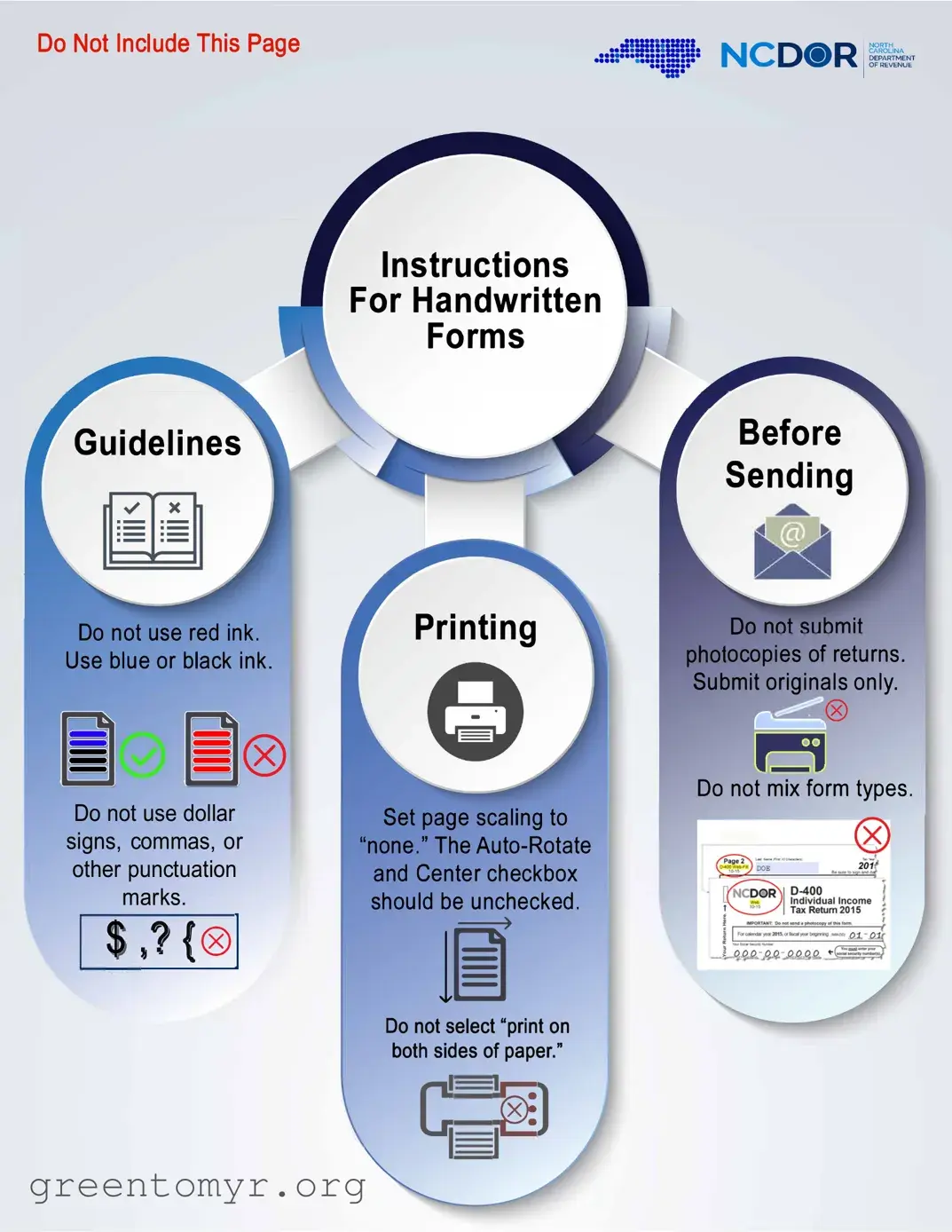
  1. Use blue or black ink. Avoid red ink, dollar signs, commas, or other punctuation marks.
  2. Set your printing page scaling to "none." Ensure the Auto-Rotate and Center checkbox is unchecked.
  3. Write your legal name in capital letters in the designated space. Limit your entry to the first 32 characters.
  4. Fill in your street address, city, state, and zip code.
  5. If applicable, enter the final date you paid wages during the calendar year in MM-DD-YYYY format.
  6. Provide your Account ID, FEIN, or SSN.
  7. Indicate the calendar year for which you are filing.
  8. For each month from January to December, enter the total tax withheld as reported to the Department.
  9. Add the totals from January through December and enter this amount on Line 13.
  10. Fill in the tax withheld as reported on W-2 statements on Line 14.
  11. Fill in the tax withheld as reported on 1099 statements on Line 15.
  12. Calculate the total tax withheld as reported to the Department and enter it on Line 16.
  13. Calculate the total tax withheld as reported on W-2 and 1099 statements and enter it on Line 17.
  14. Compare Line 16 and Line 17. If they are the same, skip to Line 21. If Line 16 is more, subtract Line 17 from Line 16 and enter the overpayment on Line 18. If Line 16 is less, subtract Line 16 from Line 17 and enter the additional tax due on Line 19.
  15. If applicable, calculate interest on Line 19 and enter it on Line 20.
  16. Calculate any penalties for failure to file by the due date and enter the total on Line 21c.
  17. If you have an overpayment, compare it with the penalty on Line 21c and enter the refund amount or the total amount due on the appropriate lines.
  18. Sign and date the form, certifying that the information is accurate and complete.
  19. If filing electronically is not possible, mail the completed form and required statements to the North Carolina Department of Revenue.

Get Answers on Nc 3

What is the NC-3 form?

The NC-3 form is an annual withholding reconciliation report required by the North Carolina Department of Revenue. It summarizes the total amount of state income tax withheld from employees' wages throughout the year. Employers use this form to reconcile the amounts reported on W-2 and 1099 statements with the total tax withheld reported to the Department.

Who needs to file the NC-3 form?

Any employer who withholds North Carolina state income tax from employee wages must file the NC-3 form. This includes businesses, organizations, and any entity that pays wages subject to withholding. If your business closed or if you stopped paying wages during the calendar year, you still need to file the form for that year.

When is the NC-3 form due?

The NC-3 form is typically due by January 31st of the year following the calendar year for which the taxes were withheld. This means that for wages paid in 2023, the form must be filed by January 31, 2024. If the due date falls on a weekend or holiday, the deadline may be extended to the next business day.

How do I fill out the NC-3 form?

When completing the NC-3 form, follow these steps:

  1. Enter your legal name, address, and account ID at the top of the form.
  2. List the total tax withheld for each month of the year.
  3. Calculate the total tax withheld for the year and enter it in the appropriate lines.
  4. Compare the total tax withheld reported to the Department with the amounts reported on W-2 and 1099 statements.
  5. Determine if you have an overpayment or additional tax due and fill in the respective lines.
  6. Sign and date the form to certify its accuracy.

Can I file the NC-3 form electronically?

Yes, the North Carolina Department of Revenue requires the NC-3 form to be filed electronically. Electronic filing is available through their website. If you are unable to file electronically, you may mail a paper form along with any required statements. However, note that penalties may apply for failing to file electronically.

What happens if I miss the filing deadline?

If you miss the filing deadline for the NC-3 form, you may incur penalties. The North Carolina Department of Revenue imposes fines for failure to file on time, as well as for failure to file in the required format. It is crucial to submit the form by the deadline to avoid these penalties.

What should I do if my reported amounts do not match?

If the amounts reported on the NC-3 form do not match the amounts on your W-2 or 1099 statements, you will need to investigate the discrepancies. Check your payroll records to ensure that all withholdings were accurately reported. If you find an error, correct it and adjust your filings accordingly. If you are due a refund or owe additional tax, make sure to complete the appropriate sections of the form.

Where do I send the NC-3 form if I file by mail?

If you choose to file the NC-3 form by mail, send it along with any required statements and payment to the following address:

North Carolina Department of Revenue
PO Box 25000
Raleigh, North Carolina 27640-0001

Common mistakes

Filling out the NC-3 form can seem straightforward, but several common mistakes can lead to issues down the line. One major error is using the wrong ink color. The instructions clearly state to use blue or black ink only. Using red ink can result in the form being rejected, causing delays in processing.

Another frequent mistake is the inclusion of dollar signs, commas, or other punctuation marks in the amounts reported. The form specifically instructs users not to use these symbols. Adhering strictly to this guideline is crucial for ensuring that the amounts are processed correctly.

Many people also overlook the requirement to print the form without scaling. Setting the page scaling to "none" is essential. If this step is ignored, the form may not fit properly on the page, leading to potential misinterpretation of the information provided.

Mixing different form types is another common error. The instructions emphasize that only the NC-3 form should be submitted without combining it with other forms. This can create confusion and complicate the processing of your tax information.

Lastly, failing to compare the totals on Line 16 and Line 17 is a mistake that can have financial implications. If these lines do not match, it is important to accurately calculate the overpayment or additional tax due. Neglecting this step can lead to either an unexpected tax bill or a delay in receiving a refund.

Documents used along the form

The NC-3 form is an important document for businesses in North Carolina, primarily used for annual withholding reconciliation. Alongside the NC-3, there are several other forms and documents that businesses may need to complete or submit. Here’s a list of these related forms, each with a brief description.

  • W-2 Form: This form reports wages paid to employees and the taxes withheld from them. Employers must provide a W-2 to each employee by January 31st of the following year.
  • 1099 Form: Used to report various types of income other than wages, salaries, and tips. Businesses must issue a 1099 to contractors or freelancers who earned more than $600 in a year.
  • Form NC-4: This is the Employee’s Withholding Allowance Certificate. Employees fill this out to determine the amount of state income tax to withhold from their paychecks.
  • Form NC-5: The Employer’s Withholding Tax Return. This form is used to report and pay the withholding tax due on employee wages throughout the year.
  • Form NC-3D: This is the Annual Withholding Reconciliation for Employers that report withholding on behalf of employees who are not residents of North Carolina.
  • Form NC-40: This is the North Carolina Estimated Income Tax Payment Voucher. It’s used for making estimated tax payments throughout the year.
  • Form 1096: This is the Annual Summary and Transmittal of U.S. Information Returns. It summarizes all the 1099 forms submitted to the IRS.
  • Form 941: This is the Employer’s Quarterly Federal Tax Return. It reports income taxes, Social Security tax, or Medicare tax withheld from employee’s paychecks.
  • Form 944: This is the Employer’s Annual Federal Tax Return. Small businesses with a low tax liability may file this instead of the 941.
  • Form W-3: This is the Transmittal of Wage and Tax Statements. It accompanies the W-2 forms when submitted to the Social Security Administration.

Understanding these documents is essential for compliance and accurate reporting. Each form serves a specific purpose in the tax process, helping both employers and employees manage their tax obligations effectively.

Similar forms

The NC-3 form is an important document for businesses in North Carolina, specifically for reporting annual withholding reconciliation. Several other forms share similarities with the NC-3 in terms of purpose and structure. Here are five documents that are comparable to the NC-3 form:

  • W-2 Form: Like the NC-3, the W-2 form is used to report wages paid and taxes withheld from employees. Both forms require accurate reporting of tax withheld for the year, making them essential for compliance with tax regulations.
  • 1099 Form: The 1099 form is similar in that it reports income received by non-employees, such as independent contractors. Both the NC-3 and 1099 require detailed information about tax withholding, ensuring that all income and taxes are accounted for.
  • Quarterly Tax Returns (e.g., Form 941): Quarterly tax returns, like Form 941, report payroll taxes withheld from employees. The NC-3 summarizes these amounts for the entire year, but both forms require similar data regarding tax withholdings.
  • Annual Return of Withholding Tax (Form 1042-S): This form reports income and taxes withheld for foreign persons. Similar to the NC-3, it provides a summary of tax withholdings for the year, ensuring that the correct amounts are reported to the IRS.
  • State Income Tax Return: A state income tax return is filed by individuals and businesses to report income and calculate tax liability. Like the NC-3, it requires accurate reporting of income and tax withheld, and both documents help ensure compliance with state tax laws.

Dos and Don'ts

When filling out the NC-3 form, it is essential to follow specific guidelines to ensure accuracy and compliance. Here are five things you should and shouldn't do:

  • Do use blue or black ink. Avoid red ink as it can cause issues with processing.
  • Do submit original forms only. Do not send copies of your returns.
  • Do enter your legal name in capital letters. This includes both your name and address.
  • Do not use dollar signs, commas, or other punctuation marks. This simplifies the data entry process.
  • Do ensure that page scaling is set to "none." This prevents any resizing that could distort the form.

Additionally, consider these common pitfalls:

  • Don't mix different form types. Each form must be distinct and correctly labeled.
  • Don't select "print on both sides of paper." This can lead to confusion and misalignment.
  • Don't leave any required fields blank. Ensure all necessary information is provided to avoid delays.
  • Don't forget to check for accuracy. Review your entries before submission to prevent errors.
  • Don't ignore the filing deadlines. Timely submission is crucial to avoid penalties.

By adhering to these guidelines, you can facilitate a smoother filing process for your NC-3 form.

Misconceptions

  • Misconception 1: The NC-3 form can be submitted in red ink.
  • This is incorrect. The form must be filled out using blue or black ink only. Using red ink will lead to rejection of the form.

  • Misconception 2: It is acceptable to mix different form types when submitting.
  • This is not allowed. Each form type must be submitted separately to ensure proper processing.

  • Misconception 3: You can print the NC-3 form on both sides of the paper.
  • This is false. The instructions specify that the form must be printed on one side only. Printing on both sides can cause processing errors.

  • Misconception 4: You can submit copies of the NC-3 form.
  • This is misleading. Only original forms should be submitted. Copies will not be accepted.

  • Misconception 5: There are no penalties for failing to file electronically.
  • This is incorrect. North Carolina law requires electronic filing, and failing to do so will result in penalties.

Key takeaways

Filling out the NC-3 form correctly is crucial for ensuring compliance with North Carolina tax regulations. Here are some key takeaways to keep in mind:

  • Use the Correct Ink: Always fill out the form using blue or black ink. Avoid using red ink, as it can cause issues with processing.
  • Follow Formatting Instructions: Do not include dollar signs, commas, or other punctuation marks. This helps maintain clarity and accuracy in your submission.
  • Submit Original Copies: Only submit original forms. Do not mix different types of forms or print on both sides of the paper.
  • Electronic Filing Requirement: North Carolina law mandates that the NC-3 form and required statements be filed electronically. If electronic filing is not possible, you must mail the form and any required documents.

By adhering to these guidelines, you can avoid common pitfalls and ensure that your filing process is smooth and compliant.