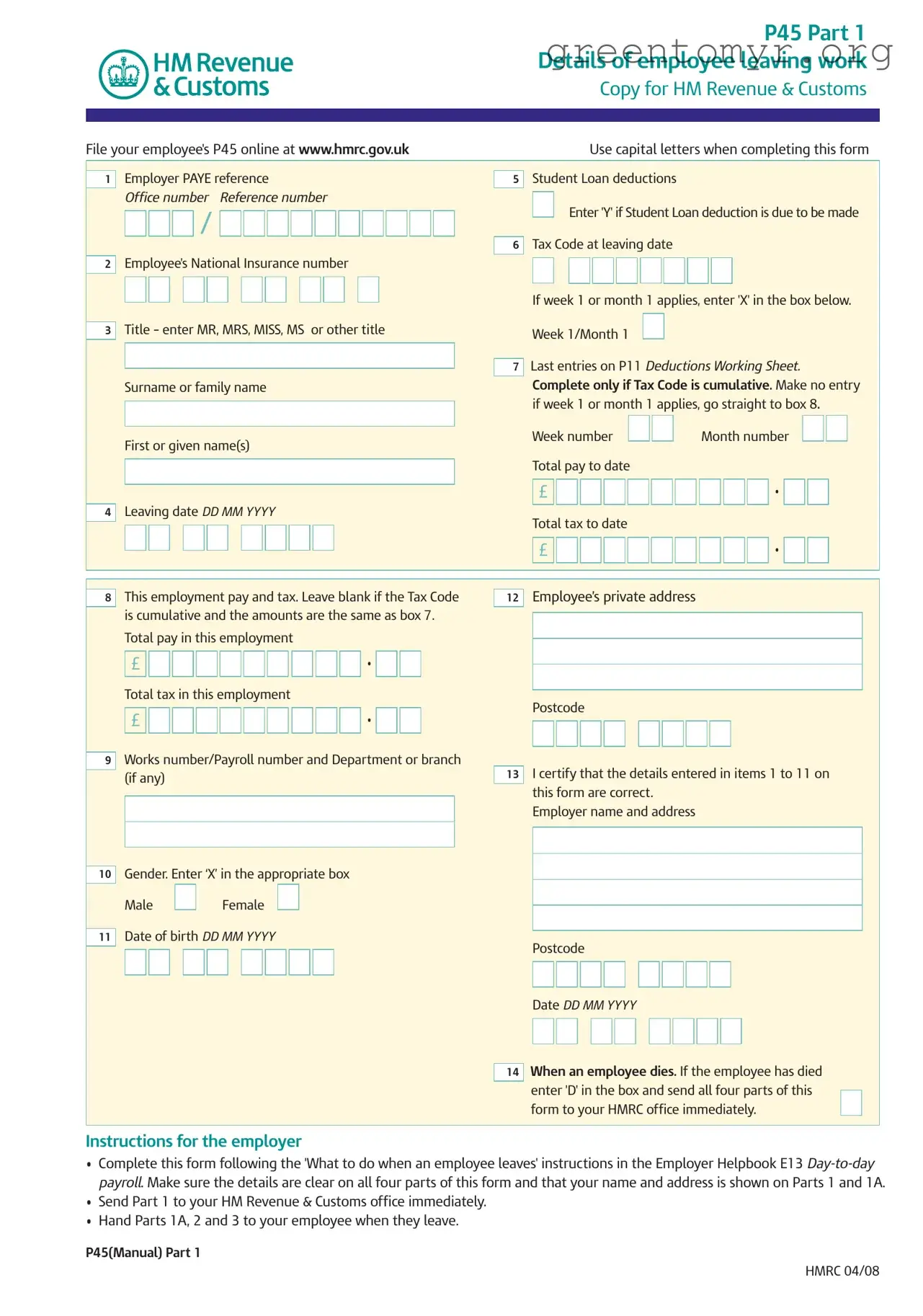
The P45 form is an essential document for employees transitioning between jobs in the UK. It consists of several parts, each serving a specific purpose in the process of reporting an individual's employment and tax details to HM Revenue & Customs (HMRC). When an employee leaves a job, the employer must complete the P45, which includes information such as the employee's National Insurance number, tax code, total pay to date, and total tax deducted. This form is crucial for the employee, as it helps ensure that they are taxed correctly when starting a new job or claiming benefits. The P45 is divided into four parts: Part 1 is sent directly to HMRC, while Parts 1A, 2, and 3 are provided to the employee and their new employer. Each part contains vital information that must be accurately filled out to avoid complications in tax calculations and to ensure a smooth transition for the employee. The form also includes specific instructions for employers regarding how to complete and submit it, as well as guidance for employees on what to do with their copies. Understanding the P45 form's structure and purpose is critical for both employers and employees to navigate the complexities of employment changes and tax obligations.

|
|
|
|
|
|
|
|
|
|
|
|
|
|
|
|
|
|
|
|
|
|
|
|
|
|
|
|
|
|
|
|
|
|
|
|
|
|
|
|
|
|
|
|
P45 Part 1 |
|||||||||
|
|
|
|
|
|
|
|
|
|
|
|
|
|
|
|
|
|
|
|
|
|
|
|
|
|
|
|
Details of employee leaving work |
|||||||||||||||||||||||||
|
|
|
|
|
|
|
|
|
|
|
|
|
|
|
|
|
|
|
|
|
|
|
|
|
|
|
|
|
|
|
|
Copy for HM Revenue & Customs |
|||||||||||||||||||||
|
|
|
|
|
|
|
|
|
|
|
|
|
|
|
|
|
|
|
|
|
|
|
|
|
|
|
|
|
|
|
|
|
|
|
|
|
|
|
|
|
|
|
|
|
|
|
|
|
|
|
|
|
|
|
|
|
|
|
|
|
|
|
|
|
|
|
|
|
|
|
|
|
|
|
|
|
|
|
|
|
|
|
|
|
|
|
|
|
|
|
|
|
|
|
|
|
|
|
|
|
|
|
|
|
|
|
|
|
File your employee's P45 online at www.hmrc.gov.uk |
|
|
|
|
|
|
Use capital letters when completing this form |
|||||||||||||||||||||||||||||||||||||||||||||
|
|
|
|
|
|
|
|
|
|
|
|
|
|
|
|
|
|
|
|
|
|
|
|
|
|
|
|
|
|
|
|
|
|
|
|
|
|
|
|
|
|
|
|
|
|
|
|
|
|
|
|
|
|
|
|
|
Employer PAYE reference |
|
|
|
|
|
|
|
|
|
|
|
|
Student Loan deductions |
|
|
|
|
|
|
|
|
|
|
|
|
|
|
|
||||||||||||||||||||||
|
1 |
|
|
|
|
|
|
|
|
|
|
|
5 |
|
|
|
|
|
|
|
|
|
|
|
|
|
|
|
|
||||||||||||||||||||||||
|
|
|
Office number |
Reference number |
|
|
|
|
Enter 'Y' if Student Loan deduction is due to be made |
|
|||||||||||||||||||||||||||||||||||||||||||
|
|
|
|
|
|
|
/ |
|
|
|
|
|
|
|
|
|
|
|
|
|
|
|
|
|
|
|
|
|
|
||||||||||||||||||||||||
|
|
|
|
|
|
|
|
|
|
|
|
|
|
|
|
|
|
|
|
|
|
|
|
|
|
Tax Code at leaving date |
|
|
|
|
|
|
|
|
|
|
|
|
|
|
|
||||||||||||
|
|
|
|
|
|
|
|
|
|
|
|
|
|
|
|
|
|
|
|
|
|
|
|
|
|
6 |
|
|
|
|
|
|
|
|
|
|
|
|
|
|
|
|
|||||||||||
|
2 |
|
Employee's National Insurance number |
|
|
|
|
|
|
|
|
|
|
|
|
|
|
|
|
|
|
|
|
|
|
|
|
|
|
|
|
||||||||||||||||||||||
|
|
|
|
|
|
|
|
|
|
|
|
|
|
|
|
|
|
|
|
|
|
|
|
|
|
|
|
|
|
|
|
|
|
|
|
|
|
|
|
|
|
|
|
|
|||||||||
|
|
|
|
|
|
|
|
|
|
|
|
|
|
|
|
|
|
|
|
|
|
|
|
|
|
|
|
If week 1 or month 1 applies, enter 'X' in the box below. |
|
||||||||||||||||||||||||
|
|
|
Title – enter MR, MRS, MISS, MS |
or other title |
|
|
|||||||||||||||||||||||||||||||||||||||||||||||
|
|
|
|
|
|
|
|
|
|
|
|
|
|
|
|
|
|
|
|
|
|
|
|
|
|
|
|
|
|
|
|||||||||||||||||||||||
|
3 |
|
|
|
Week 1/Month 1 |
|
|
|
|
|
|
|
|
|
|
|
|
|
|
|
|
|
|
||||||||||||||||||||||||||||||
|
|
|
|
|
|
|
|
|
|
|
|
|
|
|
|
|
|
|
|
|
|
|
|
|
|
|
Last entries on P11 Deductions Working Sheet. |
|
|||||||||||||||||||||||||
|
|
|
|
|
|
|
|
|
|
|
|
|
|
|
|
|
|
|
|
|
|
|
|
|
|
7 |
|
||||||||||||||||||||||||||
|
|
|
Surname or family name |
|
|
|
|
|
|
|
|
|
|
|
|
Complete only if Tax Code is cumulative. Make no entry |
|
||||||||||||||||||||||||||||||||||||
|
|
|
|
|
|
|
|
|
|
|
|
|
|
|
|
||||||||||||||||||||||||||||||||||||||
|
|
|
|
|
|
|
|
|
|
|
|
|
|
|
|
|
|
|
|
|
|
|
|
|
|
|
|
if week 1 or month 1 applies, go straight to box 8. |
|
||||||||||||||||||||||||
|
|
|
|
|
|
|
|
|
|
|
|
|
|
|
|
|
|
|
|
|
|
|
|
|
|
|
|
Week number |
|
|
|
Month number |
|
|
|
|
|
|
|
||||||||||||||
|
|
|
First or given name(s) |
|
|
|
|
|
|
|
|
|
|
|
|
|
|
|
|
|
|
|
|
||||||||||||||||||||||||||||||
|
|
|
|
|
|
|
|
|
|
|
|
|
|
|
Total pay to date |
|
|
|
|
|
|
|
|
|
|
|
|
|
|
|
|||||||||||||||||||||||
|
|
|
|
|
|
|
|
|
|
|
|
|
|
|
|
|
|
|
|
|
|
|
|
|
|
|
|
|
|
|
|
|
|
|
|
|
|
|
|
|
|
|
|||||||||||
|
|
|
|
|
|
|
|
|
|
|
|
|
|
|
|
|
|
|
|
|
|
|
|
|
|
|
|
£ |
|
|
|
|
|
|
|
|
|
|
|
|
|
|
|
|
• |
|
|
|
|
|
|
|
|
|
|
|
|
|
|
|
|
|
|
|
|
|
|
|
|
|
|
|
|
|
|
|
|
|
|
|
|
|
|
|
|
|
|
|
|
|
|
|
|
|
|
|
|
|
|
|
|
|
|
|
|||
|
4 |
|
Leaving date DD MM YYYY |
|
|
|
|
|
|
|
|
|
|
|
|
Total tax to date |
|
|
|
|
|
|
|
|
|
|
|
|
|
|
|
||||||||||||||||||||||
|
|
|
|
|
|
|
|
|
|
|
|
|
|
|
|
|
|
|
|
|
|
|
|
|
|
|
|
|
|
|
|
|
|
|
|
|
|
|
|
|
|
|
|||||||||||
|
|
|
|
|
|
|
|
|
|
|
|
|
|
|
|
|
|
|
|
|
|
|
|
|
|
|
|
£ |
|
|
|
|
|
|
|
|
|
|
|
|
|
|
|
|
• |
|
|
|
|
|
|
|
|
|
|
|
|
|
|
|
|
|
|
|
|
|
|
|
|
|
|
|
|
|
|
|
|
|
|
|
|
||||||||||||||||||||||||||
|
|
|
|
|
|
|
|
|
|
|
|
|
|
|
|
|
|
|
|
|
|
|
|
|
|
|
|
|
|
|
|
|
|
|
|
|
|
|
|
|
|
|
|
|
|
|
|
|
|
|
|
|
|
|
|
|
|
|
|
|
|
|
|
|
|
|
|
|
|
|
|
|
|
|
|
|
|
|
|
|
|
|
|
|
|
|
|
|
|
|
|
|
|
|
|
|
|
|
|
|
|
|
|
|
|
|
|
|
|
|
|
|
|
Employee’s private address |
|
|
|
|
|
|
|
|
|
|
|
|
|
|
|
||||||||||||||||||||||||||||||||
|
8 |
|
This employment pay and tax. Leave blank if the Tax Code |
12 |
|
|
|
|
|
|
|
|
|
|
|
|
|
|
|
|
|||||||||||||||||||||||||||||||||
|
|
|
is cumulative and the amounts are the same as box 7. |
|
|
|
|
|
|
|
|
|
|
|
|
|
|
|
|
|
|
|
|
|
|
|
|
|
|
|
|
||||||||||||||||||||||
|
|
|
|
|
|
|
|
|
|
|
|
|
|
|
|
|
|
|
|
|
|
|
|
|
|
|
|
|
|
|
|||||||||||||||||||||||
|
|
|
Total pay in this employment |
|
|
|
|
|
|
|
|
|
|
|
|
|
|
|
|
|
|
|
|
|
|
|
|
|
|
|
|
|
|
|
|
|
|
|
|
|
|
||||||||||||
|
|
|
|
|
|
|
|
|
|
|
|
|
|
|
|
|
|
|
|
|
|
|
|
|
|
|
|
|
|
|
|
|
|
|
|
|
|
|
|
|
|||||||||||||
|
|
|
£ |
|
|
|
|
|
|
|
|
|
|
|
|
|
|
|
• |
|
|
|
|
|
|
|
|
|
|
|
|
|
|
|
|
|
|
|
|
|
|
|
|
|
|
|
|
|
|
|
|||
|
|
|
|
|
|
|
|
|
|
|
|
|
|
|
|
|
|
|
|
|
|
|
|
|
|
|
|
|
|
|
|
|
|
|
|
|
|
|
|
|
|
|
|
|
|
|
|
|
|
|
|
||
|
|
|
Total tax in this employment |
|
|
|
|
|
|
|
|
|
|
|
|
|
|
|
|
|
|
|
|
|
|
|
|
|
|
|
|
|
|
|
|
|
|
|
|
|
|
||||||||||||
|
|
|
|
|
|
|
|
|
|
|
|
|
|
|
Postcode |
|
|
|
|
|
|
|
|
|
|
|
|
|
|
|
|||||||||||||||||||||||
|
|
|
£ |
|
|
|
|
|
|
|
|
|
|
|
|
|
|
|
• |
|
|
|
|
|
|
|
|
|
|
|
|
|
|
|
|
|
|
|
|
|
|
|
|||||||||||
|
|
|
|
|
|
|
|
|
|
|
|
|
|
|
|
|
|
|
|
|
|
|
|
|
|
|
|
|
|
|
|
|
|
|
|
|
|
|
|
|
|
|
|
|
|
|
|
|
|
|
|
||
|
|
|
|
|
|
|
|
|
|
|
|
|
|
|
|
|
|
|
|
|
|
|
|
|
|
|
|
|
|
|
|
|
|
|
|
|
|
|
|
|
|
|
|
|
|
|
|
|
|
|
|
|
|
|
|
|
Works number/Payroll number and Department or branch |
|
|
|
|
|
|
|
|
|
|
|
|
|
|
|
|
|
|
|
|
|
|
|
|
|
|
|
|
||||||||||||||||||||||
|
|
|
|
|
|
|
|
|
|
|
|
|
|
|
|
|
|
|
|
|
|
|
|
|
|
|
|
|
|
|
|||||||||||||||||||||||
|
9 |
|
|
|
|
|
|
|
|
|
|
|
|
|
|
|
|
|
|
|
|
|
|
|
|
|
|
|
|
|
|||||||||||||||||||||||
|
|
|
(if any) |
|
|
|
|
|
|
|
|
|
|
|
|
|
|
|
|
|
13 |
|
I certify that the details entered in items 1 to 11 on |
||||||||||||||||||||||||||||||
|
|
|
|
|
|
|
|
|
|
|
|
|
|
|
|
|
|
|
|
|
|
|
|
|
|
|
|
this form are correct. |
|
|
|
|
|
|
|
|
|
|
|
|
|
|
|
||||||||||
|
|
|
|
|
|
|
|
|
|
|
|
|
|
|
|
|
|
|
|
|
|
|
|
|
|
|
|
Employer name and address |
|
|
|
|
|
|
|
|
|
|
|
|
|
|
|
||||||||||
|
|
|
|
|
|
|
|
|
|
|
|
|
|
|
|
|
|
|
|
|
|
|
|
|
|
|
|
|
|
|
|
|
|
|
|
|
|
|
|
|
|
||||||||||||
|
|
|
|
|
|
|
|
|
|
|
|
|
|
|
|
|
|
|
|
|
|
|
|
|
|
|
|
|
|
|
|
|
|
|
|
|
|
|
|
|
|
|
|
|
|
|
|
|
|
|
|
|
|
|
|
|
Gender. Enter ‘X’ in the appropriate box |
|
|
|
|
|
|
|
|
|
|
|
|
|
|
|
|
|
|
|
|
|
|
|
|
|
|
|
|
||||||||||||||||||||||
|
|
|
|
|
|
|
|
|
|
|
|
|
|
|
|
|
|
|
|
|
|
|
|
|
|
|
|
|
|
|
|||||||||||||||||||||||
|
10 |
|
|
|
|
|
|
|
|
|
|
|
|
|
|
|
|
|
|
|
|
|
|
|
|
|
|
|
|
|
|||||||||||||||||||||||
|
|
|
Male |
|
|
Female |
|
|
|
|
|
|
|
|
|
|
|
|
|
|
|
|
|
|
|
|
|
|
|
|
|
|
|
|
|
|
|
|
|
|
|
|
|
|
|
|
|
||||||
|
|
|
|
|
|
|
|
|
|
|
|
|
|
|
|
|
|
|
|
|
|
|
|
|
|
|
|
|
|
|
|
|
|
|
|
|
|
|
|
|
|
|
|
|
|
|
|||||||
|
|
|
Date of birth DD MM YYYY |
|
|
|
|
|
|
|
|
|
|
|
|
|
|
|
|
|
|
|
|
|
|
|
|
|
|
|
|
|
|
|
|
|
|
|
|
|
|
||||||||||||
|
11 |
|
|
|
|
|
|
|
|
|
|
|
|
|
Postcode |
|
|
|
|
|
|
|
|
|
|
|
|
|
|
|
|||||||||||||||||||||||
|
|
|
|
|
|
|
|
|
|
|
|
|
|
|
|
|
|
|
|
|
|
|
|
|
|
|
|
|
|
|
|
|
|
|
|
|
|
|
|
|
|
|
|||||||||||
|
|
|
|
|
|
|
|
|
|
|
|
|
|
|
|
|
|
|
|
|
|
|
|
|
|
|
|
|
|
|
|
|
|
|
|
|
|
|
|
|
|
|
|
|
|
|
|
|
|
|
|
|
|
|
|
|
|
|
|
|
|
|
|
|
|
|
|
|
|
|
|
|
|
|
|
|
|
|
|
|
|
|
|
|
|
|
|
|
|
|
|
|
|
|
|
|
|
|
|
|
|
|
|
||||
|
|
|
|
|
|
|
|
|
|
|
|
|
|
|
|
|
|
|
|
|
|
|
|
|
|
|
|
Date DD MM YYYY |
|
|
|
|
|
|
|
|
|
|
|
|
|
|
|
||||||||||
|
|
|
|
|
|
|
|
|
|
|
|
|
|
|
|
|
|
|
|
|
|
|
|
|
|
|
|
|
|
|
|
|
|
|
|
|
|
|
|
|
|
|
|
|
|
|
|
|
|
|
|
|
|
|
|
|
|
|
|
|
|
|
|
|
|
|
|
|
|
|
|
|
|
|
|
|
|
|
|
|
When an employee dies. If the employee has died |
||||||||||||||||||||||||||
|
|
|
|
|
|
|
|
|
|
|
|
|
|
|
|
|
|
|
|
|
|
|
|
|
|
14 |
|||||||||||||||||||||||||||
|
|
|
|
|
|
|
|
|
|
|
|
|
|
|
|
|
|
|
|
|
|
|
|
|
|
|
enter 'D' in the box and send all four parts of this |
|
|
|
|
||||||||||||||||||||||
|
|
|
|
|
|
|
|
|
|
|
|
|
|
|
|
|
|
|
|
|
|
|
|
|
|
|
|
|
|
|
|||||||||||||||||||||||
|
|
|
|
|
|
|
|
|
|
|
|
|
|
|
|
|
|
|
|
|
|
|
|
|
|
|
form to your HMRC office immediately. |
|
|
|
|||||||||||||||||||||||
|
|
|
|
|
|
|
|
|
|
|
|
|
|
|
|
|
|
|
|
|
|
|
|
|
|
|
|
|
|
|
|
|
|
|
|
|
|
|
|
|
|
|
|
|
|
|
|
|
|
|
|
|
|
Instructions for the employer
•Complete this form following the 'What to do when an employee leaves' instructions in the Employer Helpbook E13
•Send Part 1 to your HM Revenue & Customs office immediately.
•Hand Parts 1A, 2 and 3 to your employee when they leave.
P45(Manual) Part 1
HMRC 04/08
| Fact Name | Description |
|---|---|
| Purpose | The P45 form is used to provide details about an employee who is leaving a job, including their pay and tax information. |
| Parts | The P45 consists of three parts: Part 1 for HM Revenue & Customs, Part 1A for the employee, and Parts 2 and 3 for the new employer. |
| Completion Requirement | Employers must complete the form accurately and ensure that all details are clear before submission. |
| Submission | Part 1 must be sent to HM Revenue & Customs immediately after an employee leaves. Parts 1A, 2, and 3 should be given to the employee. |
| Tax Code | The form includes a section for the employee's tax code at the time of leaving, which affects how taxes are calculated for future employment. |
| Student Loans | Employers must indicate whether student loan deductions are applicable and if they should continue for the new employer. |
| National Insurance Number | The employee's National Insurance number is required on the form to ensure proper tax and benefit calculations. |
| Legal Compliance | Employers must comply with the regulations set forth by HMRC regarding the completion and submission of the P45 form. |
| State-Specific Forms | While the P45 is a UK-wide form, specific state regulations may apply regarding tax codes and deductions, governed by the HMRC and local tax laws. |
Filling out the P45 IT form is straightforward. This form is essential for both employers and employees when someone leaves a job. It helps ensure that tax records are accurate and up-to-date. Follow the steps below to complete the form correctly.
After completing the form, ensure that all sections are filled out accurately. Send Part 1 to HM Revenue & Customs immediately. Give Parts 1A, 2, and 3 to the employee when they leave. This process will help keep tax records organized and up-to-date.
The P45 form is an important document issued by an employer when an employee leaves their job. It contains details about the employee's earnings and the taxes that have been deducted during their employment. The P45 is divided into four parts, with each part serving a different purpose for the employer, the employee, and the new employer.
A P45 includes several key pieces of information:
After leaving a job, it is essential to keep your P45 safe. You will need it for tax purposes, especially if you start a new job or file a tax return. Make sure to store it in a secure place, as copies are not available once it is issued.
If you do not receive your P45 shortly after leaving your job, you should contact your former employer. They are required to provide it to you. If you encounter difficulties, you can also reach out to HM Revenue & Customs (HMRC) for guidance on how to proceed.
Yes, you can use your P45 to claim tax refunds. If you believe you have overpaid taxes during your employment, you can present your P45 to HMRC. They will assess your situation and may issue a refund based on the information provided in the form.
If you start a new job without providing your P45, your new employer may have to use an emergency tax code. This could result in you paying more tax than necessary until your tax situation is clarified. It is best to provide your P45 to your new employer as soon as possible to avoid this issue.
Parts 2 and 3 of the P45 should be given to your new employer. They will use this information to ensure that your tax is calculated correctly. It is important not to alter these parts in any way, as they contain essential details about your previous employment.
If an employee passes away, the P45 should still be completed, but with a specific note indicating the employee's death. The employer must send all parts of the P45 to HMRC immediately. This ensures that the tax affairs of the deceased are handled appropriately.
Filling out the P45 form can be tricky, and mistakes are common. One common error is not using capital letters when completing the form. This can lead to misinterpretation of the information provided. Always ensure that names, addresses, and other details are clearly written in capital letters to avoid confusion.
Another mistake is failing to enter the correct Tax Code at the time of leaving. If the Tax Code is not accurately recorded, it can affect the employee's tax calculations in the future. Always double-check the Tax Code before submitting the form.
Many people also forget to include the National Insurance number. This number is crucial for the proper processing of the P45. Without it, the form may be deemed incomplete, causing delays in tax matters.
Leaving the leaving date blank is another frequent mistake. The leaving date is essential for determining the tax year and ensuring the correct tax is calculated. Make sure to fill in this date accurately.
Some individuals mistakenly skip the section regarding Student Loan deductions. If applicable, it is important to indicate whether deductions are due. Omitting this information can lead to incorrect deductions in the new employment.
Another common error is not certifying the details. The form requires a declaration stating that the information is correct. Failing to sign this can result in the form being rejected.
Lastly, many people overlook the importance of keeping a copy of the P45. This form is important for future tax returns or claims. It is advisable to store it safely for reference later on.
The P45 form is an important document for employees who are leaving a job in the UK. Alongside this form, several other documents may be necessary to ensure a smooth transition for both the employee and the employer. Below is a list of commonly used forms and documents that accompany the P45.
Understanding these documents can help employees navigate the complexities of leaving a job and ensure that all necessary steps are taken for a seamless transition. Proper management of these forms can prevent future tax complications and support financial stability during periods of change.
When filling out the P45 form, it is essential to be meticulous and aware of the common pitfalls. Here is a list of things you should and shouldn't do:
This is incorrect. The P45 is required for any employee who leaves a job, regardless of the reason, including redundancy or termination.
In fact, employers must send Part 1 of the P45 to HMRC immediately after an employee leaves. This ensures proper tax records are maintained.
Employees should keep their P45 safe. It contains important information for future tax returns and may be needed for claims like Jobseeker's Allowance.
Once issued, the P45 should not be altered. Any corrections must be handled through proper channels to avoid tax issues.
Even when transitioning to a new job, a P45 must be completed and provided to the employee to ensure tax information is accurate.
This is false. The information on the P45 can affect tax credits, especially if an employee's income changes after leaving a job.
New employers must review the P45. It provides essential tax information that helps avoid emergency tax codes and over-taxation.
These forms serve different purposes. The P45 is issued when leaving a job, while the P60 summarizes an employee's annual tax and pay information.
Key Takeaways for Filling Out and Using the P45 It Form