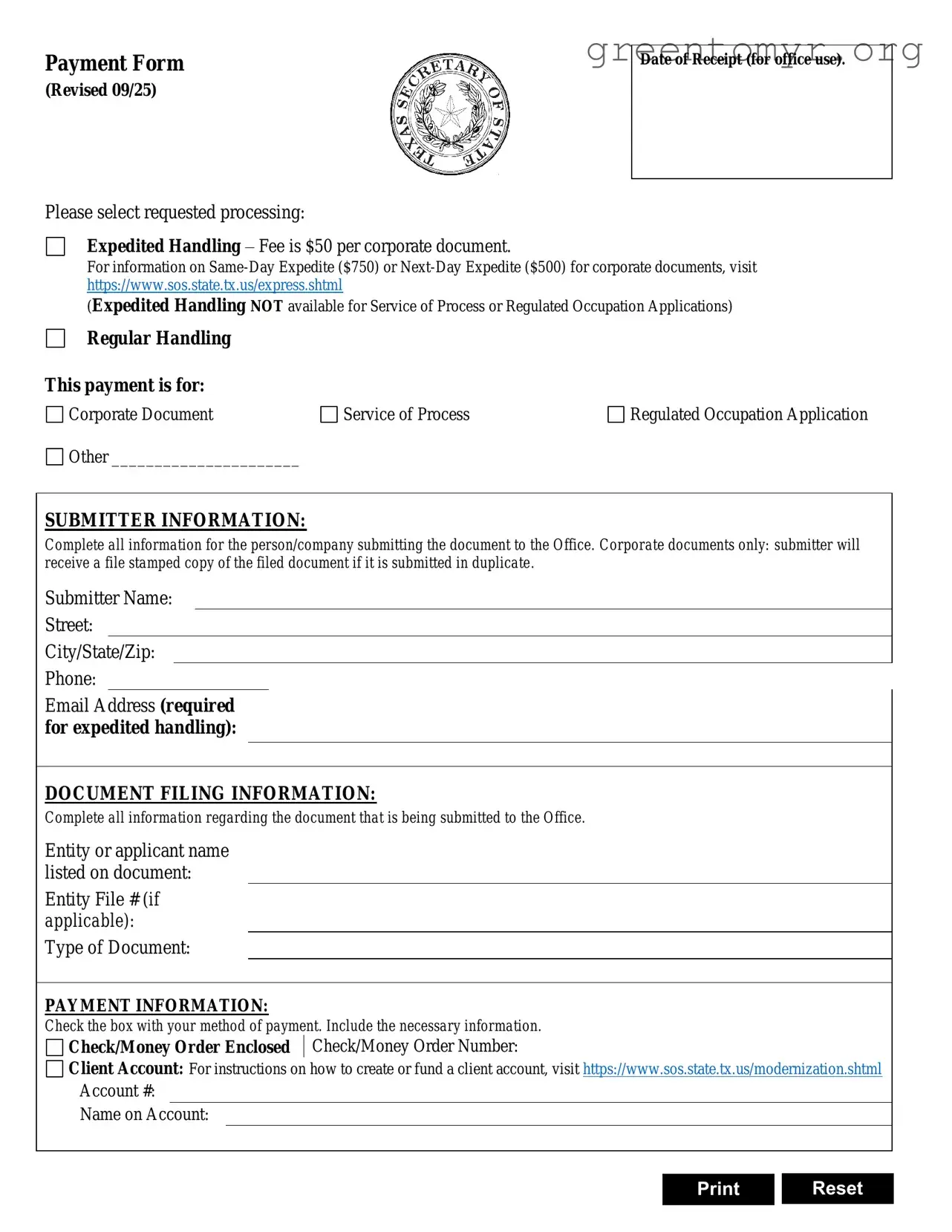
The Texas SOS Payment 807 form is an essential tool for individuals and businesses seeking to file various documents with the Texas Secretary of State. This form streamlines the payment process for document filings, allowing users to select between expedited and regular handling options. Expedited services incur additional fees, ensuring quicker processing times, while regular handling remains a cost-effective choice. The form requires detailed information about the submitter, including their name, contact information, and the specific documents being filed. Accurate completion of the document filing information is crucial, as it includes essential details such as the type of document and the number of pages submitted. Payment methods are clearly outlined, accommodating major credit cards and checks, with a small convenience fee applied to credit card transactions. Additionally, users must provide a return address for the processed documents, ensuring they receive their filings promptly. Understanding the nuances of this form can significantly enhance the efficiency of your interactions with the Texas Secretary of State.
Payment Form
(Revised 09/25)
Please select requested processing:
Expedited Handling – Fee is $50 per corporate document.
Date of Receipt (for office use).
For information on
(Expedited Handling NOT available for Service of Process or Regulated Occupation Applications)
Regular Handling
This payment is for:
Corporate Document |
Service of Process |
Regulated Occupation Application |
Other ______________________ |
|
|
SUBMITTER INFORMATION:
Complete all information for the person/company submitting the document to the Office. Corporate documents only: submitter will receive a file stamped copy of the filed document if it is submitted in duplicate.
Submitter Name:
Street:
City/State/Zip:
Phone:
Email Address (required for expedited handling):
DOCUMENT FILING INFORMATION:
Complete all information regarding the document that is being submitted to the Office.
Entity or applicant name listed on document:
Entity File # (if applicable):
Type of Document:
PAYMENT INFORMATION:
Check the box with your method of payment. Include the necessary information.
Check/Money Order Enclosed Check/Money Order Number:
Client Account: For instructions on how to create or fund a client account, visit https://www.sos.state.tx.us/modernization.shtml
Account #:
Name on Account:
Print Reset
| Fact Name | Description |
|---|---|
| Form Purpose | The Texas SOS Payment 807 form is used to request document processing from the Secretary of State's office. |
| Processing Options | Submitters can choose between expedited handling or regular handling for their documents. |
| Fees | Fees vary: $25 for corporate documents, $10 for copies, and $15 for UCC filings. A convenience fee of 2.7% applies for credit card payments. |
| Submitter Information | Complete information about the submitter, including name, address, and contact details, is required. |
| Payment Methods | Accepted payment methods include credit cards (Visa, Mastercard, Discover, American Express) and checks or money orders. |
| Governing Law | This form is governed by Texas Business Organizations Code and relevant administrative rules. |
After completing the Texas SOS Payment 807 form, the next step involves submitting it to the appropriate office for processing. Ensure that all information is accurate and complete to avoid delays.
The Texas SOS Payment 807 form is used to submit payment for various document filings with the Texas Secretary of State. This form allows individuals and businesses to request expedited or regular handling of their filings and includes payment options for different types of documents.
You can choose between expedited handling and regular handling. Expedited handling is available for most corporate documents, copies, and UCC filings but is not available for authentication services or trademark applications. Expedited handling incurs additional fees.
As a submitter, you need to fill out your name, address, phone number, fax number, and email address. This information ensures that the Texas Secretary of State can contact you if there are any issues with your submission or payment.
In the Document Filing Information section, you will need to specify the name of the document, the file number (if applicable), the type of document, and the number of pages. Providing accurate information helps expedite the processing of your request.
You can pay using several methods, including:
If you choose to pay by credit card, you will need to provide your card number, expiration date, and security code.
Yes, payments made by credit card are subject to a convenience fee of 2.7% of the total fees incurred. This fee is mandated by law and will be added to your total payment amount.
In the return address section, you should provide the address where you want the documents to be sent after processing. If the return address is the same as the submitter’s address, you can simply check the appropriate box to indicate this.
Once the form has been submitted, changes may not be possible. It’s important to double-check all information before submitting. If there are errors, you may need to contact the Texas Secretary of State’s office directly for guidance on how to proceed.
Tracking the status of your submission can typically be done by contacting the Texas Secretary of State’s office directly. You may need to provide your file number or other identifying information to get updates on your document's processing status.
Filling out the Texas SOS Payment 807 form requires attention to detail. Many individuals make common mistakes that can lead to delays or complications in processing. Understanding these mistakes can help ensure a smoother submission process.
One frequent error is failing to select the appropriate processing option. The form provides choices between expedited and regular handling. If expedited processing is desired, it is crucial to mark that option clearly. Omitting this step can result in unexpected delays.
Another mistake occurs when submitters do not provide complete contact information. The form requires the name, address, phone number, and email of the submitter. Incomplete information can hinder communication, making it difficult for the office to reach the submitter if there are questions or issues with the submission.
Many people also overlook the importance of accurately filling out the document filing information. This section must detail the name listed on the document, the file number if applicable, and the type of document being submitted. Errors in this area can lead to misfiling or rejection of the documents.
Payment information is another critical section where mistakes often occur. Submitters must check the correct payment method and provide all necessary details. For credit card payments, including the security code is essential. Failing to do so can result in payment processing issues.
Some submitters forget to include a return address. The form allows for the return address to be the same as the submitter’s, but if this box is not checked, a return address must be provided. Without a proper return address, documents may be lost or delayed in being returned.
Additionally, individuals sometimes neglect to sign the form. A missing signature can render the submission invalid, causing further delays in processing. It is important to review the form for a signature before submission.
Finally, not reviewing the entire form before submission is a common oversight. Taking the time to double-check all entries can prevent many of the issues mentioned above. A thorough review ensures that all necessary information is complete and accurate.
The Texas SOS Payment 807 form is essential for submitting various documents to the Texas Secretary of State. However, it is often accompanied by other forms and documents that facilitate the processing of requests. Understanding these additional documents can streamline your filing process and ensure compliance with state requirements.
By understanding these forms and their purposes, individuals and businesses can navigate the Texas Secretary of State's requirements more effectively. Proper documentation not only facilitates smoother transactions but also ensures compliance with state laws, ultimately fostering a more organized business environment.
The Texas SOS Payment 807 form is primarily used for submitting payment related to document filings with the Texas Secretary of State. Several other forms serve similar purposes in various contexts. Here are four documents that share similarities with the Texas SOS Payment 807 form:
When filling out the Texas SOS Payment 807 form, careful attention to detail is crucial. Here’s a list of things you should and shouldn’t do to ensure a smooth process.
The Texas SOS Payment 807 form is essential for submitting various documents to the Secretary of State's office. However, several misconceptions surround its use. Understanding these misconceptions can help individuals and businesses navigate the process more effectively.
Many believe that only corporations need to use the Texas SOS Payment 807 form. In reality, individuals and various types of entities, including partnerships and LLCs, can also submit documents using this form.
Some assume that expedited handling can be requested for any document. However, expedited services are not available for authentication services or trademark applications, which can lead to confusion.
While credit card payments are common, individuals can also submit a check or money order with their form. This option is often overlooked, especially by those who prefer not to use credit cards.
Some individuals are unaware that credit card payments incur a convenience fee of 2.7%. This fee is automatically added to the total fees, which can impact budgeting for document submissions.
It is a common belief that a return address is optional. However, including a return address is crucial for ensuring that documents are sent back to the correct location after processing.
Some may think that they can skip filling out certain fields. In truth, providing complete and accurate information is necessary to avoid delays in processing.
Many people assume that the Texas SOS Payment 807 form can be submitted electronically. However, it typically requires a physical submission via mail or in-person delivery.
There is a belief that the form does not vary based on the type of document being submitted. In fact, different documents may require specific details that must be accurately reflected on the form.
Lastly, many think that processing times are uniform regardless of the request type. In reality, processing times can differ significantly based on whether expedited handling is selected or the nature of the document submitted.
The Texas SOS Payment 807 form is essential for processing various document filings. Below are key takeaways regarding its completion and use.
Careful attention to these details will facilitate the efficient handling of your submission.