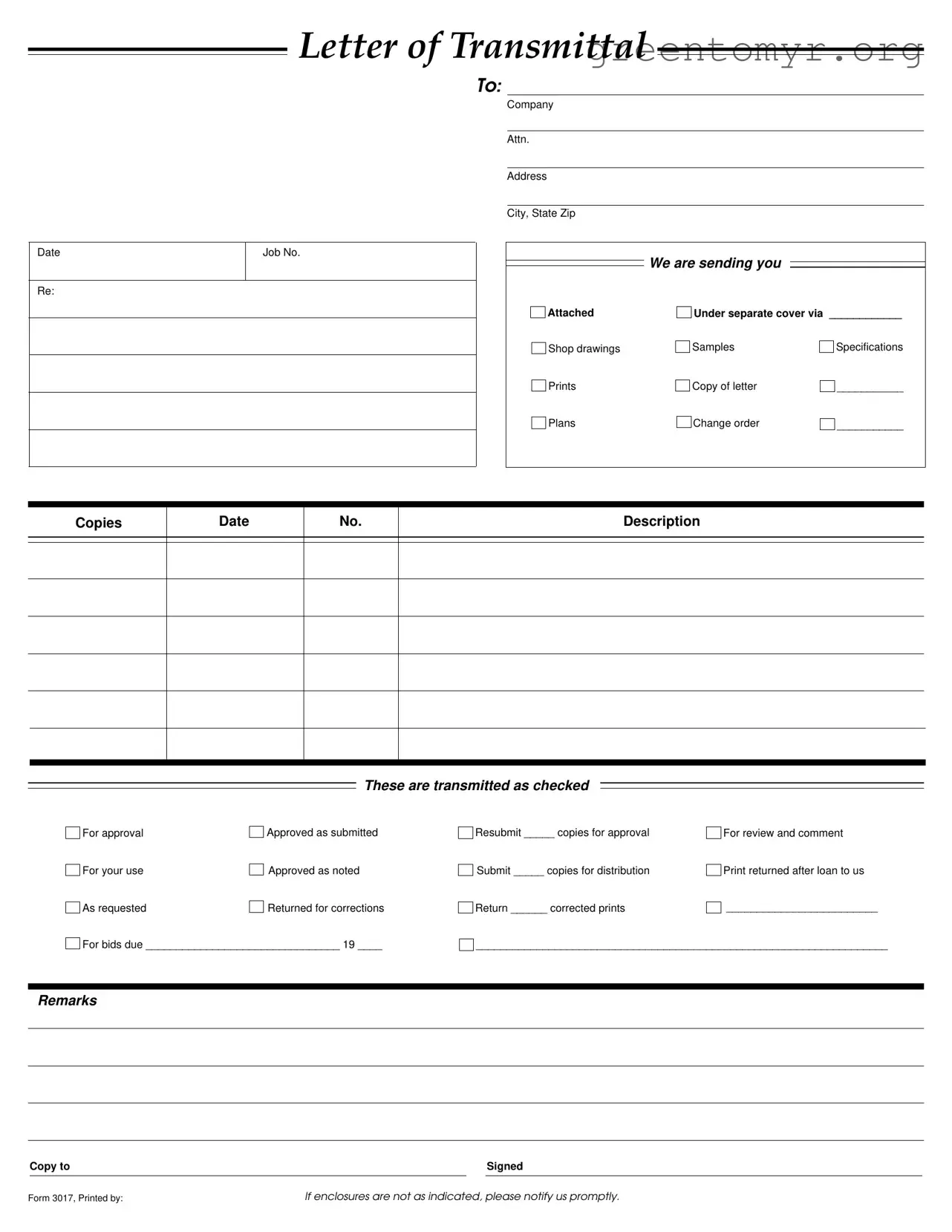
The Transmittal form serves as a vital communication tool in various business transactions, particularly within the realms of construction and project management. This form facilitates the organized transfer of important documents and materials, ensuring that all parties involved are on the same page. Typically, it includes essential information such as the date of transmission, job number, and the names of the individuals or companies involved. It outlines what is being sent, whether it be shop drawings, specifications, or change orders, and specifies the intended purpose of each item. The form also includes checkboxes for approvals and remarks, allowing recipients to provide feedback or request corrections efficiently. By streamlining the communication process, the Transmittal form helps maintain clarity and accountability, fostering a smoother workflow among teams and stakeholders.
LETTER OF TRANSMITTAL
TO:
Date
Re:
Job No.
Company
Attn.
Address
City, State Zip
We are sending you
Attached |
Under separate cover via ____________ |
|
Shop drawings |
Samples |
Specifications |
Prints |
Copy of letter |
___________ |
Plans |
Change order |
___________ |
Copies
Date
No.
Description
These are transmitted as checked
For approval |
|
Approved as submitted |
For your use |
|
Approved as noted |
|
||
As requested |
|
Returned for corrections |
|
For bids due ________________________________ 19 ____
Resubmit _____ copies for approval |
For review and comment |
Submit _____ copies for distribution |
Print returned after loan to us |
Return ______ corrected prints |
_________________________ |
____________________________________________________________________
Remarks
|
Copy to |
|
|
Signed |
|
|
|
|
|
Form 3017, Printed by: |
If enclosures are not as indicated, please notify us promptly. |
|||
| Fact Name | Details |
|---|---|
| Purpose | The Transmittal Form serves to communicate the delivery of documents and materials between parties involved in a project. |
| Components | It includes sections for job number, company details, and a list of enclosed items such as shop drawings and specifications. |
| Approval Status | The form allows the sender to indicate the approval status of the transmitted documents, such as "Approved as submitted" or "Returned for corrections." |
| State-Specific Forms | Some states may have specific requirements for transmittal forms based on local construction laws and regulations. |
| Governing Laws | In California, for instance, the use of transmittal forms is governed by the California Civil Code, Section 8200. |
| Record Keeping | It is essential to keep a copy of the Transmittal Form for record-keeping and tracking purposes in case of disputes. |
| Notification Requirement | The sender must notify the recipient promptly if the enclosures do not match what is indicated on the form. |
Once you have gathered all necessary information, you can begin filling out the Transmittal form. This form is essential for communicating specific details about documents being sent, ensuring clarity and proper handling. Follow these steps to complete the form accurately.
After completing the form, review it for accuracy. Ensure all necessary fields are filled out and that the information is clear. This will help avoid any delays in processing your documents.
A Transmittal Form is a document used to send materials, such as drawings, specifications, or samples, from one party to another. It helps ensure that all necessary documents are included and provides a record of what has been sent. This form typically includes details about the sender, recipient, and the items being transmitted.
When filling out a Transmittal Form, include the following information:
Completing these sections ensures clarity and helps avoid confusion about what is being sent.
On the Transmittal Form, you can specify the purpose of the items by checking the appropriate box. Options may include:
Clearly indicating the purpose helps the recipient understand how to handle the documents.
If the enclosures you receive do not match what is listed on the Transmittal Form, notify the sender promptly. It’s important to communicate any discrepancies to ensure that everyone is on the same page and to avoid delays in the project.
The number of copies to send can vary based on the requirements of the project or the recipient's request. The Transmittal Form allows you to specify how many copies are needed for approval or distribution. Make sure to check the boxes indicating the number of copies you are sending.
Yes, a Transmittal Form can be used for electronic submissions as well. When sending documents via email or an online platform, you can attach the Transmittal Form as a PDF or include the information in the body of your message. Ensure that all details are clear and that the recipient knows how to access the attached documents.
Filling out the Transmittal form accurately is crucial for effective communication in any project. However, several common mistakes can lead to confusion and delays. Understanding these pitfalls can help ensure that your submission is clear and complete.
One frequent error is failing to include the date. Without a date, it becomes challenging to track the timeline of submissions and approvals. This oversight can lead to misunderstandings about deadlines and project schedules.
Another common mistake is neglecting to specify what is being sent. The section that asks for attachments—like shop drawings or samples—should be filled out clearly. Leaving this blank can result in recipients not knowing what to expect, which can hinder the review process.
People often forget to check the appropriate boxes indicating the status of the submission. Whether the documents are for approval, for use, or returned for corrections, this information is essential. Without it, recipients may misinterpret the intent of the transmission.
Inaccurate or incomplete addresses are another pitfall. If the address of the recipient is incorrect, it can lead to delays in receiving the documents. Always double-check that the company name, attention line, and address are accurate.
Another mistake is not providing enough copies for distribution. If the form indicates that multiple copies are needed, ensure that the correct number is submitted. Failing to do so can slow down the review process as additional copies may need to be requested later.
People sometimes overlook the remarks section. This area can be used to clarify special instructions or additional information relevant to the submission. Ignoring this section can lead to confusion about the intent or context of the documents.
Finally, many forget to sign the form. A signature indicates that the information provided is accurate and that the sender takes responsibility for the contents. Submissions without a signature may be considered incomplete and could be returned for correction.
By avoiding these mistakes, you can enhance the efficiency of your communication and ensure that your Transmittal form serves its purpose effectively. Attention to detail in this process can save time and prevent misunderstandings down the line.
The Transmittal form is an essential document used in various industries to communicate the delivery of materials or information. It often accompanies several other forms and documents that help ensure clarity and proper record-keeping. Below is a list of commonly used documents alongside the Transmittal form, each serving a unique purpose.
In summary, the Transmittal form works best when accompanied by these supporting documents. Each plays a vital role in ensuring that all parties are informed and that projects proceed smoothly. Prompt attention to these documents can prevent misunderstandings and delays.
The Transmittal form serves as a key document in project communication. Several other documents share similar purposes, facilitating the exchange of information and materials. Here are eight documents that are similar to the Transmittal form:
When filling out the Transmittal form, it’s important to follow certain guidelines to ensure clarity and accuracy. Here’s a list of things you should and shouldn’t do:
When it comes to the Transmittal form, several misconceptions can lead to confusion. Understanding these can help ensure proper use and communication. Here are four common misconceptions:
By addressing these misconceptions, individuals can better utilize the Transmittal form, ensuring effective communication and project management.
When filling out and using the Transmittal form, there are several important points to keep in mind. These key takeaways can help ensure that the form is completed accurately and effectively.
By following these guidelines, the Transmittal form can be an effective tool for managing the flow of information and materials in a project.